


ATEN KH1508Ai Manual
PDF manual · 222 Pages
English



Quick check
Incorrect answer, please try again.
Chat with your ATEN KH1508Ai manual using AI
Get instant AI answers from your ATEN KH1508Ai manual
Ask anything about the ATEN KH1508Ai. Answers come from this manual, with the pages they are based on.
KH1508Ai Maintenance Schedule
Check the ATEN website regularly to find the latest firmware information and packages for the device IP card.
Perform the upgrade procedure anytime you add a KVM adapter cable to ensure it works with the latest firmware version.
Ask a Question
Do you recommend KH1508Ai?
Yes NoFrequently Asked Questions
It controls up to 8 computers directly. With daisy chaining, it can manage up to 128 computers in a single installation.
Is this answer helpful?
Yes, it uses TCP/IP protocol allowing access via web browser, Windows client, or Java client from any network location.
Is this answer helpful?
It supports AES, RSA encryption, RADIUS, LDAP, and Active Directory authentication for secure user management.
Is this answer helpful?
Yes, it is compatible with Windows, Mac OS X, Linux, Sun, and other platforms with appropriate adapter cables.
Is this answer helpful?
You can perform a port reset via hotkeys or use the physical reset switch on the front panel for a full system reboot.
Is this answer helpful?
Yes, the device supports firmware upgrades for the mainboard and adapter cables to ensure functionality updates.
Is this answer helpful?
You can use the web browser GUI, desktop clients, or a local laptop with USB console access for management.
Is this answer helpful?
Advantages and Disadvantages
Advantages

- Supports high-density control of up to 128 computers with daisy-chaining.
- Enables remote access over TCP/IP for management from any location.
- Includes advanced security with AES encryption and Active Directory support.
- Offers versatile connectivity for USB, PS/2, and serial devices.
- Provides both web browser and local console interface options.
Disadvantages

- Requires configuration of IP settings which may challenge new users.
- Daisy chaining additional units adds complexity to the physical setup.
- Firmware upgrade process requires careful procedure to avoid errors.
- Local console requires specific adapter cables for full compatibility.
- Security settings might restrict casual users from quick access features.
Product Specification
Type
IP Switch
Ports
8
Monitor
VGA
Keyboard/Mouse
PS/2 & USB
Audio
N/A
LAN
100Base-TX
Resolution
1600x1200
Product Description
Optimizing Data Center Efficiency with the ATEN KH1508Ai
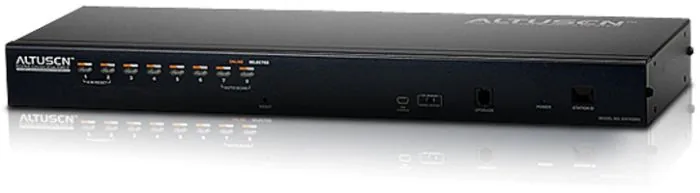
Managing modern server infrastructure requires reliable hardware that bridges the gap between physical access and remote control. The ATEN KH1508Ai stands out as a premier solution for high-density KVM applications. This device allows administrators to control multiple computers from a single KVM console, significantly streamlining IT operations in busy data centers.
Comprehensive Connectivity Options
The KH1508Ai supports Full HD video resolutions, ensuring clarity during critical management tasks. It relies on TCP/IP communications, enabling access from virtually any location on the network. Connectivity remains consistent even when teams are distant. The switch utilizes Cat 5e or Cat 6 cables to link to KVM adapter cables, supporting diverse interfaces such as USB, PS/2, and serial connections. This versatility ensures compatibility with various server environments including Windows, Mac, Linux, and Sun systems.
Scalable Architecture
One of the key strengths of this model is its ability to scale. A single unit handles eight computers, but you can daisy chain up to fifteen additional units to control as many as one hundred and twenty eight machines from one central point. The automatic station positioning feature removes the complexity of manual settings, allowing for quick expansion without downtime. Rack mounting and stacking options provide flexibility for various physical setups.
Robust Security Protocols
Security is paramount in networked devices. The KH1508Ai incorporates advanced encryption standards like 256-bit AES and 2048-bit RSA. Administrators can manage up to sixty-four user accounts with granular permission controls. Remote authentication integrates with existing infrastructure like RADIUS and Active Directory. Event logging captures all interactions for auditing and troubleshooting.
Flexible Interface Access
Users can access the system through web browsers, dedicated desktop clients, or local console ports. The On-Screen Display offers intuitive menu navigation for local hardware control. Features such as virtual remote desktops and mouse synchronization enhance the user experience. Maintenance is simplified with built-in firmware upgrade utilities and backup functions. This platform reduces the need for physical visits to server racks, saving time and operational costs while minimizing energy consumption across the facility.
This device represents a significant investment in streamlined IT management. By centralizing control and enhancing security, organizations can maintain peak performance levels while reducing overhead.
Search for 67,706 Manuals online


Type-in Brand or Model