
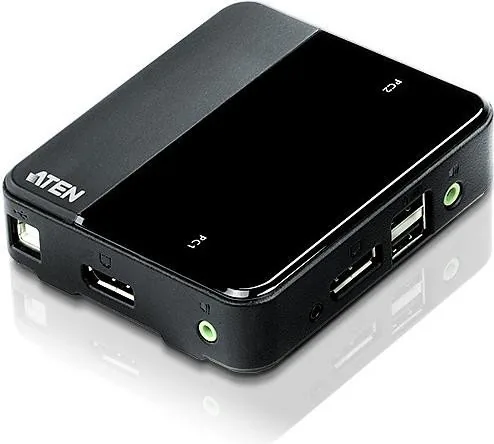
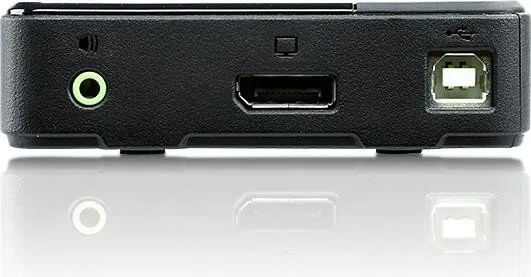
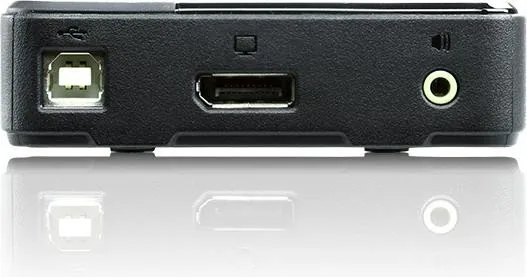
ATEN CS782DP Manual
PDF manual · 20 Pages
English



Quick check
Incorrect answer, please try again.
Chat with your ATEN CS782DP manual using AI
Get instant AI answers from your ATEN CS782DP manual
Ask anything about the ATEN CS782DP. Answers come from this manual, with the pages they are based on.
Ask a Question
Do you recommend CS782DP?
Yes No
Rob Taylor
7 months ago
Why did my monitor stay black when switching from desktop to laptop? I have integrated and dedicated graphics.
Frequently Asked Questions
The switch supports DisplayPort 1.2 compliant resolutions up to 4K (4096 x 2160) at 60Hz, providing sharp and vivid images suitable for modern high-definition monitors.
Is this answer helpful?
No, the CS782DP does not allow independent switching of audio and video. Both the KVM focus and audio focus will always remain linked to the same selected port.
Is this answer helpful?
You can switch ports by double-clicking the scroll wheel of a compatible USB mouse. Note that this feature requires mouse emulation mode to be enabled and works best with 3-key scroll wheel mice.
Is this answer helpful?
The Power on Detection feature will automatically detect the shutdown and switch the KVM focus to the other computer that remains powered on, ensuring continuous access to your active system.
Is this answer helpful?
Yes, the CS782DP supports Mac keyboards and includes a function to emulate PC keyboard combinations as Mac keys, allowing for seamless operation across different platforms.
Is this answer helpful?
Yes, the CS782DP is firmware upgradable. Users can download the latest package from the ATEN website and use specific hotkeys or the remote selector to initiate the update process.
Is this answer helpful?
Advantages and Disadvantages
Advantages

- Supports 4K resolution at 60Hz for premium visual clarity
- Includes built-in HD audio passthrough for surround sound systems
- Offers three distinct switching methods: remote button, mouse click, and hotkeys
- Features automatic Power on Detection to switch to active computers
- Compatible with a wide range of operating systems including Windows, Mac, and Linux
Disadvantages

- Audio focus cannot be switched independently from video focus
- Multi-Stream Transport requires specific monitors or an external MST hub
- Mouse port switching only works with specific USB 3-key scroll wheel mice
- Total cable length is limited to 3 meters to maintain signal quality
- Firmware upgrade mode suspends normal keyboard and mouse functions temporarily
Product Specification
Type
KVM Switch
Ports
2
Audio
3x 3.5mm Jack (1 In/2 Out)
Resolution
3840x2160@60Hz
Features
includes power supply (5V)
Product Description
Mastering Multi-Computer Workflows with the ATEN CS782DP
Managing multiple computers simultaneously can be a daunting task, but the ATEN 2-Port DisplayPort KVM Switch with USB/Audio transforms this challenge into a seamless experience. Designed for professionals who demand efficiency and high-quality multimedia performance, this device allows users to control two separate USB computers using a single set of peripherals. Whether you are a software developer testing code across different environments or a media professional editing content on dual systems, this switch provides the flexibility needed to work without interruption.
The CS782DP stands out by integrating DisplayPort 1.2 technology, ensuring crisp visuals up to 4K resolution at 60Hz. It goes beyond simple video switching by supporting full HD audio through the DisplayPort connection, delivering rich bass for 2.1 surround sound systems directly from your console speakers. This eliminates the need for separate audio switches and keeps your desk clutter-free. The inclusion of a remote port selector adds another layer of convenience, allowing you to toggle between computers from your desktop while keeping the main unit tucked away in a cabinet or under the desk.
User interaction is intuitive and versatile. You can switch ports manually via the pushbutton on the remote selector, use hotkeys on your keyboard, or simply double-click the scroll wheel of a compatible USB mouse. This mouse-switching feature significantly speeds up workflow when frequent toggling is required. Additionally, the Power on Detection feature ensures that if one computer shuts down unexpectedly, the switch automatically redirects focus to the active system, preventing lost time or confusion. With support for multi-platform operating systems including Windows, Mac, Linux, and more, the CS782DP adapts to almost any IT environment.
Key Considerations
While the device offers robust features, users should note that MST (Multi-Stream Transport) requires specific monitor capabilities or an external hub to function correctly. Furthermore, the audio channel cannot be switched independently from the video feed, meaning both must follow the same port selection. Ensuring proper grounding and using high-quality cables is essential for maintaining signal integrity, especially when aiming for maximum resolutions.
Product Highlights
- Seamless control of two PCs with one console
- Support for 4K video and HD audio
- Multiple switching methods including mouse and remote
- Automatic failover for powered-off systems
Search for 67,706 Manuals online


Type-in Brand or Model
Marlon Casper
7 months ago
Does this KVM switch require external power and does it support 4K60Hz over DisplayPort?
Manual.ly
6 months ago
This KVM switch operates without an external power supply, which is convenient for home office setups. It fully supports 4K resolution at 60Hz via DisplayPort connections. The device comes with all necessary cables including DisplayPort, USB, and audio jacks. Please note that by default the unit emulates a mouse; if you need to use advanced USB hub features on your monitor, you must enable this setting using the keyboard shortcut described in the manual.