
ATEN CS1964 Manual
PDF manual · 56 Pages
English



Quick check
Incorrect answer, please try again.
Chat with your ATEN CS1964 manual using AI
Get instant AI answers from your ATEN CS1964 manual
Ask anything about the ATEN CS1964. Answers come from this manual, with the pages they are based on.
Ask a Question
Do you recommend CS1964?
Yes NoFrequently Asked Questions
The device supports 4K UHD (3840 x 2160) at 60 Hz and 4K DCI (4096 x 2160) at 60 Hz, delivering high-definition visuals for professional workflows.
Is this answer helpful?
Yes, the CS1964 features independent switching capabilities. You can direct the KVM focus to one computer while sending audio to a different one.
Is this answer helpful?
Yes, it supports Mac keyboard emulation, allowing PC keyboards to function correctly with Mac operating systems when configured via Hotkey Setting Mode.
Is this answer helpful?
It controls up to four computers, with each computer capable of driving three separate displays for a total of twelve screens in some configurations.
Is this answer helpful?
Yes, the CS1964 supports firmware upgrades via a dedicated utility to ensure compatibility with new operating systems and features.
Is this answer helpful?
The Power On Detection feature automatically switches the KVM focus to the next available powered-on computer to maintain control.
Is this answer helpful?
Advantages and Disadvantages
Advantages

- Supports triple display output per computer with 4K UHD resolution
- Independent switching allows separate focus for KVM, audio, and USB
- Built-in USB 3.1 Gen 1 hub provides 5 Gbps transfer speeds
- Power On Detection automatically switches to active computers
- Extensive hotkey configuration options for streamlined control
Disadvantages

- Requires three DisplayPort ports on each connected computer
- Front panel buttons disabled when used as secondary DCC unit
- Mouse switching requires specific 3-button scroll wheel mice
- Audio cannot be switched independently when using DisplayPort-HDMI conversion
- Maximum cable length is limited to 3.3 meters for optimal performance
Product Specification
Type
KVM Switch
Ports
4
Monitor
3x DisplayPort 1.2
Keyboard/Mouse
USB
Audio
2x Jack
LAN
N/A
Resolution
4096x2160@60Hz
Product Description
Master Your Workspace with the ATEN CS1964 Triple Display KVM Switch
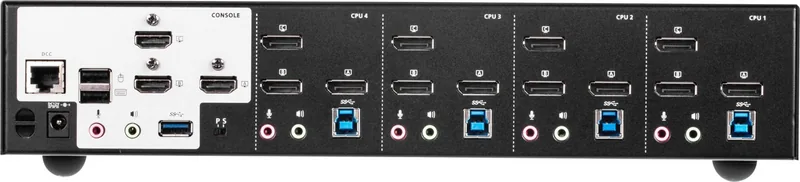
The ATEN CS1964 represents a significant leap in desktop management technology, designed specifically for power users and professionals who demand high-resolution video and seamless control over multiple systems. This advanced 4-Port USB 3.0 KVM switch stands out by supporting three displays per computer via DisplayPort connections, allowing you to manage four distinct computers using just one keyboard, mouse, and set of monitors. Whether you are editing video, coding complex applications, or managing server infrastructure, this device ensures your workflow remains uninterrupted and efficient.
Equipped with DisplayPort 1.2 technology, the CS1964 delivers stunning 4K UHD resolution at 60 Hz and 4K DCI at 60 Hz, ensuring that every pixel is vivid and clear. The built-in 2-port USB 3.1 Gen 1 hub offers SuperSpeed data transfer rates of up to 5 Gbps, eliminating the need for external hubs. A unique feature of this unit is its independent switching capability, which allows you to direct the KVM focus to one computer while simultaneously sending audio or USB peripheral data to a different machine. This asynchronous operation streamlines multitasking significantly.
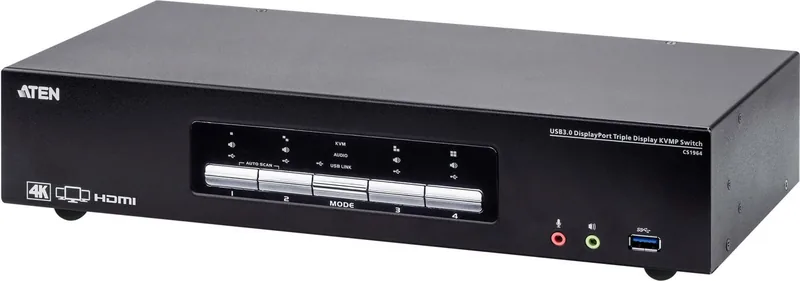
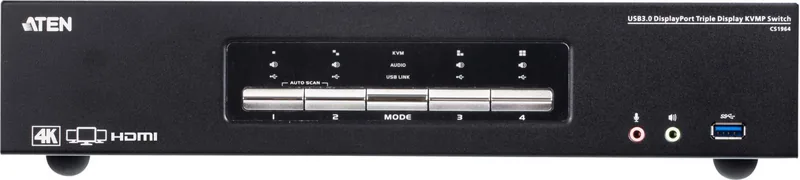
Installation is straightforward thanks to the included certified DisplayPort cables and comprehensive setup guides. The front panel features intuitive pushbuttons and an LED status indicator that provides immediate visual feedback on port selection and system modes. For those who prefer keyboard shortcuts, the extensive Hotkey functionality allows for rapid port switching without ever moving your hands from the typing position. Additionally, the unit supports Power On Detection, automatically shifting focus to an active computer if another is powered down, ensuring you never lose control of your environment.
Key Features Overview
The CS1964 integrates robust hardware with user-friendly software controls. It supports N-key rollover for collision-free typing, making it ideal for gaming or intensive data entry. The device also includes Mac keyboard emulation, allowing PC keyboards to function seamlessly with Mac operating systems. With support for HD Audio and 2.1 channel surround sound, users enjoy rich bass response directly through their console speakers. The unit is fully firmware upgradeable, guaranteeing long-term compatibility with evolving software standards.
Important Notes
Always use high-quality certified DisplayPort cables to maintain 4K resolution stability. The total cable length from the source to the monitor should not exceed 3.3 meters to prevent signal degradation. Ensure all connected devices are properly grounded to avoid interference or damage. If you encounter issues, consult the troubleshooting section or contact technical support for assistance.
Search for 67,706 Manuals online


Type-in Brand or Model