
ATEN CS1922M Manual
PDF manual · 55 Pages
English



Quick check
Incorrect answer, please try again.
Chat with your ATEN CS1922M manual using AI
Get instant AI answers from your ATEN CS1922M manual
Ask anything about the ATEN CS1922M. Answers come from this manual, with the pages they are based on.
Ask a Question
Do you recommend CS1922M?
Yes NoFrequently Asked Questions
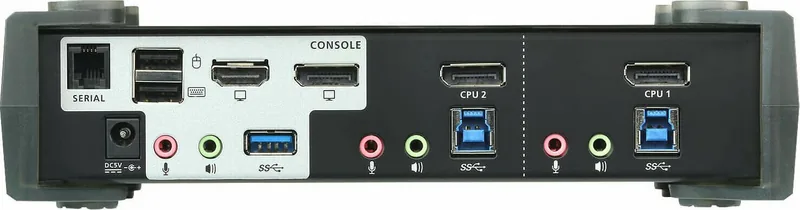
It is designed for two DisplayPort computers. For the console, you can connect a DisplayPort or HDMI-capable monitor using the appropriate supported connection approach described for the unit. MST also supports multi-monitor routing depending on display capability.
Is this answer helpful?
Yes. The CS1922M supports 4K UHD (3840 x 2160 at 60 Hz) and 4K DCI (4096 x 2160 at 60 Hz) when your system uses compatible DisplayPort cabling and appropriate monitor support. Cable quality and length can affect achievable performance.
Is this answer helpful?
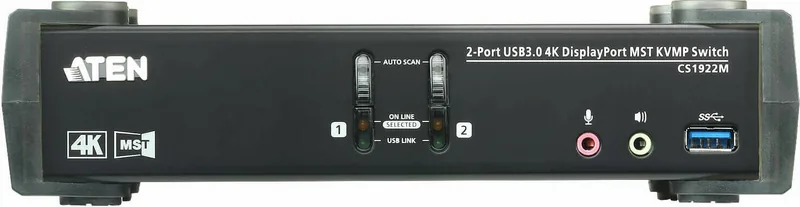
Independent switching lets you separate what the console controls: the KVM focus, the USB hub focus, and the audio focus can be directed to different attached computers. Hotkey and front-button actions can target one focus type or all at once.
Is this answer helpful?
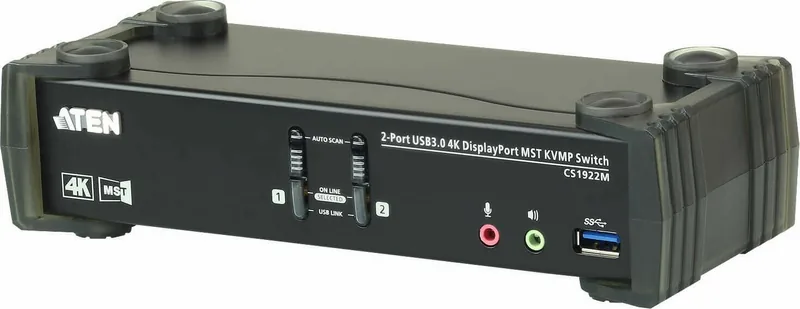
Yes. You can switch using the front-panel pushbuttons or, if enabled, by double-clicking the scroll wheel on a supported USB mouse under mouse emulation mode. RS-232 control is also available for automated or rack-based setups.
Is this answer helpful?
MST (Multi-Stream Transport) allows multiple monitors to be driven from a single DisplayPort source using the built-in MST hub. MST mode is enabled by default, but your monitor capabilities and bandwidth sharing determine the final resolution. SST can be used for point-to-point display behavior.
Is this answer helpful?
MST resolution depends on DisplayPort 1.2 behavior, monitor support, and bandwidth shared across displays. For higher monitor counts or complex layouts, you may need an external powered MST hub (not included) and you should confirm each monitor's MST/DP 1.2 capability.
Is this answer helpful?
Advantages and Disadvantages
Advantages

- All-in-one KVMP design: KVM switching plus a built-in USB 3.1 Gen 1 hub and 2.1 channel audio.
- High performance video support, including 4K UHD 60 Hz and 4K DCI 60 Hz with DisplayPort 1.2 and HDCP compliance.
- Independent switching of KVM, USB peripherals, and audio focus to streamline multitasking across computers.
- Power On Detection automatically selects the next powered-on computer when one is off.
- Supports multiple control methods: front buttons, hotkeys, and RS-232, with optional mouse switching.
Disadvantages

- Mouse port switching is disabled by default and requires USB mouse emulation with a supported 3-key scroll-wheel mouse.
- MST display outcomes and maximum resolutions depend on DP 1.2 support, bandwidth sharing, and sometimes external MST hardware.
- HD audio through DisplayPort cannot be switched independently from other focus behavior.
- 4K video quality can be impacted by cable length and quality, with a recommended max PC-to-monitor distance.
Product Specification
Type
KVM Switch
Ports
2
Monitor
DisplayPort 1.2, HDMI 2.0
Keyboard/Mouse
2x USB-A 3.0
Audio
2x Jack
LAN
N/A
Resolution
4096x2160@60Hz
Special Features
1-port USB-A 3.0 Hub
Product Description
ATEN CS1922M: 2-Port USB 3.1 Gen 1 4K DisplayPort MST KVMP Switch with 2.1 Audio
Smooth KVM switching for modern 4K setups
The ATEN CS1922M is a compact KVMP switch that brings together KVM control, a high-speed USB hub, and rich 2.1 channel audio in one solution. It lets you control two DisplayPort computers from a single USB keyboard, USB mouse, and a DisplayPort or HDMI-capable console, making it ideal for shared workstations, trading desks, and multi-system editing bays.
4K video and MST support in a single workflow
With DisplayPort 1.2 and HDCP compliance, the CS1922M supports crisp 4K UHD at up to 60 Hz and 4K DCI at up to 60 Hz for vivid detail in video, graphics, and gaming. Its built-in Multi-Stream Transport (MST) hub enables multi-monitor viewing from a single DisplayPort source, turning one workstation feed into a flexible display layout. For advanced display needs, MST behavior depends on the bandwidth of your displays and cabling.
USB 3.1 Gen 1 hub plus independent focus switching
The integrated 2-port USB 3.1 Gen 1 hub delivers SuperSpeed 5 Gbps throughput so peripherals like storage devices, scanners, and other USB tools stay responsive. A key advantage is independent (asynchronous) switching: you can move KVM control to one computer while keeping the USB peripheral focus and audio focus on other ports, reducing friction in daily multitasking.
Easy control methods
Switching is available through front-panel pushbuttons, hotkeys, RS-232 commands, or mouse-based port selection (when enabled). Power On Detection also helps by automatically selecting the next powered-on computer if one source is turned off, keeping your console usable without manual intervention.
Key results
- One console controls two computers, combining KVM switching, USB hub sharing, and 2.1 audio output.
- Supports 4K UHD 60 Hz and 4K DCI 60 Hz with DisplayPort 1.2 and HDCP compliance.
- Offers independent switching so KVM, USB hub, and audio can stay on different computers.
- Includes a built-in MST hub for multi-monitor layouts, with resolution guided by MST bandwidth.
Notes
- For best 4K performance, keep video cable length short (recommended total PC-to-monitor length is up to 3 meters) and use high-quality certified cables.
- Mouse port switching requires USB mouse wheel emulation and supported mouse behavior, and it is disabled by default.
- Monitor resolutions in MST mode depend on display capability and bandwidth sharing; more monitors may require an external powered MST hub.
Search for 67,706 Manuals online


Type-in Brand or Model