
ATEN CS1922 Manual
PDF manual · 51 Pages
English



Quick check
Incorrect answer, please try again.
Chat with your ATEN CS1922 manual using AI
Get instant AI answers from your ATEN CS1922 manual
Ask anything about the ATEN CS1922. Answers come from this manual, with the pages they are based on.
Ask a Question
Do you recommend CS1922?
Yes NoFrequently Asked Questions
The ATEN CS1922 supports 4K UHD resolution at 3840 x 2160 pixels running at 60 Hz, as well as 4K DCI at 4096 x 2160 pixels at 60 Hz, ensuring high-definition visual quality.
Is this answer helpful?
Yes, the switch supports Mac OS 9 and higher. It includes keyboard emulation features that allow PC-compatible keyboards to function correctly with Mac operating systems.
Is this answer helpful?
You can switch ports by double-clicking the scroll wheel button of a compatible USB 3-button mouse. This feature must be enabled through the Hotkey Setting Mode first.
Is this answer helpful?
Yes, it supports 2.1 channel surround sound audio. However, audio focus cannot be switched independently; it moves together with the KVM or USB focus depending on the command used.
Is this answer helpful?
The Power On Detection feature will automatically detect the shutdown and switch the KVM focus to the next computer that is currently powered on and available.
Is this answer helpful?
Yes, the device supports firmware upgrades via a dedicated utility. Users can download the latest packages from the manufacturer's website to ensure optimal performance and bug fixes.
Is this answer helpful?
Advantages and Disadvantages
Advantages

- Supports ultra-high 4K UHD resolution at 60 Hz for crystal clear visuals
- Built-in USB 3.1 Gen 1 hub enables independent peripheral sharing
- Asynchronous switching allows separate control of video, USB, and audio
- Power On Detection automatically switches to active computers
- Compatible with Windows, Mac, and Linux operating systems
Disadvantages

- Mouse port switching requires specific 3-button scroll wheel mice
- HD audio cannot be switched independently from video focus
- MST requires compatible monitors or a powered MST hub for multi-display setups
- Default hotkeys may conflict with other software applications
- Requires specific ATEN DisplayPort cables for optimal 4K performance
Product Specification
Type
KVM Switch
Ports
2
Monitor
DisplayPort 1.2
Keyboard/Mouse
2x USB-A 3.0
Audio
2x Speakers, 2x Microphones
LAN
N/A
Resolution
4096x2160@60Hz
Features
2-port USB-A 3.0 Hub
Product Description
Elevate Your Workspace with the ATEN CS1922
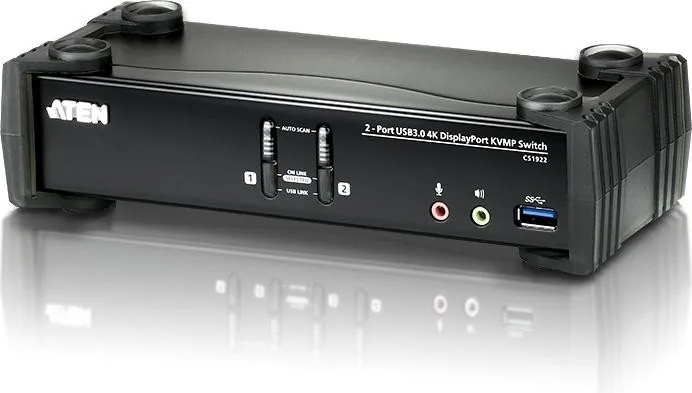
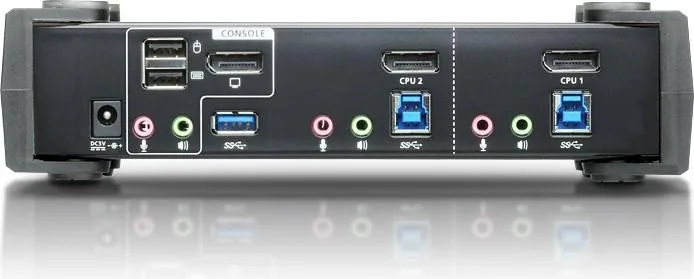
The ATEN CS1922 represents a significant advancement in desktop connectivity, designed for professionals who demand high performance and seamless control over multiple computing environments. This 2-port USB 3.0 4K DisplayPort KVMP switch allows users to manage two powerful computers from a single console equipped with a keyboard, mouse, and monitor. By integrating advanced DisplayPort technology, it delivers stunning 4K UHD resolution at 60 Hz, ensuring that visual content remains crisp and vibrant for graphic design, video editing, or gaming.
Beyond superior video capabilities, the unit features a built-in USB 3.1 Gen 1 hub, offering SuperSpeed data transfer rates of up to 5 Gbps. This eliminates the need for external hubs by allowing peripherals like printers and external drives to be shared independently of the KVM focus. The device also supports rich 2.1 channel surround sound, providing an immersive audio experience directly through the switch. Its asynchronous switching capability means you can have one computer controlling your display while another manages your USB devices simultaneously.
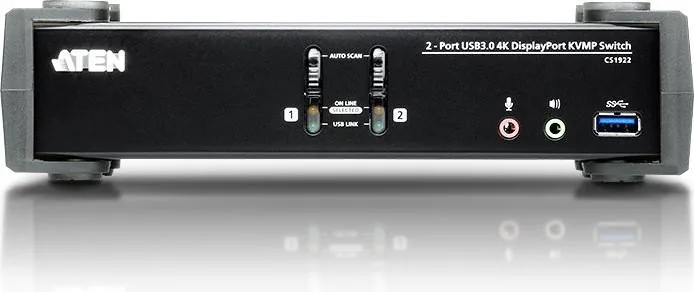
User convenience is paramount with the ATEN CS1922. It supports multiple switching methods including front panel pushbuttons, intuitive hotkeys, and even mouse wheel scrolling for port selection. A unique Power On Detection feature ensures that if your primary computer shuts down unexpectedly, the switch automatically redirects focus to the next available powered-on machine. With support for various operating systems including Windows, Mac, and Linux, along with multi-platform keyboard emulation, this switch adapts to diverse IT environments effortlessly.
Key Notes
- Ensure high-quality DisplayPort cables are used to maintain 4K resolution integrity.
- Mouse port switching requires a USB 3-button mouse with a scroll wheel and must be enabled via hotkey settings.
- The unit supports firmware upgrades to add new features and improve stability over time.
Search for 67,706 Manuals online


Type-in Brand or Model