
ATEN CS1824 Manual
PDF manual · 17 Pages
English



Quick check
Incorrect answer, please try again.
Chat with your ATEN CS1824 manual using AI
Get instant AI answers from your ATEN CS1824 manual
Ask anything about the ATEN CS1824. Answers come from this manual, with the pages they are based on.
Ask a Question
Do you recommend CS1824?
Yes NoFrequently Asked Questions
Type Open command followed by Enter in HyperTerminal after setting up the serial port connection. This initiates the link and disables front panel controls for exclusive serial management.
Is this answer helpful?
Yes use the baud command followed by the desired rate like 19200 or 38400. This configuration changes how the serial port communicates data between the computer and the device.
Is this answer helpful?
The Switch Port command allows you to select input ports using a numerical code. For a four-port model you can enter codes ranging from 01 to 04 to direct the console output.
Is this answer helpful?
Yes the Audio Mixer command enables selection of two audio ports for mixing. You can pair ports on both two and four-port models depending on your connectivity requirements.
Is this answer helpful?
Sending the usbreset on command activates the USB reset function. This restores the connection between the console and the connected computers without a power cycle.
Is this answer helpful?
Yes by enabling the upgrade on command the system enters firmware upgrade mode. This facilitates software updates while maintaining operational control during the process.
Is this answer helpful?
Advantages and Disadvantages
Advantages

- Built-in bi-directional RS-232 serial interface for system control via HyperTerminal.
- Supports 4K HDMI and USB3.0 for high-performance computing needs.
- Audio Mixer function allows selecting two audio ports for mixed output.
- Firmware upgrade mode enables remote updates without physical access.
- Multiple keyboard layout options including English Japanese and French support.
Disadvantages

- Requires HyperTerminal software on a computer not part of the installation.
- Front panel buttons are disabled when RS-232 link is in open state.
- Specific RJ-11 to DB-9 adapter may need purchase for serial connection.
- Setup involves manual configuration of baud rate and COM port settings.
- Operation in residential areas poses risk of radio frequency interference.
Product Specification
Type
KVM Switch
Ports
4
Monitor
HDMI
Keyboard/Mouse
2x USB-A 2.0
Audio
1x Speaker, 1x Microphone
LAN
N/A
Resolution
4096x2160@60Hz
Features
2-port USB-A 3.0 Hub
Product Description
Advanced Control Features of the ATEN CS1824
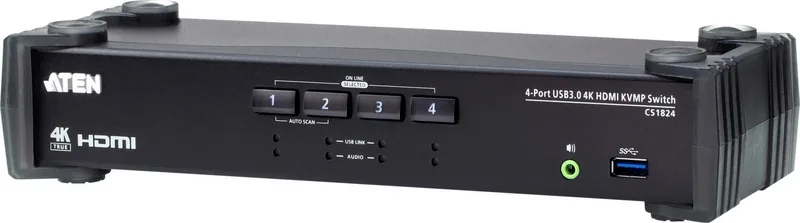
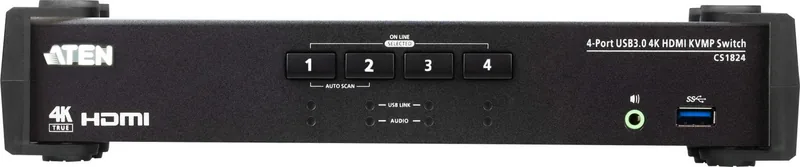
The ATEN CS1824 stands out as a premium 4-Port USB3.0 4K HDMI KVMP Switch designed for demanding enterprise environments. This device ensures seamless control over multiple computers from a single console efficiently. The hardware supports high-resolution displays for IT infrastructures requiring stable connections. By integrating advanced serial capabilities, it offers more than basic switch functionality to support growth. IT admins rely on this hardware for consistent performance in server rooms.
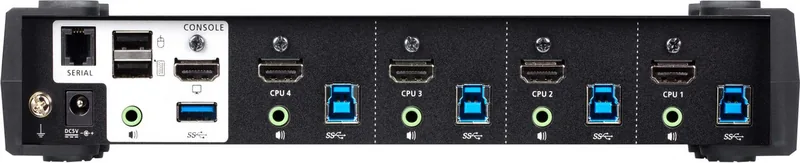
Users can manage the switch via HyperTerminal sessions on Windows systems effectively. This requires setting up a serial connection using a specific RJ-11 to DB-9 adapter for hardware compatibility. Once connected, administrators can execute specific commands to configure the system remotely without touch. The command set is robust, covering link management, port switching, and hardware settings. For instance, the Open command initiates serial control while disabling front panel buttons to prevent conflicts. Closing the link restores normal operation for local access. Verification messages confirm successful execution of every instruction sent to the device during active sessions. The serial link allows for automation scripts to send commands efficiently for batch processing of port changes.
Customization is a key strength of this architecture for user needs. The Baud Rate command lets users adjust connection speed defaults to match their network infrastructure requirements. Keyboard Layouts can be changed dynamically for Japanese or French users without physical intervention needed. Hotkey settings allow modification of keys like Num Lock or Ctrl F12 for invoking settings modes efficiently. These features reduce downtime during configuration updates and improve user experience significantly across teams.
Maintenance is straightforward using the command interface features available. The USB Reset command re-establishes connections if issues occur without rebooting the entire switch unit. Firmware upgrades are enabled via the upgrade command for security patches and performance improvements. Restoring default settings clears configurations quickly using the reset on command for troubleshooting. Monitoring status shows current hardware states to ensure operational integrity across all ports. The Audio Mixer enables mixing sources on specific ports, beneficial for multimedia workspaces requiring audio consolidation. These maintenance tools simplify complex tasks significantly for technical teams.
Compliance standards are strictly met. The equipment meets FCC Class A limits specifically for commercial environments and is RoHS compliant globally. This ensures safety standards are met. The ATEN CS1824 Manual provides crucial details for optimization of your setup effectively. Interfaces deliver tangible performance improvements for complex setups and allow for streamlined management.
Search for 67,706 Manuals online


Type-in Brand or Model