


ATEN CN8000A Manual
PDF manual · 205 Pages
English



Quick check
Incorrect answer, please try again.
Chat with your ATEN CN8000A manual using AI
Get instant AI answers from your ATEN CN8000A manual
Ask anything about the ATEN CN8000A. Answers come from this manual, with the pages they are based on.
Ask a Question
Do you recommend CN8000A?
Yes NoFrequently Asked Questions
It adds over-IP capability to existing KVM switches allowing remote control via internet.
Is this answer helpful?
The system supports up to 32 concurrent user logins for single-bus access.
Is this answer helpful?
Yes, it connects via standard KVM cables to legacy switches or servers with VGA or USB ports.
Is this answer helpful?
It includes SSL, TLS 1.2, AES encryption, and supports LDAP and RADIUS authentication.
Is this answer helpful?
Updates are downloaded from the website and installed over the internet using the utility.
Is this answer helpful?
Yes, locally connected USB devices can appear on the remote server for installation tasks.
Is this answer helpful?
Yes, with a compatible Power Over the NET device for rebooting powered equipment.
Is this answer helpful?
Advantages and Disadvantages
Advantages

- Enables remote access to KVM switches over IP network using browser or client apps
- Supports up to 64 user accounts with thirty-two concurrent sessions for team collaboration
- Virtual media allows local drives and smart cards to act as if installed on remote server
- Advanced encryption with SSL and TLS ensures secure transmission across public networks
- Firmware upgrades occur over internet maintaining system functionality without physical access
Disadvantages

- Single port configuration limits management to one server or KVM switch connection at a time
- Virtual media requires specific KVM cable lengths and models for full functionality support
- Initial IP setting might be complex for users unfamiliar with network configuration commands
- External power supply adapter is required and separate from standard network cabling setup
- Advanced security features like LDAP may require additional server infrastructure to implement
Product Specification
Type
IP-Switch
Ports
1
Monitor
VGA
Audio
N/A
LAN
1x 1000Base-T
Resolution
1920x1200@60Hz
Product Description
Revolutionize Remote Server Management
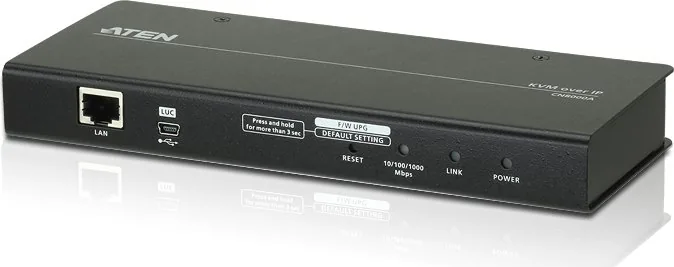
Modern IT infrastructure demands seamless access to critical systems from anywhere on the globe. The ATEN CN8000A delivers this capability by transforming legacy KVM switches into powerful networked assets. This device enables operators to monitor and control computers over the internet using standard browsers or specialized client applications. It simplifies the complex process of accessing servers located in distant data centers or branch offices efficiently.
Key Features of the Solution
Administrators benefit from advanced security protocols including SSL and TLS 1.2 encryption standards. This ensures sensitive data remains protected during transmission across public networks without compromise. The system supports up to 64 user accounts with thirty-two simultaneous connections. This scalability allows large teams to collaborate efficiently without constant access conflicts or connection timeouts. Virtual media functionality further enhances daily operations by mapping local storage drives or smart cards directly to remote servers. This feature simplifies software installation and system updates across entire installations.
Flexible Connection Options
Connectivity is robust with support for both USB and PS/2 interfaces to match existing hardware. A dedicated RS-232 port facilitates modem access for out-of-band management scenarios when the network fails. Users can also integrate Power Over the NET power management modules for remote reboot capabilities. The onboard On-Screen Display makes local configuration straightforward without needing external tools or keyboards. Laptop connections are also supported via a dedicated USB console port for field technicians.
Performance and Reliability
Video quality reaches up to 1920 by 1200 resolution with twenty-four bit color depth for clarity. Bandwidth optimization ensures smooth performance even on limited connections or low latency networks. Firmware upgrades occur directly over the internet, keeping systems current without physical intervention or cable management. Detailed event logging helps administrators analyze security and performance trends over time. Multi-language keyboard support eliminates the need for separate physical setups in global offices. Users appreciate the consistent connection speeds provided by the 10/100/1000 Mbps LED indicators.
Comprehensive Support Ecosystem
Setup guides such as the ATEN CN8000A KVM-over-IP Manual provide essential configuration steps for initial deployment. The package includes custom cables, mounting kits, and power adapters for immediate deployment readiness. Browser compatibility spans major platforms ensuring broad access flexibility for various client devices. Whether using Windows or Java clients, remote control feels intuitive and responsive. This technology protects original investments by adding modern features to older equipment.
Compatibility and Installation
The switch operates with a wide range of operating systems including Windows and Linux. Web browser support extends to modern versions of Chrome, Firefox, and Edge for login access. The provided IP Installer utility simplifies network configuration for administrators without advanced technical skills. Initial setup requires basic networking knowledge and standard Cat 5e cables for data transfer. Power settings must be verified before connecting to avoid hardware issues. Regular updates ensure continued security compliance with industry standards.
Search for 67,706 Manuals online


Type-in Brand or Model