

ATEN CL3100 Manual
PDF manual · 78 Pages
English



Quick check
Incorrect answer, please try again.
Chat with your ATEN CL3100 manual using AI
Get instant AI answers from your ATEN CL3100 manual
Ask anything about the ATEN CL3100. Answers come from this manual, with the pages they are based on.
Ask a Question
Do you recommend CL3100?
Yes NoFrequently Asked Questions
The CL3100NX supports a maximum integrated LCD resolution of 1366 x 768 pixels at 60 Hz. Ensure connected computers do not exceed this setting.
Is this answer helpful?
Yes, the CL3100 includes a rear panel external console section that supports connecting a second VGA monitor, keyboard, and mouse for expanded workspace.
Is this answer helpful?
No, the CL3100 is dedicated to VGA KVM switches. For HDMI compatibility, you should consider the CL3700 or CL3800 models instead.
Is this answer helpful?
You can upgrade the firmware using the included upgrade cable connected to a PC and the firmware upgrade utility software downloaded from the ATEN website.
Is this answer helpful?
Yes, the CL3100 features two mini stereo ports for connecting audio speakers, one in the CPU section and another in the external console section.
Is this answer helpful?
The CL3100 supports Windows, Mac, Linux, and Sun operating systems, ensuring broad compatibility with most server environments.
Is this answer helpful?
Advantages and Disadvantages
Advantages

- Short depth design fits easily into shallow racks and tight server environments
- Integrated 18.5-inch widescreen LCD reduces clutter and simplifies cabling
- Sliding single-rail mechanism allows convenient storage and quick access
- Supports hot-plugging for easy connection and disconnection of peripherals
- Firmware is upgradable to ensure long-term compatibility and security
Disadvantages

- Single rail design means keyboard and screen cannot be adjusted independently
- Limited to VGA video input which may not support newer high-resolution standards
- Maximum resolution is capped at 1366 x 768 on NX models
- External console requires separate monitor purchase for dual-view setups
- Standard rack mount kit does not include necessary screws or cage nuts
Product Specification
Type
Rack KVM Switch
Monitor
VGA
Resolution
1920x1200
Input Devices
2x USB-A
Audio
Speakers
LAN
N/A
Height
1U
Features
KVM Console
Product Description
ATEN CL3100 - Read, Download & Print Free
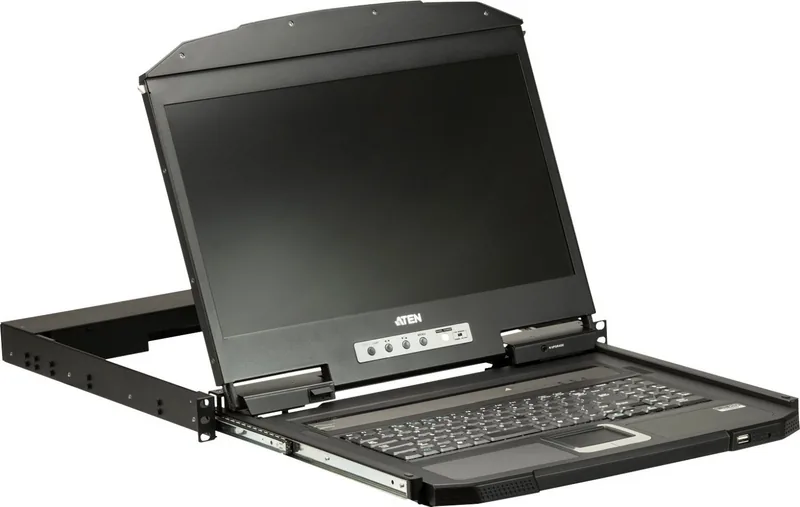
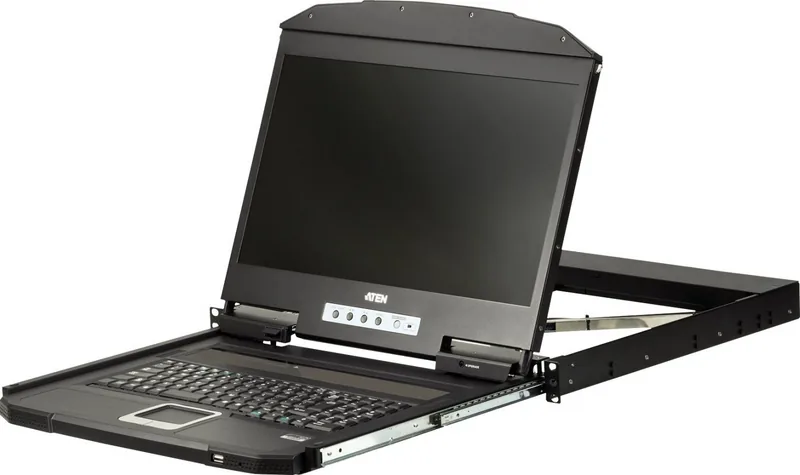
The ATEN CL3100 represents a significant advancement in rack-mounted console solutions, specifically designed for environments where space is at a premium. This short-depth wide-screen LCD console is the ideal choice for shallow racks, mobile live streaming applications, and compact control rooms such as outside broadcast vans. By integrating an 18.5-inch LED-backlit widescreen monitor with a full-sized keyboard and touchpad, the CL3100 offers a complete management station that fits seamlessly into standard 19-inch equipment cabinets without protruding excessively.
Unlike bulkier alternatives, the single-rail design of the CL3100 allows the entire console module to slide out smoothly for operation and retract flush against the rack when not in use. This feature not only saves valuable floor space but also protects the delicate components from accidental damage or obstruction. The unit supports VGA video input, making it perfectly compatible with a wide range of legacy and modern KVM switches that utilize VGA connectivity. Users can manage multiple computers efficiently by simply connecting the custom USB VGA KVM cable provided in the package.
Operational flexibility is enhanced through the inclusion of an external console port on the rear panel. This allows administrators to connect a secondary VGA monitor, keyboard, and mouse if they prefer a traditional desktop setup while maintaining the primary sliding console for quick access. The device also features audio support, enabling users to listen to system sounds directly from the console section. With firmware upgradability, the CL3100 ensures that your infrastructure remains current with the latest security patches and performance improvements available from the manufacturer.
Key Features
- Short-depth design for narrow rack spaces.
- 18.5-inch LED-backlit widescreen display.
- Integrated sliding keyboard and touchpad modules.
- Support for hot-plugging and various operating systems.
- Optional mounting kits for flexible installation.
Notes
Ensure that the connected computer resolution does not exceed the maximum supported resolution of 1366 x 768 for optimal display performance. Always verify voltage settings before powering on the unit to prevent damage.
Search for 67,706 Manuals online


Type-in Brand or Model