

ATEN CL1000N Manual
PDF manual · 42 Pages
English



Quick check
Incorrect answer, please try again.
Chat with your ATEN CL1000N manual using AI
Get instant AI answers from your ATEN CL1000N manual
Ask anything about the ATEN CL1000N. Answers come from this manual, with the pages they are based on.
Ask a Question
Do you recommend CL1000N?
Yes NoFrequently Asked Questions
The CL1000N supports up to 1280 x 1024 at 75 Hz and implements DDC/DDC2/DDC2B emulation so connected computers can automatically adapt their video output.
Is this answer helpful?
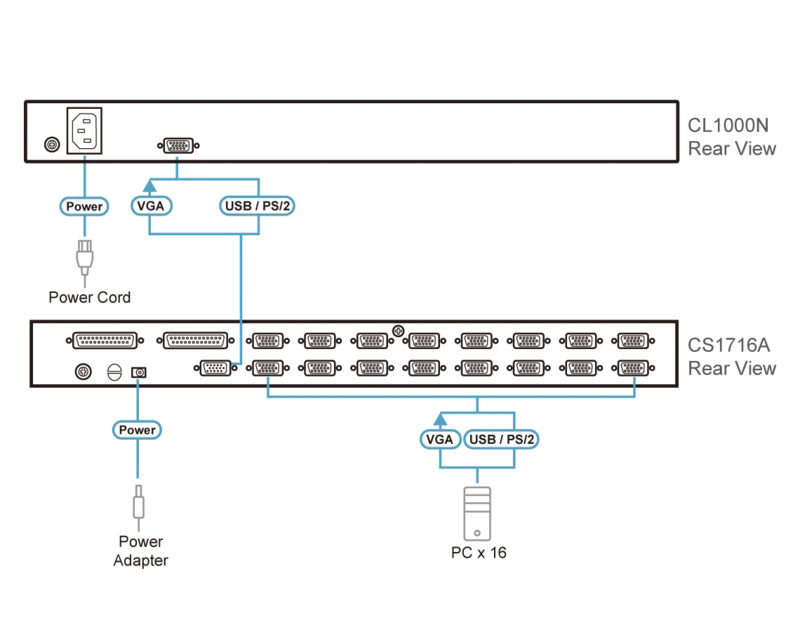
Use the supplied ATEN SPHD KVM cable to plug the unit's SPHD KVM port into the console port of a compatible PS/2 or USB KVM switch. Ensure you use the matching ATEN cable set for PS/2 or USB as appropriate.
Is this answer helpful?
Yes. The unit is a 1U sliding console designed for standard 19" racks. The supplied standard rack mount kit fits common rack depths; optional longer or single-person easy-install kits are available for deeper racks or simplified installation.
Is this answer helpful?
The CL1000N accepts 100–240 VAC at 50/60 Hz with an internal power supply. Operating temperature is 0–50°C with 0–80% non-condensing humidity. Use surge protection or a UPS for critical installations.
Is this answer helpful?
The console supports PS/2 by default and supports USB when used with ATEN’s 2L-52xxUP USB KVM cables, enabling keyboard and mouse emulation for USB systems.
Is this answer helpful?
Allow proper ventilation clearance on the sides and rear, do not place heavy objects on the keyboard module, use the safety catches when sliding, and follow rack-loading best practices to avoid tipping or overload.
Is this answer helpful?
ATEN provides online technical support, documentation, and software via its support portals. Telephone and email support contacts are listed in product resources. The hardware carries a limited warranty (terms vary by region).
Is this answer helpful?
Advantages and Disadvantages
Advantages

- Space-saving 1U sliding design with integrated 19" LED-backlit LCD, keyboard, and touchpad.
- Supports up to 1280 x 1024 @75Hz with DDC emulation for automatic video adjustment.
- Durable rack-grade construction with included standard mount kit and optional mounts.
- Integrated LED illumination for low-light operation and rotatable LCD for ergonomic viewing.
- Custom SPHD connector and ATEN cable compatibility for reliable KVM connectivity.
Disadvantages

- Maximum resolution limited to 1280 x 1024, not suitable for higher-resolution monitoring.
- Requires ATEN-specific SPHD KVM cables; third-party cables may not fit.
- Keyboard module load limit (30 kg) — not intended as a work surface or support.
- Standard mount kit requires two people to install; easy-install kit sold separately.
- No onboard advanced KVM switching—serves as a console front-end and requires a KVM switch.
Product Specification
Type
Rack KVM Switch
Monitor
19"
Resolution
1280x1024
Input Devices
PS/2 & USB
Audio
N/A
LAN
N/A
Rack Units
1U
Special Features
KVM console, Notebook-like keyboard with touchpad and numeric keypad, DE layout
Product Description
ATEN CL1000N 19"-Rack console
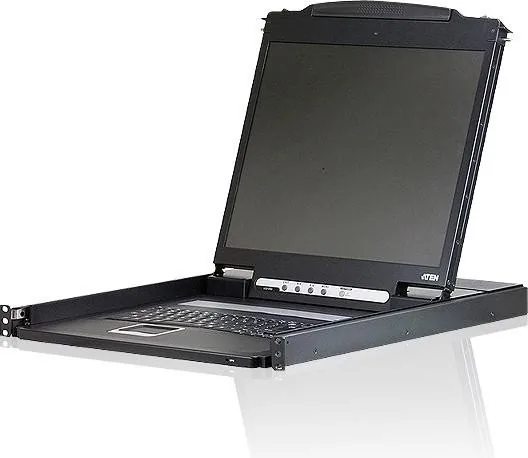
The ATEN CL1000N 19"-Rack console is a purpose-built 1U sliding LCD KVM console that combines a 19" LED-backlit monitor with a full keyboard and touchpad for compact, at-the-rack management. Designed for data centers, server rooms, and industrial rack installations, it provides direct, local console access to compatible KVM switches while saving valuable rack space.
Compact, practical design
Housed in a sturdy metal-and-plastic chassis, the CL1000N slides smoothly in and out of a standard 19" rack and features a flip-up 19" LCD that rotates for improved viewing angles. Its integrated illumination light helps you work in low-light environments. The console includes standard rack-mount brackets, and optional mounting kits are available for deeper racks or single-person installation.
Built for real-world use
The CL1000N supports up to 1280 x 1024 @ 75Hz and uses DDC emulation so connected systems automatically adjust video settings for optimal output. SPHD-style KVM connectors are keyed to ATEN’s custom cables to ensure reliable connections. The unit offers an internal power supply, rocker power switch, four LCD OSD control buttons, and LEDs for power and lock states. It supports both PS/2 and USB console configurations when paired with the correct ATEN cable set.
Installation and operation highlights
Installation is straightforward: mount the console using the supplied hardware, connect the custom KVM cable to your KVM switch, plug in power, and boot your systems. The sliding assembly includes safety catches to prevent accidental opening; release tabs must be pressed to slide the module out. The keyboard module supports up to 30 kg but should not be leaned on or used as a work surface. The LCD OSD offers brightness, contrast, clock/phase, position, color temperature, and reset options for quick on-site adjustments.
Reliability and support
Built to industry standards, the CL1000N complies with FCC, ICES and RoHS requirements. ATEN provides online and telephone support, and a limited hardware warranty covers defects (terms vary by region). Documentation and firmware/support channels are accessible through ATEN’s support portals.
Notes
- Maximum supported video: 1280 x 1024 @ 75Hz. Use supplied ATEN cables for best signal integrity.
- Leave adequate ventilation: allow side and rear clearance as recommended during rack installation.
- Use surge protection or UPS for power stability in critical environments.
Search for 67,706 Manuals online


Type-in Brand or Model