
ATEN 2-Port DVI Secure KVM Switch Manual
PDF manual · 45 Pages
English



Quick check
Incorrect answer, please try again.
Chat with your ATEN 2-Port DVI Secure KVM Switch manual using AI
Get instant AI answers from your ATEN 2-Port DVI Secure KVM Switch manual
Ask anything about the ATEN 2-Port DVI Secure KVM Switch. Answers come from this manual, with the pages they are based on.
Ask a Question
Do you recommend 2-Port DVI Secure KVM Switch?
Yes NoFrequently Asked Questions
It is NIAP certified, features chassis intrusion detection that disables the unit if opened, restricts USB connectivity to only keyboards and mice, and enforces unidirectional data flow to prevent cross-computer data transfer.
Is this answer helpful?
No, the switch does not support wireless keyboards due to strict security policies that require direct wired connections to prevent potential interception or interference.
Is this answer helpful?
The active chassis intrusion detection system will trigger, causing all front panel LEDs to flash and permanently disabling the switch until it is serviced by an authorized dealer.
Is this answer helpful?
Yes, the switch supports video resolutions up to 4K UHD (3840 x 2160 @ 30Hz) for both single and dual display configurations depending on the specific model variant.
Is this answer helpful?
No, the switch strictly prohibits analog microphone or line-in audio inputs. Only standard analog speaker connections are allowed to prevent audio-based data exfiltration.
Is this answer helpful?
You can manually switch ports by pressing the pushbuttons on the front panel. This action simultaneously switches the keyboard, mouse, video, audio, and CAC reader focus to the selected computer.
Is this answer helpful?
Advantages and Disadvantages
Advantages

- NIAP PP PSS v3.0 certified for maximum government-grade security
- Supports 4K UHD video resolution for high-quality visuals
- Active chassis intrusion detection permanently disables unit if tampered
- Unidirectional data flow prevents data transfer between computers
- Video DynaSync technology eliminates boot-up display errors
Disadvantages

- Does not support wireless keyboards or mice
- Microphone audio input is strictly prohibited
- Cannot be repaired or upgraded if tampering is detected
- Requires separate purchase of specific KVM cable sets
- Non-qualified USB devices are rejected and will not function
Product Specification
Type
KVM Switch
Ports
2
Monitor
DVI
Keyboard/Mouse
USB, PS/2
Audio
1x Jack
LAN
N/A
Resolution
3840x2160@30Hz
Features
Dual-Monitor
Product Description
Secure Control with the ATEN 2-Port DVI KVM Switch
Managing multiple computers in a secure environment requires more than just standard switching capabilities. The ATEN 2-Port DVI KVM Switch offers a robust solution designed for high-security settings where data isolation is paramount. This device allows administrators to control two separate computers using a single keyboard, mouse, and monitor setup while ensuring that sensitive information remains protected from cross-contamination.
Advanced Security Features
The core strength of this switch lies in its NIAP PP PSS v3.0 certification. This compliance ensures that the hardware meets rigorous U.S. Department of Defense standards for peripheral sharing. Unlike standard KVM switches, this unit prevents unauthorized USB devices from connecting to the console ports. It strictly limits connectivity to keyboards and mice, rejecting all other Human Interface Devices (HIDs) to maintain a secure perimeter. Additionally, the system features active chassis intrusion detection. If the metal enclosure is opened or tampered with, the device permanently disables itself, flashing LEDs to signal a security breach and voiding the warranty to deter physical attacks.
High-Performance Video and Connectivity
Despite its focus on security, the ATEN 2-Port DVI KVM Switch does not compromise on performance. It supports ultra-high video resolutions up to 4K UHD (3840 x 2160 @ 30Hz), delivering crystal clear images for demanding tasks. The proprietary Video DynaSync technology eliminates boot-up display issues when switching between ports, ensuring seamless transitions. The switch also employs unidirectional data flow, meaning data can only move from the peripherals to the computer, never between connected computers. This channel isolation guarantees that even if one machine is compromised, the other remains safe.
Ease of Use and Configuration
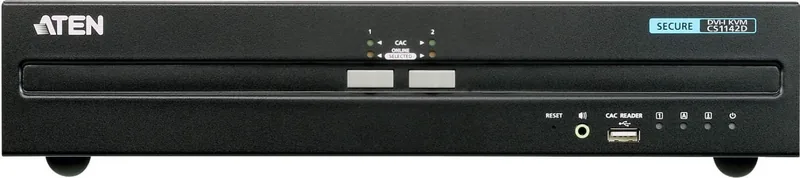
Operation is straightforward yet secure. Users switch ports via pushbuttons on the front panel, which simultaneously toggles video, audio, and CAC reader connections. The unit includes an LED display to indicate port status, online availability, and any security warnings. For environments requiring smart card authentication, the built-in CAC reader port supports authorized USB authentication devices, further enhancing access control. The rugged metal housing provides durability, making it suitable for rack-mounting or desktop stacking in professional IT infrastructure.
Notes
- Always use qualified monitors and cables to ensure proper operation.
- Wireless keyboards are not supported due to security policies.
- Audio input via microphone is strictly prohibited; only speaker output is allowed.
Search for 67,706 Manuals online


Type-in Brand or Model