
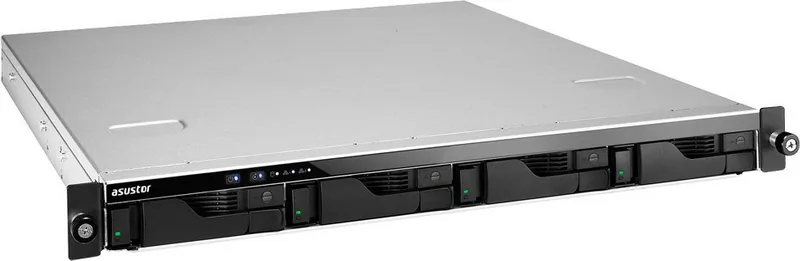


Asustor AS62 Manual
PDF manual · 29 Pages
English



Quick check
Incorrect answer, please try again.
Chat with your Asustor AS62 manual using AI
Get instant AI answers from your Asustor AS62 manual
Ask anything about the Asustor AS62. Answers come from this manual, with the pages they are based on.
Ask a Question
Do you recommend AS62?
Yes NoFrequently Asked Questions
You can access your device remotely using Cloud Connect technology which allows secure access from any internet location without complex IP configuration. DDNS settings help maintain a consistent host name.
Is this answer helpful?
The system runs Asustor Data Master (ADM), an intuitive interface designed for ease of use. It supports various protocols for cross-platform file sharing and application management.
Is this answer helpful?
Yes, it functions as a media hub supporting UPnP AV and iTunes servers. You can stream audio and video to compatible networks and mobile devices seamlessly.
Is this answer helpful?
Data protection includes RAID configurations for redundancy and security features like ADM Defender. One-touch backup allows quick data recovery via external USB drives effectively.
Is this answer helpful?
The App Central offers numerous applications including surveillance, download helpers, and file sharing tools. Users can tailor the system to specific needs with flexible software options.
Is this answer helpful?
You can reset the admin password using the hardware reset button located on the front. Hold the button until a beep signals the process has completed successfully.
Is this answer helpful?
Yes, iSCSI support enables integration into virtualized environments. This allows the NAS to serve as a storage target for virtual machines needing reliable access.
Is this answer helpful?
Advantages and Disadvantages
Advantages

- Supports multiple RAID levels including 5 and 6 for data redundancy and performance.
- Cross-platform compatibility allows seamless access from Windows, Mac, and Unix systems easily.
- ADM Defender offers robust firewall protection against unauthorized network access attempts.
- App Central allows extensive customization by downloading additional third-party or system apps.
- Mobile application AiMaster provides remote control and monitoring capabilities from any location.
Disadvantages

- External Wi-Fi adapter performance can vary and may be less stable than wired connections.
- Initial setup requires understanding of network protocols like DDNS and DHCP for best results.
- Encryption adds overhead which may reduce access speed for heavily encrypted shared folders.
- Virtualization requires specific hardware compatibility to ensure full iSCSI functionality support.
- Resetting the password requires physical access to the hardware reset button on the front.
Product Specification
Hard Drive
N/A
External
4x Gb LAN
RAID Level
0/1/5/6/10
CPU
Intel Celeron N3160, 4C/4T, 1.60-2.24GHz, 2MB Cache, 6W TDP, 4W SDP, Codename "Braswell" (Airmont, Intel 14nm)
RAM
4GB DDR3L
Fan
2x 1.57 in
Warranty
3 Years
USB Documentation
Link
Product Description
Discover Powerful Storage Solutions
Unlocking Data Potential
In the digital landscape, secure data storage is important. The Asustor AS62 is a robust solution meeting rigorous demands. Users often refer to the Asustor AS62 Rackmount NAS Manual for initial configuration. This device integrates into home and corporate networks, providing a reliable foundation. The architecture supports high availability and ensures data integrity. Data protection ensures critical documents are never lost to accidental deletion or hardware failure. It features advanced hardware design for rackmount installations.
Advanced Operating System
At the core of this system lies Asustor Data Master, an intuitive operating system. With a user-friendly interface, administrators can manage applications, storage, and security with ease. The system supports a wide array of protocols, ensuring compatibility across Windows, Mac, and Unix environments. Cross-platform file sharing is effortless, allowing diverse teams to collaborate. Security is enhanced through ADM Defender, which protects against unauthorized access attempts. System logs provide insights into activity, aiding in troubleshooting.
Cloud and Connectivity
Remote access is a critical feature. Through Cloud Connect technology, users can securely access files from anywhere. Using smartphones or desktops, data remains synchronized. Dynamic DNS simplifies external connectivity, eliminating complex IP address recall. One-touch backup functionality streamlines external data protection via USB interfaces. Mobile applications like AiMaster allow control of the NAS from any location.
Media and Multimedia Hub
This unit transforms into a multimedia server with advanced applications. Supported media protocols enable streaming via UPnP AV and iTunes servers. Digital entertainment can be enjoyed throughout the home network. Surveilling capabilities allow monitoring and recording via IP cameras, ensuring security. Web-based streaming means files can be viewed without local downloads.
Expansion and Integration
The App Central expands functionality significantly. Users can download additional software to tailor the system. Storage configurations support various RAID levels, balancing performance with redundancy. Energy management features help reduce power consumption. Comprehensive backup options include Remote Sync for other devices. Virtualized environments benefit from iSCSI integration, allowing seamless expansion. Downloaders can schedule tasks to manage bandwidth. Whether serving databases or files, the system maintains stability under pressure.
Conclusion
This storage solution represents a balance of power and security. Careful configuration ensures optimal performance. The Asustor AS62 Rackmount NAS Manual offers comprehensive information on setup. Investing in this hardware guarantees a scalable environment. The system adapts to your workflow, ensuring business continuity and personal data safety.
Search for 67,706 Manuals online


Type-in Brand or Model