
Asustor AS33 Drivestor PRO Gen2 Manual
PDF manual · 152 Pages
English



Quick check
Incorrect answer, please try again.
Chat with your Asustor AS33 Drivestor PRO Gen2 manual using AI
Get instant AI answers from your Asustor AS33 Drivestor PRO Gen2 manual
Ask anything about the Asustor AS33 Drivestor PRO Gen2. Answers come from this manual, with the pages they are based on.
Ask a Question
Do you recommend AS33 Drivestor PRO Gen2?
Yes NoFrequently Asked Questions
You can access your NAS from most anywhere by enabling EZ Connect. This uses a Cloud ID for a simple connection without complex network settings. Alternatively, you can enter the Cloud ID into a browser to connect securely to your device over the internet without needing to configure port forwarding manually.
Is this answer helpful?
ADM stands for ASUSTOR Data Master. It is the operating system designed around the use of Apps and features a web-based interface. It allows for easy organization and a user-friendly experience for managing storage and applications on your device.
Is this answer helpful?
Yes, the device supports One Touch Backup functionality. You can preset the USB backup button to execute a job when plugged in, or use the settings to schedule backups to external USB or eSATA hard disks for off-site insurance.
Is this answer helpful?
Yes, ADM Defender protects against malicious attacks with features like trusted lists, auto black lists, and firewall capabilities. You can also use SSL certificates to encrypt data transmission via HTTPS for secure communication with clients.
Is this answer helpful?
It supports multiple RAID levels including RAID 1, 5, 6, 0, 10, and JBOD. You can select the level based on your data protection needs and the number of disks you have installed to maintain storage integrity and redundancy.
Is this answer helpful?
You can use App Central to browse and download additional applications that peak your interest. The pre-installed apps are just the beginning, allowing you to explore unlimited potential while creating a personalized NAS configuration for yourself quickly.
Is this answer helpful?
You can configure notifications to send e-mail or SMS immediately if the system encounters problems. Push notifications are also supported via push services to forward alerts to your mobile device when designated system events occur.
Is this answer helpful?
Advantages and Disadvantages
Advantages

- Secure encryption with ADM Defender and SSL certificates for safe data transmission.
- EZ Connect technology allows easy remote access without complex network configuration.
- Snapshot Center provides recovery points for volumes and LUNs against accidental deletion.
- Supports multiple RAID levels including RAID 1, 5, and 6 for data redundancy.
- App Central allows expansion with additional applications beyond the pre-installed suite.
Disadvantages

- Sleep mode may be restricted if certain applications are syncing or performing tasks.
- USB backup button logic requires specific One Touch Backup function setup to work.
- Manual IP configuration is required if automatic DNS settings fail on the network.
- Automatic backup is not enabled for all pre-installed applications by default.
- SSD caching feature is only supported on specific models like AS31 and AS32 series.
Product Specification
Hard Drive
N/A
Network Interface
1x 2.5GBase-T
Additional Ports
3x USB-A 3.0 (Host)
RAID Level
0/1/5/6/10/JBOD/Single
CPU
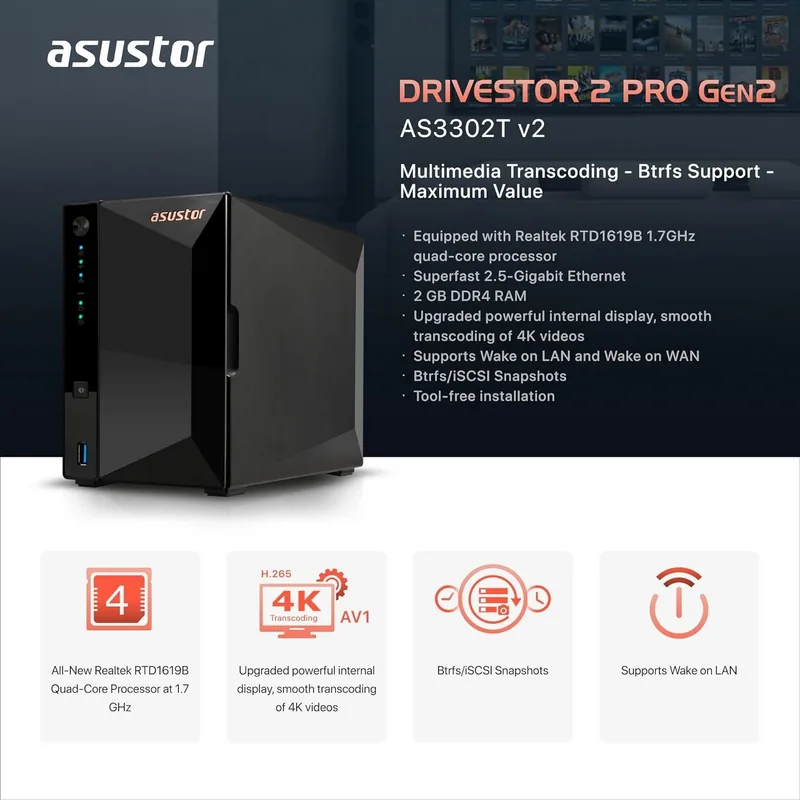
Realtek RTD1619B, 4x 1.70GHz (ARM Cortex-A55)
RAM
2GB DDR4, 8GB Flash
Features
iSCSI, DLNA Server, 256-bit AES Encryption, FTP Server, 4K Transcoding, iTunes Server, BitTorrent Client, WebDAV, Theft Protection (Kensington Lock)
Warranty
36 months
USB Documentation
Link
Product Description
Asustor AS33 Drivestor PRO Gen2 NAS Overview
Welcome to the future of home and office storage with the Asustor AS33 Drivestor PRO Gen2 NAS. This device transforms your digital life by offering seamless connectivity and robust data protection. When you explore the Asustor AS33 Drivestor PRO Gen2 NAS Manual resources, you discover a world of integrated features designed for efficiency. The system runs on ADM, an intuitive operating system that simplifies management through a web-based interface. You can access your files from anywhere using EZ Connect technology, allowing remote access without complex network setups.
Security remains a top priority with ADM Defender protecting against malicious attacks. Features like encrypted shared folders and SSL certificates ensure your data stays safe during transmission. Storage management is flexible, supporting multiple RAID levels including RAID 1, 5, and 6 for data redundancy. You can configure volumes using quick or advanced setup options to fit your needs. SSD caching is available to enhance performance by storing frequently accessed data on faster drives. Snapshot Center functionality allows you to take regular snapshots of your volumes and LUNs, providing recovery points in case of accidental deletion or corruption.
Collaboration is effortless with supported protocols like SMB, NFS, and FTP. Users can manage access rights through local users or integrate with Active Directory for enterprise environments. Mobile productivity is enhanced via dedicated apps for iOS and Android, enabling photo galleries, file access, and surveillance monitoring. Backup solutions range from internal syncs to external USB One Touch backups, ensuring peace of mind against data loss. Remote Sync capabilities facilitate off-site backups to other NAS devices or compatible servers.
The device supports various services including a web server and virtual host management for hosting personal websites. Multimedia enjoyment is facilitated by UPnP Media Server and SoundsGood integration, turning your NAS into an entertainment hub. Energy efficiency is also considered with features like fan control and disk hibernation to reduce power consumption. Network monitoring is possible via SNMP, allowing external management tools to track system health. Surveillance Center integration lets you manage IP cameras for full security oversight within your premises.
Whether for personal cloud usage or professional applications, this solution provides a reliable foundation for your digital infrastructure. The Asustor AS33 Drivestor PRO Gen2 NAS Manual provides detailed guidance on installing and configuring these diverse features effectively. You can customize notification settings via email or push services to stay informed of system events. App Central offers access to thousands of additional applications, expanding functionality beyond the pre-installed suite. Experience the unlimited potential of modern network storage by exploring every feature available to you today.
Note: Always read the specific model compatibility before buying.
Search for 67,706 Manuals online


Type-in Brand or Model