
ASUS X299 Series Manual
PDF manual · 142 Pages
English


Quick check
Incorrect answer, please try again.
Chat with your ASUS X299 Series manual using AI
Get instant AI answers from your ASUS X299 Series manual
Ask anything about the ASUS X299 Series. Answers come from this manual, with the pages they are based on.
Ask a Question
Do you recommend X299 Series?
Yes NoFrequently Asked Questions
It is designed for Intel Core X-series processors using the LGA2066 socket. The board uses DDR4 DIMMs in non-ECC, unbuffered configurations, with support for up to 256GB (via 8 DIMM slots). Always verify QVL guidance for the best compatibility with your specific CPU and memory kit.
Is this answer helpful?
You can install M.2 storage modules in supported M.2 sockets with PCIe 3.0 x4 capability (and in some cases SATA support on specific sockets). The board also provides SATA 6.0 Gb/s ports. RAID support includes Intel Rapid Storage Technology configurations such as RAID 0, 1, 5, and 10, depending on how you select the SATA mode and connect drives.
Is this answer helpful?
BIOS FlashBack lets you update firmware by placing the correct BIOS file on a compatible USB storage device and pressing the BIOS FlashBack button for a few seconds. For other update methods, use ASUS EZ Flash 3 (through BIOS) or EZ Update in Windows. Avoid removing the USB device, cutting power, or pressing reset during an update to prevent boot failure.
Is this answer helpful?
Yes. Q-Fan Control provides fan profile selection and manual tuning for CPU and chassis fans. The BIOS also includes AI OC Guide and overclock-related settings in Ai Tweaker, with AI Overclocking available only when using an unlocked CPU.
Is this answer helpful?
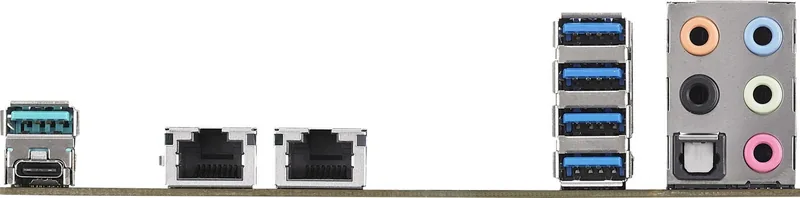
The rear I/O includes PS/2 combo, multiple USB 3.2 Gen 1 and Gen 2 ports (including Type-C), BIOS FlashBack button, Intel Gigabit LAN, optical S/PDIF out, and multi-channel audio jacks. For best results, match USB device generations to the corresponding port generation.
Is this answer helpful?
Wi-Fi requires an M.2 Wi-Fi module (E-key, 2230), which is purchased separately. Thunderbolt support relies on an add-on Thunderbolt I/O card and cables, also purchased separately. The BIOS includes Thunderbolt configuration options to match the installed card setup.
Is this answer helpful?
Use the onboard Q-LEDs and Q-Code LED system to identify which subsystem is most likely causing the problem (CPU, DRAM, VGA, or boot device). Then verify power connectors, reseat components, confirm jumper settings, and check BIOS storage/controller modes for your drive layout.
Is this answer helpful?
Advantages and Disadvantages
Advantages

- Supports Intel Core X-series on LGA2066 with quad-channel DDR4 up to 256GB.
- Fast build-ready storage with M.2 PCIe 3.0 x4 and SATA for common RAID levels.
- BIOS FlashBack enables firmware updates without entering the current BIOS or OS.
- Tuning and stability tools include AI OC Guide, EZ/Advanced BIOS modes, and Q-Fan Control.
- Strong connectivity with USB 3.2 options, Intel Gigabit LAN, and multi-channel audio.
Disadvantages

- CPU and configuration compatibility are strict, and features depend on CPU type and lane layout.
- Bandwidth sharing and slot behavior can limit performance when using certain device combinations.
- Some connectivity options require separately purchased add-ons, such as the Wi-Fi/BT module.
- Overclocking and advanced BIOS changes can reduce stability if settings are incorrect.
Product Specification
Socket
Intel 2066
RAID Level
0/1/5/10 (X299)
USB Notation
Link
Product Description
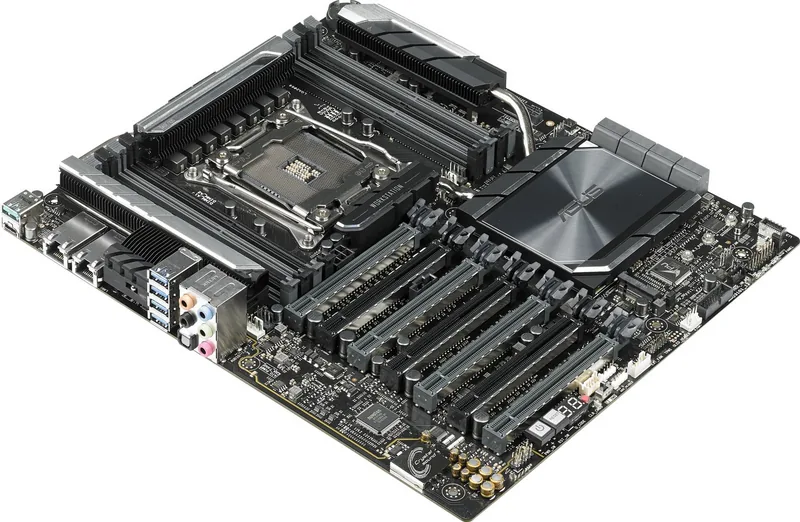
ASUS X299 Manual: ASUS PRIME X299-A II for Intel LGA2066 Power Builds
The ASUS PRIME X299-A II is a high-end desktop motherboard built for Intel Core X-series processors on the LGA2066 socket. If you are planning a performance-focused workstation or enthusiast PC, it brings a strong platform foundation for multi-GPU setups, fast storage options, and BIOS tools that help you tune, update, and troubleshoot with confidence. The focus here is practical: you get a board that is designed to support modern expansion needs while keeping configuration workflows clear for builders.
At the core, the platform supports quad-channel DDR4 memory (up to 256GB) and offers versatile expansion connectivity with multiple PCIe x16 slots depending on CPU lane configuration. For storage, you can populate M.2 slots with PCIe 3.0 x4 support, and you also get SATA 6.0 Gb/s connectivity for traditional drives. Storage flexibility extends into RAID support with Intel Rapid Storage Technology, including common RAID levels like 0, 1, 5, and 10.
Where this board really helps during everyday building and maintenance is in its firmware and board-level features. The UEFI BIOS provides both EZ and Advanced modes, along with tools like AI Overclocking guidance (for unlocked CPUs) and Q-Fan Control for managing CPU and chassis fan behavior. Updating BIOS is simplified through BIOS FlashBack, letting you refresh firmware without relying on a fully working OS-based setup.
Connectivity and platform usability are also well covered. The back panel includes multiple USB 3.2 ports, Intel I219-V Gigabit LAN with ASUS LAN protection features, and multi-channel audio using a Realtek S1220A codec. RGB support is available through AURA and addressable RGB headers, with guidance on safe power handling during installs.
Key results (most important benefits)
- Flexible performance foundation for Intel Core X-series on LGA2066 with quad-channel DDR4 and up to 256GB support.
- Fast storage ready: M.2 PCIe 3.0 x4 options plus SATA for RAID 0/1/5/10 workflows.
- Easier tuning and thermals with AI OC Guide and Q-Fan Control profiles.
- Safer firmware maintenance via BIOS FlashBack and structured BIOS update utilities.
- Practical multi-device expansion with multiple PCIe x16/x1 slots and SLI/CrossFireX support.
Key results (most important considerations)
- CPU compatibility is strict: use LGA2066 processors only, and install components with power disconnected.
- Some features depend on CPU type and add-on hardware (for example, Wi-Fi module is sold separately).
- Expansion and bandwidth sharing can change depending on lane configuration and installed devices.
- High-performance BIOS and overclocking settings can affect stability if misconfigured.
- RAID behavior depends on the selected controller mode (Intel RST Premium vs other options).
Notes
- Match memory correctly: DDR4 non-ECC, unbuffered DIMMs, and check QVL for best compatibility.
- For cooler and fan installs, connect the proper pump/fan headers and ensure airflow to avoid component stress.
- For BIOS updates, follow the recommended file naming and avoid interrupting power during flashing.
Search for 67,706 Manuals online


Type-in Brand or Model