
ASUS TUF Gaming K5 Manual
PDF manual · 2 Pages
English


Quick check
Incorrect answer, please try again.
Chat with your ASUS TUF Gaming K5 manual using AI
Get instant AI answers from your ASUS TUF Gaming K5 manual
Ask anything about the ASUS TUF Gaming K5. Answers come from this manual, with the pages they are based on.
Ask a Question
Do you recommend TUF Gaming K5?
Yes NoFrequently Asked Questions
Connect the device to your PC using the USB interface. Then download and install the Armoury II software from the official ASUS support site. Follow the on-screen instructions to update the firmware and configure your settings.
Is this answer helpful?
Press the function key along with the 1, 2, 3, or 4 keys to switch between different profiles. You can access static, breathing, or color cycling modes through the Armoury II application for visual customization.
Is this answer helpful?
Yes, the keyboard supports on-the-fly macro recording. Press Fn plus Right Alt to begin recording and press the same keys again to stop. You can then assign the macro to the desired key for automatic sequences.
Is this answer helpful?
This feature allows you to adjust how fast keys register when held down. It can be set to different levels using function key shortcuts to improve performance in fast-paced gaming scenarios requiring rapid input.
Is this answer helpful?
Press the Function key combined with the Windows key to lock it. This prevents accidental presses during play. Press the same combination again to unlock if needed.
Is this answer helpful?
Contact details are available via the official website and regional offices. Check the compliance and notice section in the product documentation for specific telephone and email contacts based on your region.
Is this answer helpful?
Press and hold the Fn key and the Esc key simultaneously for approximately 10 to 15 seconds. The unit will reset to its original factory settings and clear any custom configurations stored.
Is this answer helpful?
Advantages and Disadvantages
Advantages

- Robust military-grade construction for long-term durability under heavy usage
- Armoury II software enables deep customization of lighting and firmware updates
- Supports twenty-four key anti-ghosting for error-free rapid input
- Macro recording functionality automates complex sequences during gameplay
- Multiple lighting profile options including static, breathing, and color cycling modes
Disadvantages

- Firmware and lighting customization require Armoury II software installation
- Specific function key combinations are needed to switch lighting profiles
- Resetting to factory defaults involves holding buttons for a set duration
- Regional support contact details vary depending on your geographic location
- Disposal and recycling must adhere to local electronic waste regulations
Product Specification
Keyboard Layout
Italian
Type
Hybrid Mechanical
Backlight
RGB
Keycap Profile
Standard, with frame
Keycap Size
Standard
Keycap Surface
Concave
Numeric Keypad
Standard
Navigation Cluster
Standard
Control Keys
Standard
Function Keys
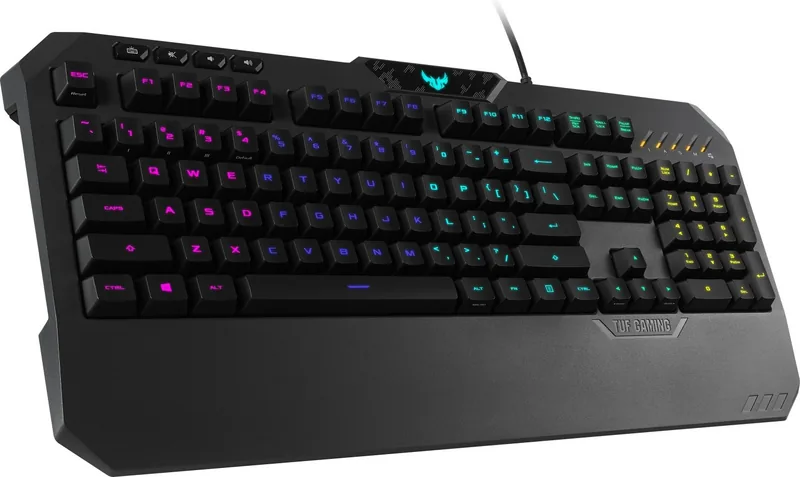
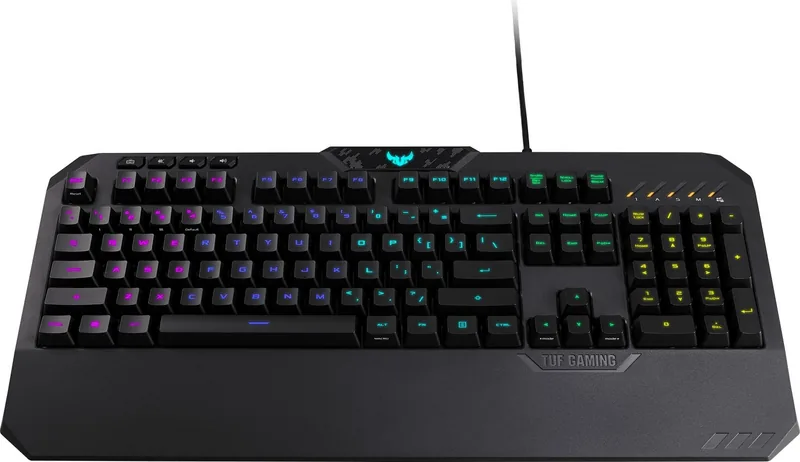
Standard (top row, with spacing downwards, in groups of 4)
Enter Key
Standard
Delete Key
Standard
LED Indicators
Caps Lock, Num, Scroll
Wrist Rest
Fixed
Housing
Plastic
Housing Color
Solid Black
Keycap Finish
Solid Black
Key Labeling
Solid White (Translucent)
Connectivity
Wired, USB-A 2.0
Power
USB
Dimensions (WxHxD)
18.11x1.57x8.58 inches
Weight
2.31 lbs
Features
4 multimedia keys, Anti-Ghosting (24-Key Rollover), splash-proof, Fn key
Product Description
Elevate Your Play with the ASUS TUF Gaming K5
High performance gaming requires hardware that delivers consistent response times and visual appeal. The ASUS TUF Gaming K5 represents a robust solution for enthusiasts seeking precision. This mechanical keyboard offers tactile feedback essential for competitive play. Each key press is registered accurately to ensure no input is missed during critical moments. The build quality reflects the military standard durability expected from the TUF Series branding. Players can rely on this equipment to withstand intense sessions without degradation over time. Connecting to your PC is simple using the standard USB interface found at the rear of the device.
Customization Through Software
To fully utilize the potential of your device, download and install the Armoury II software suite. This application allows you to update the firmware and customize lighting effects. There are multiple color profiles including red, purple, and orange that can be switched dynamically. Users can map colors to define profiles such as static, breathing, or color cycling states. Adjusting settings through the application ensures the hardware matches your personal visual preferences. It also connects to the online support portal for updates. You can switch between profile 1 to 4 using function key combinations for quick access during gameplay.
Macro Recording and Key Control
Advanced gamers often require automation for complex in-game commands. This unit supports on-the-fly macro recording to streamline repetitive tasks. You can start and stop recording sequences using specific hotkey combinations for immediate application. Key repeat acceleration can be adjusted to improve flow in rapid fire scenarios. The twenty-four key anti-ghosting capability prevents input errors when holding multiple keys simultaneously. Locking the Windows key avoids accidental exits from your game sessions caused by mishaps. Resetting the factory defaults is possible by holding the function and escape keys for a specific duration.
Maintenance and Support Services
Regular updates help maintain optimal performance and security standards. Contact information is available through regional offices globally to assist with inquiries. Compliance statements ensure the product meets regulatory requirements in various countries. Responsible disposal guidelines are provided to promote environmental sustainability. Users should follow safety protocols regarding electrical components to ensure longevity. Accessing the ASUS TUF Gaming K5 Manual resources provides detailed guidance for initial pairing and configuration steps. This ensures a smooth start to your gaming journey without technical hurdles. International support teams are ready to assist if specific technical issues arise during setup.
Notes
Keep the device away from liquids to avoid electrical hazards. Clean the keys regularly using a soft cloth to maintain appearance. Do not attempt to disassemble the unit yourself to preserve warranty terms. Keep the software updated for best compatibility with operating systems.
Search for 67,732 Manuals online


Type-in Brand or Model