
ASUS Tinker Board 2 Manual
PDF manual · 30 Pages
English


Quick check
Incorrect answer, please try again.
Chat with your ASUS Tinker Board 2 manual using AI
Get instant AI answers from your ASUS Tinker Board 2 manual
Ask anything about the ASUS Tinker Board 2. Answers come from this manual, with the pages they are based on.
Ask a Question
Do you recommend Tinker Board 2?
Yes NoFrequently Asked Questions
The device uses the Rockchip RK3399 SoC featuring a 64-bit architecture. It contains dual-core Cortex-A72 processors at 2.0 GHz and quad-core Cortex-A53 processors at 1.5 GHz, paired with an Arm Mali-T860 MP4 GPU.
Is this answer helpful?
Memory configurations include dual-channel LPDDR4 with options for 2GB or 4GB of RAM to suit different workload requirements and performance needs.
Is this answer helpful?
The system officially supports Debian 9 and Android 10 to ensure compatibility with various software ecosystems and development tools.
Is this answer helpful?
Yes, you can use a Micro SD card slot for external storage. Selected models also support onboard 16GB eMMC storage for faster access speeds.
Is this answer helpful?
The board draws power via a DC input jack accepting 12 to 19 volts. Power consumption ranges from 0.44W in suspend mode up to 29.18W under max load.
Is this answer helpful?
Yes, there is a 40-pin GPIO header that supports up to 28 GPIO pins plus SPI, I2C, UART, PWM, and sound interfaces for robotics.
Is this answer helpful?
Disconnect all power before adding or removing components. Use a grounded wrist strap to avoid static electricity damage. Follow power input ratings strictly.
Is this answer helpful?
Advantages and Disadvantages
Advantages

- Robust RK3399 SoC with big.LITTLE architecture for balanced performance and efficiency
- Rich connectivity options including HDMI, USB 3.2, GbE LAN, and M.2 Wi-Fi slot
- Flexible storage supports both Micro SD card and onboard eMMC on select models
- Comprehensive 40-pin GPIO header with 28 usable pins for extensive hardware expansion
- Supports multiple OS options including Debian 9 and Android 10 for versatility
Disadvantages

- Requires careful handling of power input ratings to avoid hardware damage
- Heat generation may require additional cooling solutions during max load scenarios
- eMMC storage is only available on the Tinker Board 2S model not standard 2
- Wireless module is purchased separately on selected models
- Static electricity precautions are mandatory during component handling
Product Specification
Manufacturer
ASUS
Type
Motherboard
Video Inputs
1x MIPI CSI2
Internal Connectors
N/A
GPIO
40-Pin
GPIO Standards
UART, PWM, SPI, I2C, I2S, S/PDIF
LAN
1x Gb LAN
Package Contents
1x Motherboard, 1x Heatsink
Product Description
Exploring the ASUS Tinker Board 2 Experience
The ASUS Tinker Board 2 Series creates opportunities for maker enthusiasts seeking robust performance in a compact design. This single board computer serves as a gateway to new ideas and relationships within the DIY community. Experienced makers value the performance-to-price ratio, while novices appreciate the accessibility and ease of use. Every component contributes to a cohesive computing platform that bridges the gap between hobbyism and professional application. The ecosystem supports diverse projects ranging from media centers to industrial automation.
Core Specifications and Power
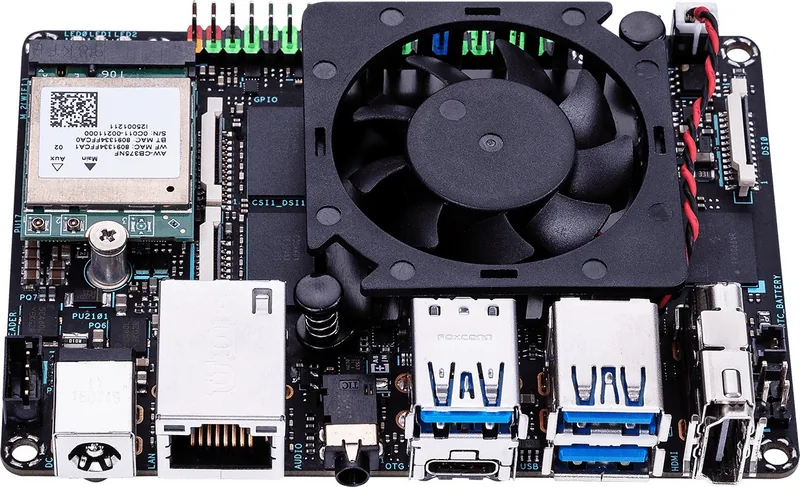
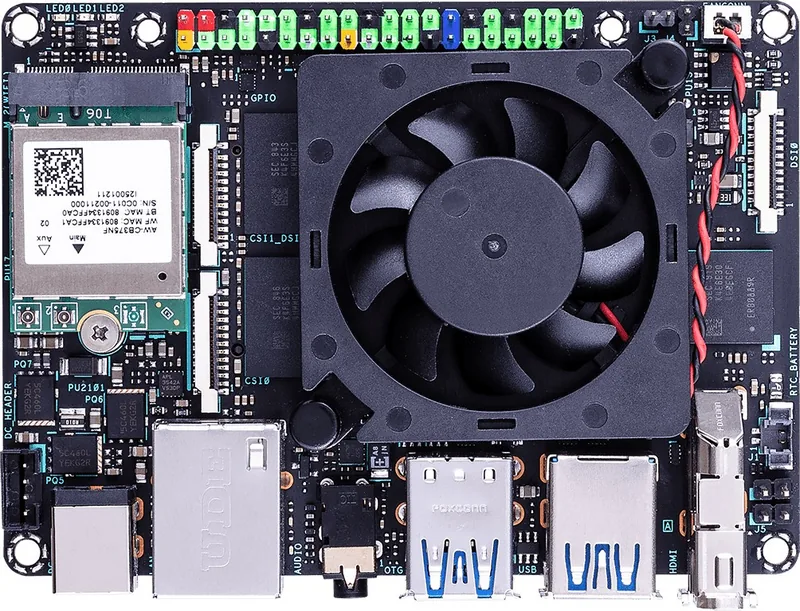
At the heart of the device lies the Rockchip RK3399 SoC. This 64-bit system features dual-core Arm Cortex-A72 processors running at 2.0 GHz paired with quad-core Arm Cortex-A53 processors at 1.5 GHz. This big.LITTLE architecture optimizes battery life and processing speed dynamically. Performance is further enhanced by the Arm Mali-T860 MP4 GPU capable of rendering video and graphics efficiently. Memory configurations include dual-channel LPDDR4 available in 2GB or 4GB sizes to suit different workload requirements. Users seeking detailed breakdowns often reference the ASUS Tinker Boards Manual for complete technical data and pinout diagrams. Power requirements are met via a DC input jack accepting 12 to 19 volts.
Connectivity and Ports
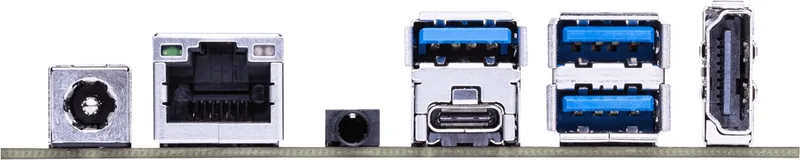
Rich connectivity ensures integration with various peripherals and display options. The board includes a USB Type-C port supporting DisplayPort 1.2 output alongside a standard HDMI port for video. Network connectivity is handled by an RTL8211F-CG GbE LAN controller for stable ethernet connections. Wireless capabilities are provided via an M.2 slot for Wi-Fi and Bluetooth 5.0 modules. Users can add a compatible module for expanded range. Five USB 3.2 Gen 1 ports allow for high-speed data transfer to external devices. Audio support exists via HDMI and digital pins.
Storage and Installation
Storage flexibility is achieved through a Micro SD card slot and optional onboard eMMC storage on selected models. Booting from external media is quick and requires a simple setup process using Etcher or similar tools. The package includes a heatsink and Wi-Fi antenna cables to get you started. It is vital to follow safety guidelines regarding power input voltage and current ratings to prevent hardware issues. Static electricity precautions should be taken before handling internal components.
Expansion and GPIO
The 40-pin GPIO header opens doors for extensive expansion. This interface supports up to 28 GPIO pins along with SPI, I2C, UART, and PWM buses. This makes the board ideal for robotics and IoT projects requiring complex interconnectivity. Status LEDs provide visual feedback on power and disk activity. The compact dimensions of 85 by 56 millimeters allow integration into tight spaces.
Operating Systems and Warranty
The system supports popular operating systems like Debian 9 and Android 10 to ensure compatibility with software ecosystems. Updates are managed via OTA tools to keep the system current. ASUS provides limited warranty coverage for manufacturing defects. Users must adhere to RF exposure regulations for wireless components during installation. Proper care during installation ensures longevity and optimal function under various environmental conditions. Temperature control is crucial.
Search for 67,706 Manuals online


Type-in Brand or Model