Manual.ly Logo

ASUS ROG Strix Scope NX TKL Deluxe Manual

5.0 · 2 Ratings

PDF manual · 2 Pages

English

M: OA-GPT-5-NAN
page

/ 2

Loading...
0c945a5b1da354b6d509eb7457e73d683ecb page 2
English ASUSTeK Computer Inc. hereby declares
that this device is in compliance with the essential
requirements and other relevant provisions of related
Directives. Full text of EU declaration of conformity
available at: www.asus.com/support
Français AsusTek Computer Inc. déclare par la
présente que cet appareil est conforme aux critères
essentiels et autres clauses pertinentes des directives
concernées. La déclaration de conformité de l’UE peut
être téléchargée à partir du site Internet suivant :
www.asus.com/support.
Deutsch ASUSTeK Computer Inc. erklärt hiermit, dass
dieses Gerät mit den wesentlichen Anforderungen
und anderen relevanten Bestimmungen der
zugehörigen Richtlinien übereinstimmt. Der gesamte
Text der EU-Konformitätserklärung ist verfügbar
unter: www.asus.com/support
Italiano ASUSTeK Computer Inc. con la presente
dichiara che questo dispositivo è conforme ai
requisiti essenziali e alle altre disposizioni pertinenti
con le direttive correlate. Il testo completo della
dichiarazione di conformità UE è disponibile
all’indirizzo: www.asus.com/support
Русский Компания ASUS заявляет, что это
устройство соответствует основным требованиям
и другим соответствующим условиям
соответствующих директив. Подробную
информацию, пожалуйста, смотрите на
www.asus.com/support
Български С настоящото ASUSTeK Computer Inc.
декларира, че това устройство е в съответствие със
съществените изисквания и другите приложими
постановления на свързаните директиви. Пълният
текст на декларацията за съответствие на ЕС е
достъпна на адрес: www.asus.com/support
Hrvatski ASUSTeK Computer Inc. ovim izjavljuje da
je ovaj uređaj sukladan s bitnim zahtjevima i ostalim
odgovarajućim odredbama vezanih direktiva. Cijeli
tekst EU izjave o sukladnosti dostupan je na:
www.asus.com/support
Čeština Společnost ASUSTeK Computer Inc.
tímto prohlašuje, že toto zařízení splňuje základní
požadavky a další příslušná ustanovení souvisejících
směrnic. Plné znění prohlášení o shodě EU je k
dispozici na adrese: www.asus.com/support
Dansk ASUSTeK Computer Inc. erklærer
hermed, at denne enhed er i overensstemmelse
med hovedkravene og andre relevante
bestemmelser i de relaterede direktiver. Hele EU-
overensstemmelseserklæringen kan ndes på:
www.asus.com/support
Nederlands ASUSTeK Computer Inc. verklaart hierbij
dat dit apparaat voldoet aan de essentiële vereisten
en andere relevante bepalingen van de verwante
richtlijnen. De volledige tekst van de EU-verklaring
van conformiteit is beschikbaar op:
www.asus.com/support
Federal Communications Commission Statement
This device complies with Part 15 of the FCC Rules. Operation is subject to the following two conditions:
• This device may not cause harmful interference.
• This device must accept any interference received including interference that may cause undesired
operation.
This equipment has been tested and found to comply with the limits for a Class B digital device, pursuant
to Part 15 of the FCC Rules. These limits are designed to provide reasonable protection against harmful
interference in a residential installation. This equipment generates, uses and can radiate radio frequency energy
and, if not installed and used in accordance with manufacturer’s instructions, may cause harmful interference
to radio communications. However, there is no guarantee that interference will not occur in a particular
installation. If this equipment does cause harmful interference to radio or television reception, which can be
determined by turning the equipment o and on, the user is encouraged to try to correct the interference by
one or more of the following measures:
• Reorient or relocate the receiving antenna.
• Increase the separation between the equipment and receiver.
• Connect the equipment to an outlet on a circuit dierent from that to which the receiver is connected.
• Consult the dealer or an experienced radio/TV technician for help.
The use of shielded cables for connection of the monitor to the graphics card is required to
assure compliance with FCC regulations. Changes or modications to this unit not expressly
approved by the party responsible for compliance could void the user’s authority to operate
this equipment.
Eesti Käesolevaga kinnitab ASUSTeK Computer Inc,
et see seade vastab asjakohaste direktiivide oluliste
nõuetele ja teistele asjassepuutuvatele sätetele.
EL vastavusdeklaratsiooni täielik tekst on saadaval
järgmisel aadressil: www.asus.com/support
Suomi ASUSTeK Computer Inc. ilmoittaa täten, että
tämä laite on asiaankuuluvien direktiivien olennaisten
vaatimusten ja muiden tätä koskevien säädösten
mukainen. EU-yhdenmukaisuusilmoituksen koko
teksti on luettavissa osoitteessa:
www.asus.com/support
Ελληνικά Με το παρόν, η AsusTek Computer Inc.
δηλώνει ότι αυτή η συσκευή συμμορφώνεται με τις
θεμελιώδεις απαιτήσεις και άλλες σχετικές διατάξεις
των Οδηγιών της ΕΕ. Το πλήρες κείμενο της δήλωσης
συμβατότητας είναι διαθέσιμο στη διεύθυνση:
www.asus.com/support
Magyar Az ASUSTeK Computer Inc. ezennel kijelenti,
hogy ez az eszköz megfelel a kapcsolódó Irányelvek
lényeges követelményeinek és egyéb vonatkozó
rendelkezéseinek. Az EU megfelelőségi nyilatkozat
teljes szövege innen letölthető:
www.asus.com/support
Latviski ASUSTeK Computer Inc. ar šo paziņo, ka šī
ierīce atbilst saistīto Direktīvu būtiskajām prasībām
un citiem citiem saistošajiem nosacījumiem. Pilns ES
atbilstības paziņojuma teksts pieejams šeit:
www.asus.com/support
Lietuvių „ASUSTeK Computer Inc.“ šiuo tvirtina, kad
šis įrenginys atitinka pagrindinius reikalavimus ir
kitas svarbias susijusių direktyvų nuostatas. Visą ES
atitikties deklaracijos tekstą galima rasti:
www.asus.com/support
Norsk ASUSTeK Computer Inc. erklærer herved at
denne enheten er i samsvar med hovedsaklige krav
og andre relevante forskrifter i relaterte direktiver.
Fullstendig tekst for EU-samsvarserklæringen nnes
på: www.asus.com/support
Polski Firma ASUSTeK Computer Inc. niniejszym
oświadcza, że urządzenie to jest zgodne z
zasadniczymi wymogami i innymi właściwymi
postanowieniami powiązanych dyrektyw. Pełny tekst
deklaracji zgodności UE jest dostępny pod adresem:
www.asus.com/support
Português A ASUSTeK Computer Inc. declara que
este dispositivo está em conformidade com os
requisitos essenciais e outras disposições relevantes
das Diretivas relacionadas. Texto integral da
declaração da UE disponível em:
www.asus.com/support
Română ASUSTeK Computer Inc. declară că acest
dispozitiv se conformează cerinţelor esenţiale şi altor
prevederi relevante ale directivelor conexe. Textul
complet al declaraţiei de conformitate a Uniunii
Europene se găseşte la: www.asus.com/support
Key combinations
Function Key / Media Function Toggle
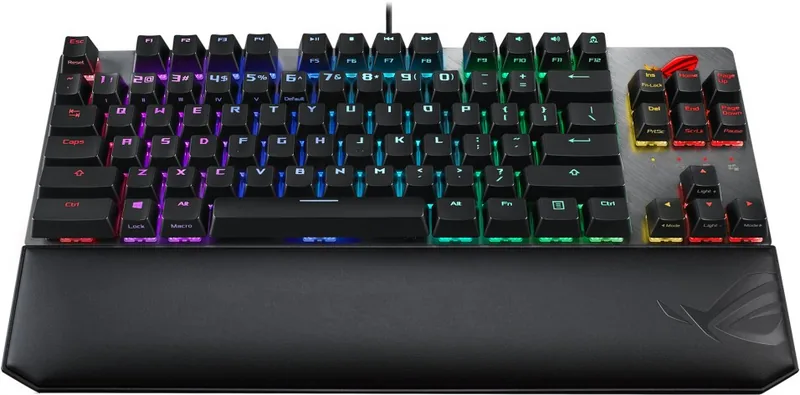
Fn + Ins: Toggle between system function and media control for the F5 - F12 keys.
Stealth Mode: Minimize all windows and mute / Maximize all windows and unmute
F12: Minimize all active windows and mute the system, or maximize all minimized windows and
unmute the system.
This function is only available when the F5 - F12 keys are toggled to Media Function.
On-the-y macro recording
Step 1: Fn + Left-ALT to start recording
Step 2: Fn + Left-ALT to end recording
Step 3: Assign Macro Key
Prole Switch
Fn + 1 / 2 / 3 / 4 / 5 / 6*
* 6 is default
Light Eect Switch
Fn + Right or Fn + Left
Brightness Level
Fn + Up: Brightness up
Fn + Down: Brightness down
Print screen, Scroll lock, Pause keys
Fn + Delete: Print Screen (PrtScr)
Fn + End: Scroll Lock toggle (ScrLk)
Fn + PageDown: Pause (Pause)
Factory Default
Fn + Esc: Hold these two buttons for over 10-15 seconds to reset to factory settings.
When running AURA SYNC, the hot key related with the lighting eect will be disabled, for
example: Prole switch, Lighting eects switch, Brightness level.
Srpski ASUSTeK Computer Inc. ovim izjavljuje da je
ovaj uređaj u saglasnosti sa osnovnim zahtevima i
drugim relevantnim odredbama povezanih Direktiva.
Pun tekst EU deklaracije o usaglašenosti je dostupan
da adresi: www.asus.com/support
Slovensky Spoločnosť ASUSTeK Computer Inc. týmto
vyhlasuje, že toto zariadenie vyhovuje základným
požiadavkám a ostatým príslušným ustanoveniam
príslušných smerníc. Celý text vyhlásenia o zhode pre
štáty EÚ je dostupný na adrese:
www.asus.com/support
Slovenščina ASUSTeK Computer Inc. izjavlja, da
je ta naprava skladna z bistvenimi zahtevami in
drugimi ustreznimi določbami povezanih direktiv.
Celotno besedilo EU-izjave o skladnosti je na voljo na
spletnem mestu: www.asus.com/support
Español Por la presente, ASUSTeK Computer Inc.
declara que este dispositivo cumple los requisitos
básicos y otras disposiciones pertinentes de las
directivas relacionadas. El texto completo de la
declaración de la UE de conformidad está disponible
en: www.asus.com/support
Svenska ASUSTeK Computer Inc. förklarar
härmed att denna enhet överensstämmer med
de grundläggande kraven och andra relevanta
föreskrifter i relaterade direktiv. Fulltext av EU-
försäkran om överensstämmelse nns på:
www.asus.com/support
Українська ASUSTeK Computer Inc. заявляє,
що цей пристрій відповідає основним вимогам
та іншим відповідним положенням відповідних
Директив. Повний текст декларації відповідності
стандартам ЄС доступний на:
www.asus.com/support
Türkçe AsusTek Computer Inc., bu aygıtın temel
gereksinimlerle ve ilişkili Yönergelerin diğer
ilgili koşullarıyla uyumlu olduğunu beyan eder.
AB uygunluk bildiriminin tam metni şu adreste
bulunabilir: www.asus.com/support
Bosanski ASUSTeK Computer Inc. ovim izjavljuje da
je ovaj uređaj usklađen sa bitnim zahtjevima i ostalim
odgovarajućim odredbama vezanih direktiva. Cijeli
tekst EU izjave o usklađenosti dostupan je na:
www.asus.com/support
 תירבע



www.asus.com/support

Prole color and lighting eect mapping list
Eects and
the color
Prole 1
(Red)
Prole 2
(Purple)
Prole 3
(Blue)
Prole 4
(Green)
Prole 5
(Yellow)
Default
Prole
Static Red Purple Blue Green Yellow White
Breathing Red Purple Blue Green Yellow White
Color Cycle Multi-color Multi-color Multi-color Multi-color Multi-color Multi-color
Wave Multi-color Multi-color Multi-color Multi-color Multi-color Multi-color
Ripple Red Purple Blue Green Yellow Random color
Reactive Red Purple Blue Green Yellow Random color
Starry Night Red Purple Blue Green Yellow Random color
Quicksand Red Purple Blue Green Yellow Random color
Current Red Purple Blue Green Yellow Random color
Rain Drop Red Purple Blue Green Yellow Random color
• The default color(s) for the RGB lock indicator LEDs can be customized by switching
proles. Please refer to the table above.
• Whenever lock keys are enabled (Caps Lock, Scroll Lock, Fn-Lock, and Win Lock), the
corresponding LEDs will always be lit. The default color will be displayed if no lighting
eects are active. e.g. When Prole 3 is selected, any enabled lock indicator LEDs will
always be blue or multi-colored unless specied otherwise.
Compliance Statement of Innovation, Science and Economic
Development Canada (ISED)
This device complies with Innovation, Science, and Economic Development Canada licence exempt RSS
standard(s). Operation is subject to the following two conditions: (1) this device may not cause interference,
and (2) this device must accept any interference, including interference that may cause undesired operation of
the device.
CAN ICES-3(B)/NMB-3(B)
Déclaration de conformité de Innovation, Sciences et Développement
économique Canada (ISED)
Le présent appareil est conforme aux CNR d’Innovation, Sciences et Développement économique Canada
applicables aux appareils radio exempts de licence. Son utilisation est sujette aux deux conditions suivantes : (1)
cet appareil ne doit pas créer d’interférences, et (2) cet appareil doit tolérer tout type d’interférences, y compris
celles susceptibles de provoquer un fonctionnement non souhaité de l’appareil.
CAN ICES-3(B)/NMB-3(B)
Manufacturer
ASUSTeK Computer Inc.
Tel: +886-2-2894-3447
Address: 1F., No. 15, Lide Rd., Beitou Dist., Taipei City
112, Taiwan
Authorised representative
in Europe
ASUSTeK Computer GmbH
Address: Harkortstrasse 21-23, 40880 Ratingen,
Germany
Официальное представительство в России
Горячая линия Службы технической поддержки в России:
Бесплатный федеральный номер для звонков по России: 8-800-100-2787
Номер для пользователей в Москве: +7(495)231-1999
Время работы: Пн-Пт, 09:00 - 21:00 (по московскому времени)
Официальные сайты ASUS в России:
www.asus.ru
www.asus.com/ru/support
Данное устройство соответствует требованиям Технического регламента Таможенного Союза ТР ТС
020/2011 Электромагнитная совместимость технических средств утв. решением КТС от 09.12.2011г. №879
ASUS contact information
ASUSTeK COMPUTER INC.
Address 1F., No. 15, Lide Rd., Beitou Dist., Taipei City 112, Taiwan
Telephone +886-2-2894-3447
Fax +886-2-2890-7798
Web site https://www.asus.com
Technical Support
Telephone +86-21-38429911
Online support https://qr.asus.com/techserv
ASUS COMPUTER INTERNATIONAL (America)
Address 48720 Kato Rd., Fremont, CA 94538, USA
Telephone +1-510-739-3777
Fax +1-510-608-4555
Web site https://www.asus.com/us/
Technical Support
Support fax +1-812-284-0883
Telephone +1-812-282-2787
Online support https://qr.asus.com/techserv
ASUS COMPUTER GmbH (Germany and Austria)
Address Harkortstrasse 21-23, 40880 Ratingen, Germany
Web site https://www.asus.com/de
Online contact https://www.asus.com/support/Product/ContactUs/Services/
questionform/?lang=de-de
Technical Support
Telephone (DE) +49-2102-5789557
Telephone (AT) +43-1360-2775461
Online support https://www.asus.com/de/support
ASUS Recycling/Takeback Services
ASUS recycling and takeback programs come from our commitment to the highest standards for protecting our
environment. We believe in providing solutions for you to be able to responsibly recycle our products, batteries,
other components as well as the packaging materials. Please go to http://csr.asus.com/english/Takeback.htm
for detailed recycling information in dierent regions.
DO NOT throw the keyboard in municipal waste. This product has been designed to enable
proper reuse of parts and recycling. This symbol of the crossed out wheeled bin indicates that
the product (electrical and electronic equipment) should not be placed in municipal waste.
Check local regulations for disposal of electronic products.
REACH
Complying with the REACH (Registration, Evaluation, Authorisation, and Restriction of Chemicals) regulatory
framework, we published the chemical substances in our products at ASUS REACH website at
http://csr.asus.com/english/REACH.htm.
Notices
VCCI: Japan Compliance Statement
Class B ITE
KC: Korea Warning Statement
單元 限用物質及其化學符號
鉛 (Pb) 汞 (Hg) 鎘 (Cd) 六價鉻 (Cr
+6
) 多溴聯苯 (PBB) 多溴二苯醚 (PBDE)
印刷電路板及電子組件
-
○ ○ ○ ○ ○
外殼
○ ○ ○ ○ ○ ○
按鍵
-
○ ○ ○ ○ ○
其他及其配件
-
○ ○ ○ ○ ○
備考2. “O”係指該項限用物質之百分比含量未超出百分比含量基準值。
備考3. “-”係指該項限用物質為排除項目。
限用物質及其化學符號:
部件名稱 有害物質
鉛 (Pb) 汞 (Hg) 鎘(Cd) 六價鉻 (Cr (VI)) 多溴聯苯
(PBB)
多溴二苯醚
(PBDE)
印刷電路板及其電子組件
×
○ ○ ○ ○ ○
外壳
○ ○ ○ ○ ○ ○
外部信號連接頭及線材
○ ○ ○ ○ ○ ○
其它
×
○ ○ ○ ○ ○
本表格依據 SJ/T 11364 的規定編制。
○: 表示該有害物質在該部件所有均質材料中的含量均在 GB/T 26572 規定的限量要求以下。
×: 表示該有害物質至少在該部件的某一均質材料中的含量超出 GB/T 26572 規定的限量要求,然該部件仍符合歐盟指令 2011/65/EU 的規范。
備註:此產品所標示之環保使用期限,係指在一般正常使用狀況下。
電子電氣產品有害物質限制使用標識:圖中之數字為產品之環保使用期限。
僅指電子電氣產品中含有的有害物質不致發生外洩或突變,從而對環境造成
污染或對人身、財產造成嚴重損害的期限。
Regional notice for California
WARNING
Cancer and Reproductive Harm -
www.P65Warnings.ca.gov
Q17537_X801_ROG_STRIX_SCOPE_TKL_DELUXE_QSG_V3.indd 2Q17537_X801_ROG_STRIX_SCOPE_TKL_DELUXE_QSG_V3.indd 2 2020/12/11 14:57:432020/12/11 14:57:43

Chat with your ASUS ROG Strix Scope NX TKL Deluxe manual using AI

Get instant AI answers from your ASUS ROG Strix Scope NX TKL Deluxe manual

Ask anything about the ASUS ROG Strix Scope NX TKL Deluxe. Answers come from this manual, with the pages they are based on.

Ask a Question

0/1000

Do you recommend ROG Strix Scope NX TKL Deluxe?

Yes No
0
User Pic

Lina Schmidt

11 months ago

Does the magnetic wrist rest stay firmly attached, and is there any issue with the magnets on this keyboard?

0
User Pic

Manual.ly

11 months ago

From user feedback, the wrist rest works reliably and stays in place during normal use. One reviewer noted that the magnets could be a bit stronger, but importantly, the wrist rest still functions perfectly and does not cause any noticeable problems. If you attach it correctly and align it with the contact points, it should hold well. In case of any defect or if it feels loose right out of the box, support can help you with troubleshooting or replacement options.

M: OA-GPT-5-NAN
M: OA-GPT-5-NAN

Frequently Asked Questions

A

Connect the included USB Type-C cable to the keyboard and PC. Download and install Armoury Crate from the ASUS support page to update firmware, remap keys, create profiles, and configure lighting.

Is this answer helpful?

A

The keyboard uses ROG NX RED linear switches, which deliver smooth, quiet, low-friction keystrokes tailored for rapid actuation—ideal for competitive gaming and extended typing sessions where a linear feel is preferred.

Is this answer helpful?

A

Yes. The keyboard supports on-the-fly macro recording: press Fn + Left Alt to start recording, press Fn + Left Alt again to stop, then assign the macro to a key. Full macro editing is available in Armoury Crate.

Is this answer helpful?

A

Hold Fn + Esc for 10–15 seconds to reset the keyboard to factory settings. This clears onboard profiles and returns keys and lighting to defaults.

Is this answer helpful?

A

Yes. Lighting effects, RGB color profiles, and the default colors for lock indicator LEDs can be customized via Armoury Crate or by switching onboard profiles. Note: some lighting hotkeys are managed by AURA Sync when active.

Is this answer helpful?

A

ASUS provides compliance declarations and regional support; the product includes regulatory statements and ASUS support contacts. Firmware and drivers are downloadable from the official ASUS support page for global users.

Is this answer helpful?

M: OA-GPT-5-NAN

Advantages and Disadvantages

Advantages

  • Compact TKL layout saves desk space and improves mouse ergonomics.
  • ROG NX RED linear switches provide smooth, low-friction keystrokes for gaming and typing.
  • Detachable USB Type-C cable offers stable wired connection and easy transport.
  • Extensive customization via Armoury Crate: firmware updates, macros, key remaps, RGB profiles.
  • Onboard shortcuts for profile switching, macro recording, brightness, and media control.
VS

Disadvantages

  • Requires Armoury Crate for full feature access and firmware updates.
  • No numpad may be inconvenient for users needing frequent numeric input.
  • Some lighting hotkeys are disabled when AURA Sync is active.
  • Wired-only connection limits flexibility compared with wireless alternatives.
  • Regional keycap/layout variations may not match all user preferences out of the box.
M: OA-GPT-5-NAN

Product Specification

Layout

DE

Type

mechanical

Switch designation

ASUS ROG NX RED

Lighting

RGB, individual key

Keycap level

elevated, frameless

Keycap format

regular

Keycap profile

concave

Numpad

N/A

Cursor block

Standard

Control keys

Standard

F-keys

Standard (top row, with spacing downwards, in groups of 4)

Enter key

Standard

Delete key

Standard

Status indicator

Caps Lock, Scroll Lock

Palm rest

modular (padded, magnetic)

Case

Metal

Case color

monochrome, grey

Keycap finish

monochrome, black

Keycap lettering

monochrome, white (translucent)

Connection

wired (5.91 ft), USB-A 2.0, detachable cable (USB-C socket)

Power supply

USB

Dimensions (WxHxD)

14.02x1.57x5.35 in

Weight

1.94 lb

Special features

Anti-Ghosting (N-Key-Rollover), FN key

Switch manufacturer

ASUS

Switch module

ROG NX

Switch model

RED

Switch characteristic

linear

Tactile feedback

none

Damping

none

Actuation force

44.13cN ~ 45.00gf

Key travel

0.16 in

Tactile force

N/A

Pre-travel

0.07 in

Initial force

39.23cN ~ 40.00gf

Lifespan

70 million

M: OA-GPT-54-NAN

Product Description

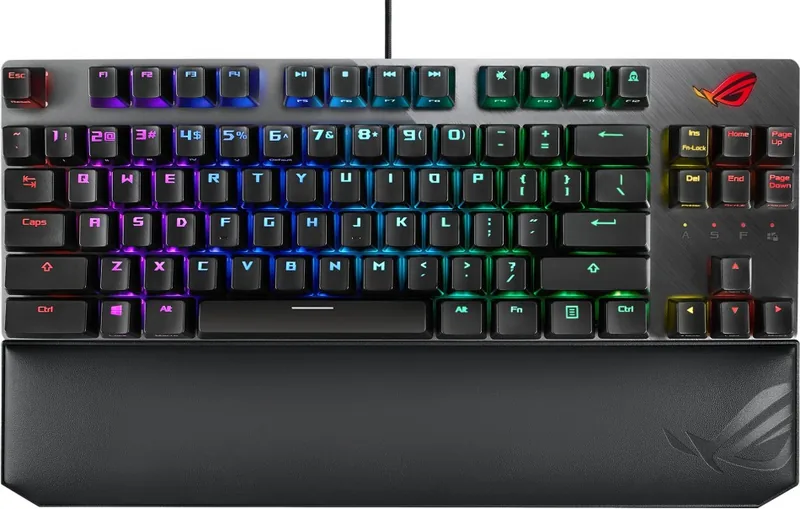
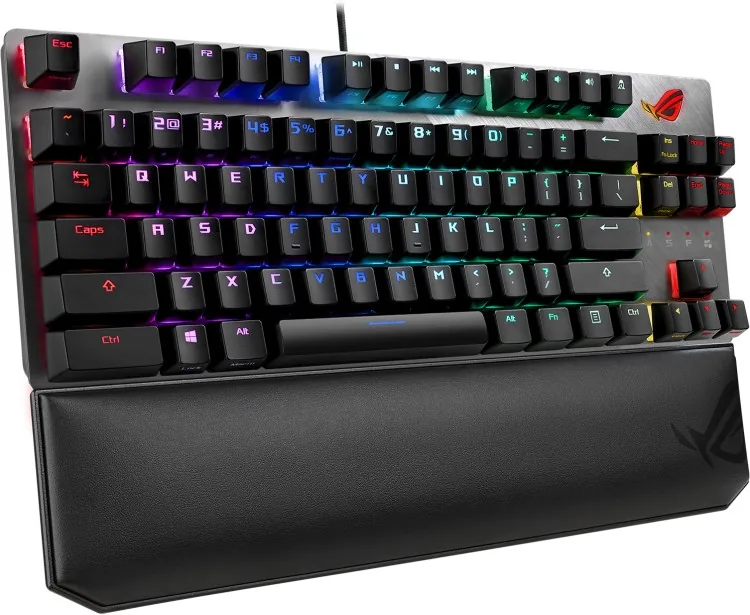
ASUS ROG Strix Scope NX TKL Deluxe — Stylish TKL Performance

The ASUS ROG Strix Scope NX TKL Deluxe in black/gray is a tenkeyless mechanical keyboard built for gamers and creators who want a compact layout without sacrificing premium features. Equipped with ROG NX RED linear switches, it delivers smooth, low-friction keystrokes and a responsive typing feel ideal for fast-paced gaming and long typing sessions. The USB Type-C wired connection ensures stable, low-latency performance and easy hot-plugging across systems.

Beyond core switches and build, the keyboard emphasizes customization. Users can install Armoury Crate software from ASUS to update firmware, remap keys, record macros on the fly, and configure RGB lighting profiles. The keyboard ships with a detachable USB Type-C cable and supports multiple lighting effects and profile slots for quick switching between setups. Dedicated function combinations allow brightness, media control, and profile toggles without opening software, while factory reset and macro recording are available via key combos.

The TKL form factor removes the numpad for a smaller desk footprint and better mouse ergonomics, while retaining crucial navigation and function keys. Lock indicator LEDs are customizable per profile and will display default colors when locks are active. Compliance and safety statements included by ASUS confirm regulatory approvals across regions; ASUS provides support and firmware downloads through its official website.

Design and build quality focus on durability and practicality: a sturdy chassis in black/gray finish complements RGB accents, and a standard US/DE key layout variant ensures regional compatibility. The keyboard includes features like on-the-fly macro recording (Fn + Left Alt to start/stop), profile switching (Fn + 1–6), lighting effect cycling, and multimedia toggles. When AURA Sync is enabled, some hotkeys tied to lighting will be managed by the lighting ecosystem.

Whether you want a compact competitive keyboard with linear switches or a customizable peripheral integrated into the ASUS RGB and software ecosystem, the ROG Strix Scope NX TKL Deluxe offers a balance of performance, customization, and compact ergonomics.

Notes

  • Armoury Crate is required for firmware updates and deep customization. Download at: https://www.asus.com/ROG-Republic-Of-Gamers/ROG-STRIX-SCOPE-TKL/HelpDesk_Download/
  • On-the-fly macros and profile switching work without software for quick setup.
  • Factory reset: hold Fn + Esc for 10–15 seconds.
M: OA-GPT-5-NAN

© Copyright 2026 Manual.ly