
ASUS PCE-C2500 Manual
PDF manual · 4 Pages
English


Quick check
Incorrect answer, please try again.
Chat with your ASUS PCE-C2500 manual using AI
Get instant AI answers from your ASUS PCE-C2500 manual
Ask anything about the ASUS PCE-C2500. Answers come from this manual, with the pages they are based on.
Ask a Question
Do you recommend PCE-C2500?
Yes NoFrequently Asked Questions
The adapter supports auto-negotiation for 2.5G, 1G and 100M Ethernet, allowing devices and switches to connect at the highest mutually supported rate.
Is this answer helpful?
Install the PCE-C2500 into any available PCIe x1 slot. It is compatible with PCIe 2.0 x1 and will function in larger PCIe slots (x4/x8/x16) that provide physical clearance.
Is this answer helpful?
Use Cat5e or Cat6 cabling for many short to medium runs to achieve 2.5G. For longer runs or best margin, Cat6A is recommended to minimize signal loss.
Is this answer helpful?
Download drivers and firmware from the ASUS PCE-C2500 support page (HelpDesk_Download). Regional hotline numbers and global support info are provided by ASUS if you need assistance.
Is this answer helpful?
Yes. Operate the adapter in ambient temperatures between 0°C and 40°C, avoid exposure to liquids, ensure proper chassis ventilation, and follow the safety notes in ASUS documentation.
Is this answer helpful?
Not automatically. Both the connected switch or peer device and the cabling must support 2.5G. If either endpoint or the switch is limited to 1G, the connection will negotiate down accordingly.
Is this answer helpful?
The adapter uses a Speed LED and Link/ACT LED: green indicates 2.5G (blinking shows activity), yellow indicates 1G/100M, and off/green states indicate no traffic or link presence per ASUS LED conventions.
Is this answer helpful?
Advantages and Disadvantages
Advantages

- 2.5G speed boosts transfer rates over standard Gigabit without requiring 10G infrastructure.
- Simple PCIe 2.0 x1 form factor for easy installation in most desktops.
- RJ-45 port supports Cat5E/Cat6/Cat6A—no specialized cabling required in many homes.
- Clear LED indicators for speed and activity make diagnostics quick.
- ASUS regulatory compliance and global support resources ensure reliability and assistance.
Disadvantages

- Limited to PCIe 2.0 x1 bandwidth ceiling on some older motherboards.
- Does not replace need for 2.5G-capable switch or peer to realize full speed.
- No external antenna or Wi‑Fi capability—wired only.
- Performance depends on cable quality and distance; long runs may degrade speed.
- Driver installation required after hardware fit; may need manual download.
Product Specification
Type
LAN Adapter
Form Factor
1x PCIe Card (full height bracket)
Interface
1x PCIe 2.0 x1
Port
1x RJ-45
Transmission
1x RJ-45 (100/1000/2.5GBase-T)
Power Supply
Power supply only via interface
Chipset
Realtek (LAN adapter, RJ-45)
Dimensions
4.76x3.31x0.87 in (WxHxD)
Weight
0.09 lb
Compatibility
universal
Product Description
ASUS PCE-C2500 LAN adapter, RJ-45, PCIe 2.0 x1 Manual
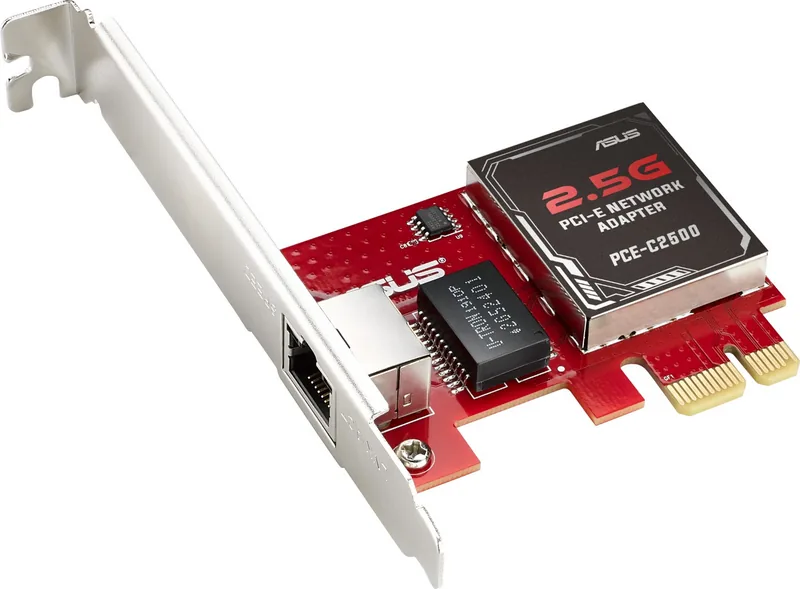
The ASUS PCE-C2500 is a compact PCIe 2.0 x1 network adapter designed to bring multi-gigabit wired connectivity to desktop systems. Supporting 2.5G, 1G and 100M auto-negotiation, this RJ-45 equipped card is aimed at users who need faster-than-gigabit LAN for smoother file transfers, low-latency gaming, and improved streaming across modern home and small office networks. Installation is straightforward: power down the PC, insert the card into an available PCIe x1 slot, secure the chassis, then download and install the official drivers from ASUS.
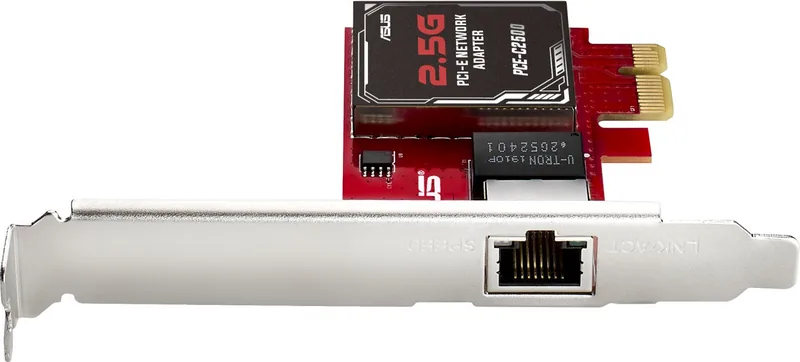
Performance-wise, the PCE-C2500 fills the gap between standard Gigabit Ethernet and more expensive 10G solutions. With a 2.5G link it leverages existing Cat5e/Cat6 cabling in many installs, providing a meaningful bandwidth uplift without rewiring. LED indicators on the bracket clearly show link speed and activity—green for 2.5G, yellow for 1G/100M, and blinking activity feedback—so you can quickly verify connection status.
Beyond performance, ASUS includes safety and regulatory compliance info, environmental guidance, and global support contacts in multiple languages. The card meets common regulatory standards (CE, FCC) and includes instructions to use Cat5E/Cat6/Cat6A cables, driver download links, operating temperature guidance (0–40°C), and basic precautions to avoid damage and interference.
For builders and upgraders the PCE-C2500 is a practical, cost-effective way to modernize older desktops for demanding network tasks—cloud backups, large media transfers, NAS access, and multiplayer gaming—without replacing motherboards or investing in expensive switches. It’s also a good fit for mixed-speed networks where some devices still run at 1G but others can take advantage of 2.5G throughput.
Notes
- Drivers and firmware are available from the ASUS support site (HelpDesk_Download). Install drivers after physically fitting the card for optimal compatibility.
- Use Cat5E or higher cabling to achieve 2.5G speeds; Cat6A provides the best margin for longer runs.
- Keep the system temperature within 0–40°C and do not block chassis ventilation.
- Check regional recycling information at ASUS recycling pages and follow local disposal regulations.
Search for 67,732 Manuals online


Type-in Brand or Model