
ASUS A68HM-K Manual
PDF manual · 47 Pages
English


Quick check
Incorrect answer, please try again.
Chat with your ASUS A68HM-K manual using AI
Get instant AI answers from your ASUS A68HM-K manual
Ask anything about the ASUS A68HM-K. Answers come from this manual, with the pages they are based on.
Ask a Question
Do you recommend A68HM-K?
Yes NoFrequently Asked Questions
It supports AMD FM2+ APUs, including AMD A-Series and Athlon processors. You should always match the processor to ASUS compatibility guidance for the motherboard.
Is this answer helpful?
The motherboard supports up to 32GB of DDR3 memory across two DIMM slots. For best stability, use compatible unbuffered non-ECC modules that match the board’s requirements.
Is this answer helpful?
Yes. It uses a dual-channel memory architecture, which can help improve bandwidth and responsiveness when matching modules are installed correctly.
Is this answer helpful?
Yes, if you install a compatible AMD APU with integrated graphics. The board provides DVI-D and D-Sub outputs for display connection.
Is this answer helpful?
It includes EZ Flash 2, EZ Update, CrashFree BIOS 3, and BIOS Updater support. These tools help update or recover BIOS settings with less risk.
Is this answer helpful?
Yes. Its SATA controller supports RAID 0, RAID 1, RAID 10, and JBOD, giving you flexibility for performance or data redundancy.
Is this answer helpful?
Try clearing the CMOS using the CLRTC header and then load default BIOS settings. This often restores stable startup after incorrect configuration changes.
Is this answer helpful?
Advantages and Disadvantages
Advantages

- FM2+ support makes it compatible with AMD A-Series and Athlon processors for affordable builds.
- Dual DDR3 slots support up to 32GB, giving enough memory headroom for everyday multitasking.
- Built-in DVI-D, D-Sub, Gigabit LAN, and USB 3.0 provide practical connectivity in a compact layout.
- ASUS BIOS tools and recovery options simplify updates, troubleshooting, and basic system tuning.
Disadvantages

- Only two memory slots limit expansion compared with larger boards.
- No built-in Wi‑Fi or advanced storage extras, so wireless and premium features require add-ons.
- PCIe slot selection is modest, which may restrict future upgrade flexibility.
- USB 3.0 support depends on OS drivers, so older setups may not use it as smoothly.
Product Specification
Form Factor
µATX
Socket
AMD FM2+
Chipset
AMD A68H
RAM
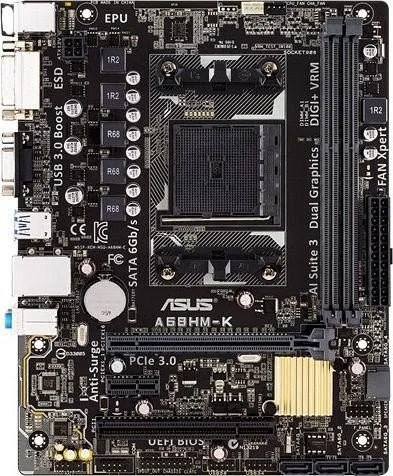
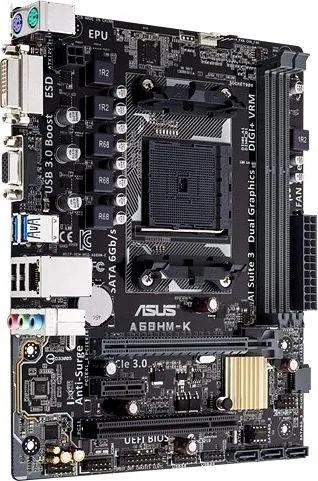
2x DDR3 DIMM, dual PC3-19200U/DDR3-2400 (OC), max. 32GB (UDIMM)
Expansion Slots
1x PCIe 3.0 x16, 1x PCIe 2.0 x1, 1x PCI
External Connectors
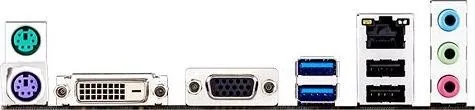
1x VGA (iGPU), 1x DVI (iGPU), 2x USB-A 3.0, 2x USB-A 2.0 (480Mb/s), 1x Gb LAN (Realtek RTL8111GR), 3x Audio Jack, 1x PS/2 Keyboard, 1x PS/2 Mouse
Internal Connectors
2x USB 2.0 Header (480Mb/s, 4x USB 2.0), 4x SATA 6Gb/s (A68H), 1x serial, 1x TPM Header
Cooling Header
1x CPU Fan 4-Pin, 1x Fan 4-Pin
Lighting Header
N/A
Audio
7.1 (Realtek ALC887)
Graphics
iGPU
Wireless
N/A
RAID Level
0/1/10 (A68H)
Multi-GPU
N/A
Power Connectors
1x 24-Pin ATX, 1x 4-Pin ATX12V
Lighting
N/A
Special Features
All solid capacitors
Manufacturer Warranty
three years (processing via retailer)
USB Naming Convention
Link
Product Description
ASUS A68HM-K: A Compact Foundation for Everyday PC Builds
The ASUS A68HM-K is a practical micro-ATX motherboard built for users who want a dependable platform without unnecessary complexity. Designed around the AMD FM2+ socket and A68H chipset, it supports AMD A-Series and Athlon processors, making it a solid choice for budget-friendly desktops, office systems, and modest home setups. If you are looking for guidance, the ASUS A68HM-K Manual highlights the board’s focus on straightforward installation, essential connectivity, and stable day-to-day operation.
Balanced features for core computing
This motherboard offers two DDR3 DIMM slots with support for up to 32GB of memory, giving users enough flexibility for multitasking, media playback, and general productivity. Dual-channel support helps improve responsiveness, while compatibility with a range of DDR3 speeds gives builders room to match their memory to the system’s needs. The manual also notes important memory guidelines, which is helpful for avoiding stability issues during assembly.
Graphics, storage, and expansion
For display output, the board includes DVI-D and D-Sub connections, which makes it convenient for both modern monitors and older screens. Integrated AMD Radeon graphics support on compatible APUs keeps the build simple for users who do not need a separate graphics card. Storage is handled by four SATA 6Gb/s ports with RAID support, including RAID 0, RAID 1, RAID 10, and JBOD, so the board can suit both basic and slightly more advanced storage setups.
Connectivity and usability
The A68HM-K also covers the essentials in networking, sound, and USB support. Gigabit LAN, USB 3.0 ports, multiple USB 2.0 connectors, and 7.1-channel audio support make it versatile for a compact system. ASUS adds value with UEFI BIOS tools, EZ Flash, CrashFree BIOS recovery, and helpful tuning utilities. These features make setup, maintenance, and updates more manageable even for users who are not deeply technical.
Notes
- Use an FM2+ compatible APU for proper installation.
- Follow the board’s memory and power recommendations for stability.
- Clear CMOS only when needed, especially after failed boot settings.
- The BIOS tools are useful for updates, recovery, and basic tuning.
Overall, the ASUS A68HM-K is best seen as a reliable, no-frills motherboard that focuses on compatibility, practical expansion, and easy ownership. It is especially appealing for builders who want a stable AMD-based system with useful onboard features and clear setup support.
Search for 67,706 Manuals online


Type-in Brand or Model
Valerie Bechtelar
8 months ago
Does the Asus A68HM-K keep power on the USB ports during standby/energy-saving mode or when the PC is fully off, and can USB power to connected devices be disabled?
Manual.ly
8 months ago
The USB power behavior depends on BIOS/UEFI settings. On boards like this, you typically find options under Advanced or Power Management such as "USB power in S4/S5" or "ErP/EuP" and settings related to USB wake-up. If you want attached devices to be unpowered in standby or when the system is off, enable the energy-saving mode (often labeled ErP/EuP) and disable any USB wake-up/USB power-on during sleep states. If the exact toggle is not present in your BIOS version, the practical workaround is to unplug USB devices when not needed or use a switched USB power hub. Also note: some variants do not provide an onboard USB 3.0 header, so you may need an adapter/card for USB 3.0.