
ASRock X299 Refresh Manual
PDF manual · 112 Pages
English



Quick check
Incorrect answer, please try again.
Chat with your ASRock X299 Refresh manual using AI
Get instant AI answers from your ASRock X299 Refresh manual
Ask anything about the ASRock X299 Refresh. Answers come from this manual, with the pages they are based on.
Ask a Question
Do you recommend X299 Refresh?
Yes NoFrequently Asked Questions
Yes, it supports both NVIDIA SLI and AMD CrossFire technologies for dual or triple GPU setups depending on CPU PCIe lane availability.
Is this answer helpful?
The board supports up to 256GB of DDR4 RAM across eight DIMM slots using Quad Channel technology.
Is this answer helpful?
Yes, it features Thunderbolt 3 controllers allowing for up to 40Gbps data transfer and high-resolution display output.
Is this answer helpful?
It is designed to run Microsoft Windows 10 64-bit and supports UEFI boot modes for modern functionality.
Is this answer helpful?
Yes, it includes a dual BIOS system with Secure Backup UEFI technology to protect against firmware corruption.
Is this answer helpful?
There are multiple Ultra M.2 sockets supporting both SATA and PCIe NVMe modules for fast storage expansion.
Is this answer helpful?
Yes, the UEFI Setup Utility and software utilities like A-Tuning provide extensive overclocking controls.
Is this answer helpful?
Advantages and Disadvantages
Advantages

- Quad-channel DDR4 memory support with 8 slots allows for massive capacity up to 256GB.
- Features dual 10G Lan ports including AQUANTIA for high-speed wired networking capabilities.
- Integrated WiFi 802.11ax module provides excellent wireless speeds and Bluetooth 5.0 support.
- Thunderbolt 3 interface supports 40Gbps transfer speeds and multi-monitor display daisy-chaining.
- Dual BIOS technology ensures system stability with secure backup if main firmware becomes corrupted.
Disadvantages

- Requires a robust CPU cooler as the platform generates significant heat under high loads and overclocking.
- Large ATX form factor may not fit into smaller chassis cases without proper measurement verification.
- High power consumption necessitates a quality power supply unit to ensure stable system operation.
- Multiple M.2 slots may disable PCIe lanes requiring careful planning of graphics card configurations.
- Complex BIOS settings might overwhelm entry-level users unfamiliar with advanced motherboard customization.
Product Specification
Form Factor
ATX
Socket
Intel 2066
Chipset
Intel X299 (Platform "Glacier Falls")
RAM
8x DDR4 DIMM, quad PC4-33600U/DDR4-4200 (OC), Max. 256GB (UDIMM)
Cooling Headers
1x CPU Fan 4-Pin, 1x CPU Fan/Pump 4-Pin, 5x Fan/Pump 4-Pin
Lighting Headers
2x 4-Pin RGB (+12V/G/R/B, Max. 3A), 2x 3-Pin ARGB (+5V/DATA/GND, Max. 3A)
Buttons/Switches
Power-Button (Internal), Reset-Button (Internal), Clear-CMOS-Button (External)
RAID Level
0/1/5/10 (X299)
Multi-GPU
NVIDIA 3-Way-SLI (x16/x16, x16/x16/x8), AMD 3-Way-CrossFireX (x16/x16, x16/x16/x8)
Power Connectors
1x 24-Pin ATX, 2x 8-Pin EPS12V
USB Header
Link
Product Description
Exploring the ASRock X299 Creator Series
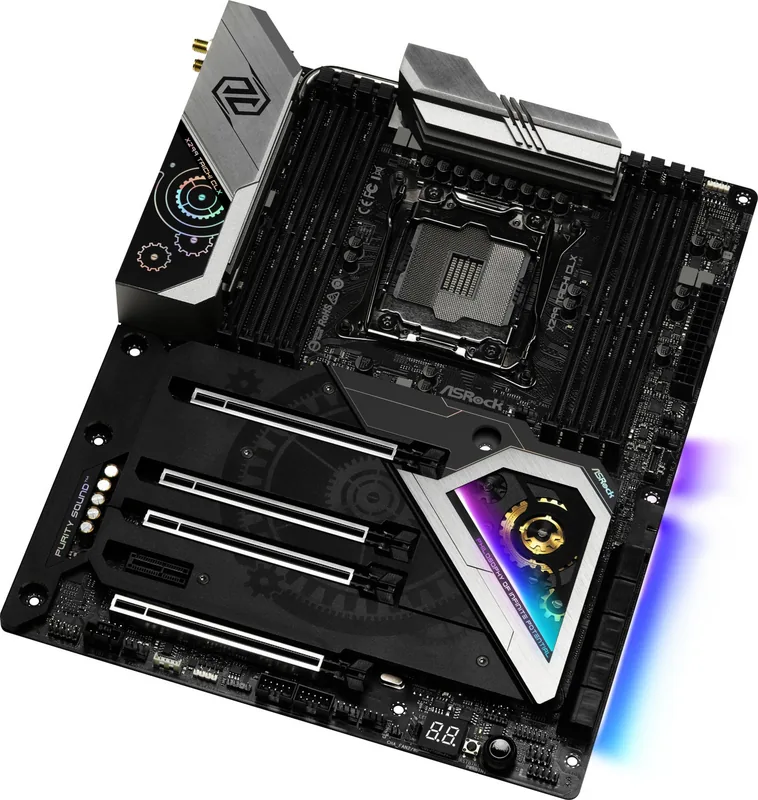
The ASRock X299 (Refresh) establishes a new benchmark for enthusiast computing, combining raw performance with advanced stability features. When users seek detailed technical guidance, a comprehensive ASRock X299 (Refresh) Manual is essential for optimizing system settings and ensuring hardware longevity. This platform is built on the Intel X299 chipset, supporting the LGA 2066 socket for powerful Core X-Series processors. It supports advanced cooling solutions to maintain peak efficiency.
Robust Memory and Power Architecture
Central to this platform is the Quad Channel DDR4 memory architecture supporting eight DIMM slots. This configuration allows for a total capacity of 256GB, perfect for demanding productivity workflows. The motherboard utilizes a 13-phase digital power design to maintain voltage stability under load. Intel Extreme Memory Profile support ensures users can easily enable memory overclocking profiles for enhanced speeds exceeding standard JEDEC limits without manual tweaking. The board features an 8-layer PCB design for improved signal integrity and heat dissipation.
Superior Connectivity and Networking
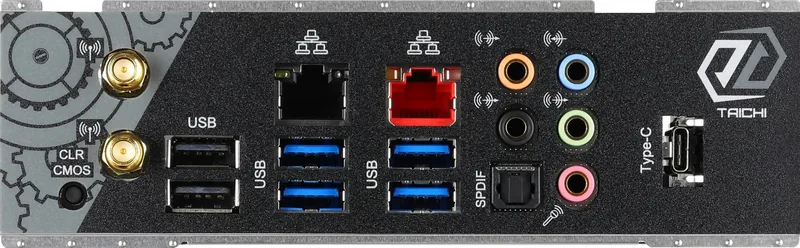
Networking flexibility is a key highlight, featuring dual LAN ports. One is a 10 Gigabit AQUANTIA port, while the other is Intel Gigabit, catering to varied bandwidth needs. Wireless connectivity is integrated directly onto the rear I/O panel with a WiFi 802.11ax module, supporting high-speed links up to 2.4Gbps. Additionally, the board includes a Thunderbolt 3 controller capable of 40Gbps transfer rates, enabling connections to external storage docks and 5K displays. USB 3.2 Gen2 connectors are also included, offering further peripheral connectivity options.
Comprehensive Storage and Expansion
Storage solutions include multiple M.2 sockets designed for NVMe SSDs, providing Gen3 x4 speeds for rapid data access. Users can configure various RAID types including PCIe RAID for enhanced data redundancy or speed. NVMe SSDs provide superior read and write speeds compared to traditional SATA drives. The PCIe slot layout supports multi-GPU setups, allowing for SLI or CrossFire technologies with specific CPU models. Proper cable management is recommended to handle the multiple fan connectors and headers available.
System Control and Maintenance
The UEFI BIOS offers extensive configuration options through a graphical interface with Dual BIOS protection. This redundancy allows the system to boot from a backup chip if the primary firmware fails. Software utilities like A-Tuning simplify overclocking tasks, while Polychrome SYNC manages RGB lighting effects from a single location. Hardware monitoring tracks temperatures and voltages, enabling proactive thermal management for sustained performance. Users can customize fan curves based on real-time temperature data provided by onboard sensors.
Important Installation Notes
During assembly, handle components by edges to avoid static damage. Ensure all power connectors are securely attached to prevent system instability. Always update the BIOS to the latest version for improved hardware compatibility and security patches. Always refer to safety guidelines to protect the motherboard components from electrical discharge.
Search for 67,706 Manuals online


Type-in Brand or Model