
ASRock Rack W680D4U-2L2T/G5 Manual
PDF manual · 121 Pages
English



Quick check
Incorrect answer, please try again.
Chat with your ASRock Rack W680D4U-2L2T/G5 manual using AI
Get instant AI answers from your ASRock Rack W680D4U-2L2T/G5 manual
Ask anything about the ASRock Rack W680D4U-2L2T/G5. Answers come from this manual, with the pages they are based on.
Ask a Question
Do you recommend Rack W680D4U-2L2T/G5?
Yes NoFrequently Asked Questions
This motherboard supports 12th and 13th Gen Intel Core series processors on the LGA 1700 socket. It also supports 12th Gen Pentium and Celeron models depending on specific BIOS version and chipset capabilities.
Is this answer helpful?
Yes, the W680 variants support DDR5 288-pin ECC or non-ECC UDIMMs. This ensures data redundancy and system stability for critical enterprise workloads and servers.
Is this answer helpful?
The board includes two RJ45 10GbE ports and two RJ45 1GbE ports. There is also a dedicated IPMI LAN port for remote server management via the BMC.
Is this answer helpful?
Yes, it features an ASPEED AST2600 BMC controller with iKVM and vMedia support for IPMI remote control, allowing administrators to manage the system remotely.
Is this answer helpful?
You can use ASRock Rack Instant Flash utility embedded in the Flash ROM. This allows updates directly from within the UEFI environment without needing an operating system first.
Is this answer helpful?
The system supports up to 128GB of DDR5 memory. This is achieved by utilizing all four DIMM slots with 32GB modules installed in each bank.
Is this answer helpful?
Advantages and Disadvantages
Advantages

- Dedicated BMC with full IPMI remote control access for out of band management
- Dual 10GbE ports alongside two Gigabit Ethernet connections for network flexibility
- DDR5 memory support with ECC options for enhanced data reliability
- Multiple M.2 slots and OCuLink interfaces for high-speed storage expansion
- Intel W680 chipset ensures top-tier performance for professional servers
Disadvantages

- Restricted to 12th and 13th Gen Intel Core processors only
- Micro-ATX form factor limits expansion slots compared to standard ATX
- Complex UEFI setup may require technical knowledge for overclocking
- OCuLink lanes share with PCIe slots reducing total bandwidth availability
- Requires specific memory compatibility for dual channel functionality
Product Specification
Form Factor
Micro ATX
Socket
Intel 1700
Chipset
Intel W680
CPU Compatibility
Core i-14000, Core i-13000, Core i-12000, Pentium Gold G7000, Celeron G6000
RAM
4x DDR5 DIMM, dual-channel PC5-35200U/DDR5-4400, max. 128GB (UDIMM)
Expansion Slots
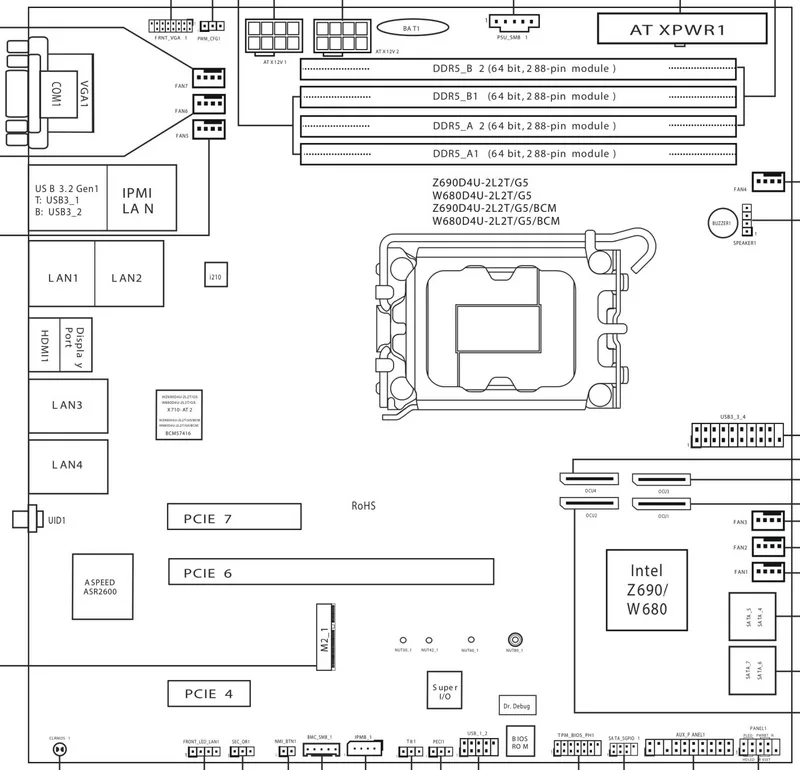
1x PCIe 5.0 x16, 1x PCIe 4.0 x4, 1x PCIe 3.0 x1, 1x M.2 M-Key (PCIe 3.0 x4, 2280/2260/2242/2230), 3x OCuLink SFF-8611 (PCIe 4.0 x4), 1x OCuLink SFF-8611 (PCIe 4.0 x4/SATA)
External Ports
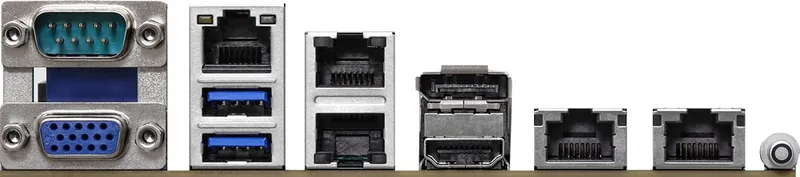
1x VGA (AST2600), 1x HDMI 2.0b (iGPU), 1x DisplayPort 1.4a (iGPU), 2x USB-A 3.0 (5Gb/s), 2x 10GBase-T (Intel X710-AT2), 2x Gb LAN (Intel I210-AT), 1x Serial, 1x Management Port (RJ-45)
Internal Headers
1x USB 3.0 Header (5Gb/s, 2x USB 3.0), 1x USB 2.0 Header (480Mb/s, 2x USB 2.0), 4x SATA 6Gb/s (W680), 4x SATA 6Gb/s (via OCuLink SFF-8611, W680), 1x TPM-Header, 1x Speaker-Header, 1x Chassis Intrusion-Header, 1x BMC-Header, 1x IPMB-Header, 1x VGA-Header, 1x SMBus-Header, 1x PMBus-Header, 1x NMI-Header, 1x SGPIO-Header, 1x Speaker
Cooling Headers
7x Fan 4-Pin, 1x Thermal-Sensor
Lighting Headers
N/A
Buttons/Switches
UID-Button (External)
Audio
N/A
Graphics
ASPEED AST2600 - Onboard
Wireless
N/A
RAID Levels
0/1/5/10 (W680)
Multi-GPU
N/A
Power Connectors
1x 24-Pin ATX, 2x 8-Pin EPS12V
Lighting
N/A
BIOS
1x 32MB (256Mb)
Features
All solid capacitors, Diagnostic LED (Segment Display), IPMI 2.0, ECC Support, Remote management with compatible CPU (Intel vPro), Onboard TPM 2.0 Support
USB Labeling
Link
Product Description
ASRock Rack W680D4U-2L2T/G5 Server Motherboard Overview
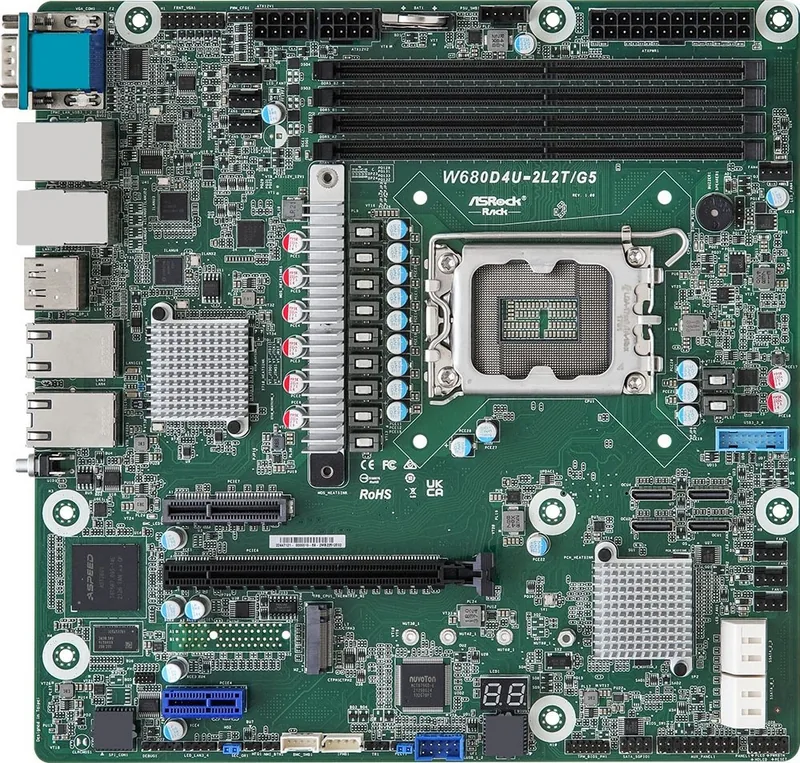
This robust server motherboard delivers high performance designed for demanding enterprise workloads efficiently. The ASRock Rack W680D4U-2L2T/G5 supports the latest Intel processors on the LGA 1700 platform with optimal stability. It features comprehensive server management capabilities including a dedicated BMC with full IPMI remote control access for out of band management. Users can expect reliability during prolonged operation thanks to rigorous quality control measures implemented during manufacturing processes. The board utilizes the Intel W680 chipset to ensure top-tier performance for professional servers.
Connectivity and Expansion Features
Network speeds are significantly boosted with dual 10GbE ports alongside two Gigabit Ethernet connections included for flexibility. Storage expansion is made versatile via multiple SATA connectors and high-speed M.2 slots supporting various standard form factors for solid state drives. OCuLink interfaces provide additional flexibility for connecting high-throughput storage devices directly to the chipset. The micro-ATX form factor ensures compatibility with standard server cases and racks while maintaining a compact physical footprint for better airflow. USB connectivity options include high-speed Type-A ports and internal headers for easy front panel integration.
Memory and Performance Capabilities
DDR5 memory support ensures fast data access speeds with ECC options for enhanced data reliability critical for business applications. Up to 128GB capacity is achievable across four DIMM slots depending on specific module configuration used within the system. Overclocking features within the advanced UEFI BIOS allow fine-tuning for specific application performance needs and testing stability. Power management features help maintain overall efficiency during peak usage times and light loads to reduce energy consumption effectively. Voltage regulation ensures consistent power delivery to all major components under heavy computational loads.
Support and Maintenance Resources
The ASRock Rack W680D4U-2L2T/G5 Manual guides users through detailed installation and configuration steps effectively for new builds. Troubleshooting tools like Dr.Debug assist in identifying hardware issues quickly and accurately during power on self test sequences. Drivers and firmware updates ensure ongoing compatibility with evolving software environments and modern operating systems for extended product life. Technical support channels remain open for professional assistance when needed for complex enterprise deployments needing expert knowledge. Firmware flashing utilities allow for easy BIOS updates directly from the boot screen without needing external media.
Installation Notes: Always check official compatibility lists before installing memory modules to ensure correct function. Ensure proper grounding during assembly to prevent static discharge damage to sensitive electronic circuits. Verify BIOS version ensures you have the latest patches available for your specific hardware setup before deployment.
Search for 67,706 Manuals online


Type-in Brand or Model