
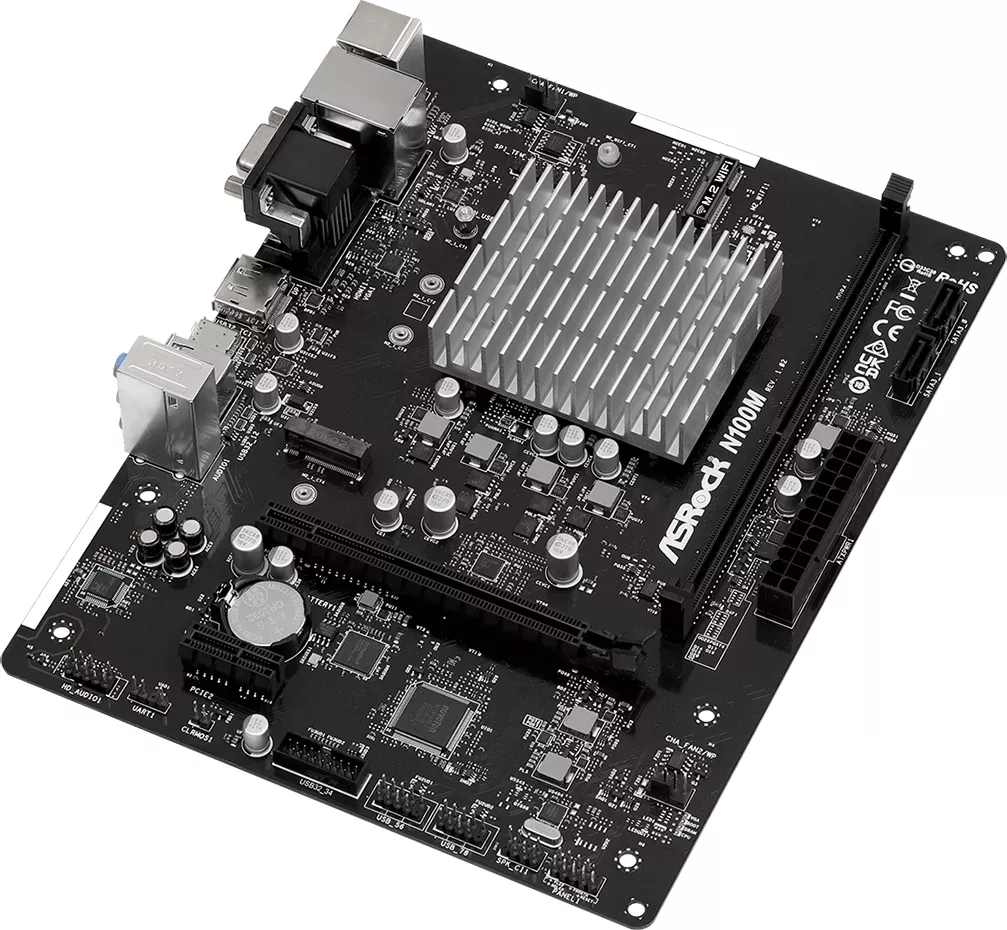
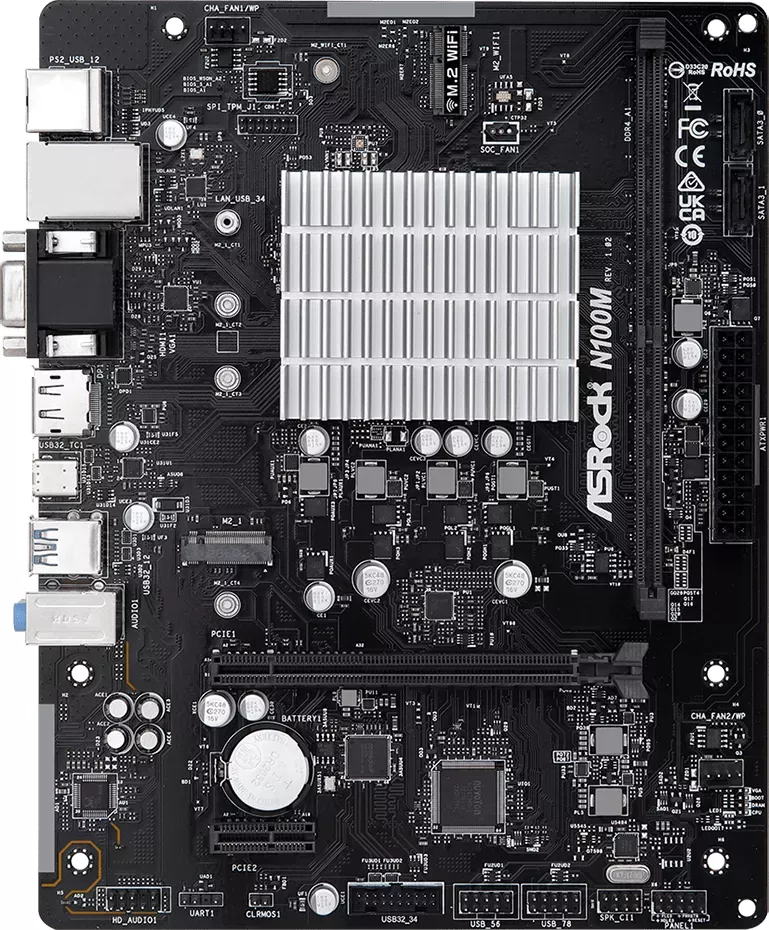
ASRock N100M Manual
PDF manual · 42 Pages
English



Quick check
Incorrect answer, please try again.
Chat with your ASRock N100M manual using AI
Get instant AI answers from your ASRock N100M manual
Ask anything about the ASRock N100M. Answers come from this manual, with the pages they are based on.
Ask a Question
Do you recommend N100M?
Yes No
Hans_G55
8 months ago
I want to build a NAS. Does this motherboard have enough SATA ports for multiple hard drives, or will I need extra controllers?

Manual.ly
7 months ago
This board features only two native SATA ports. If you require more drive connections for your NAS setup, you can install a PCIe SATA expansion card as noted by several users. The N100 chip provides low power consumption and sufficient performance for server tasks. Ensure Trusted Computing is disabled in BIOS for optimal compatibility with Linux-based OSs like IPFire or Proxmox.
Stefan Muller
6 months ago
I plan to build an Unraid NAS with more than 2 drives. Are there specific BIOS settings required for stability?
Manual.ly
6 months ago
To ensure stability with Unraid or similar Linux distributions, we recommend disabling Trusted Computing in the BIOS before installation. The board features two native SATA ports. For additional storage, you can install a PCIe SATA expansion card. Many users report success expanding their storage without issues while maintaining the low power consumption ideal for a 24/7 server.
kyler89
4 months ago
Is this motherboard reliable for a low-power Linux NAS or home server, and can I add more drives?
Manual.ly
4 months ago
It is widely reported to work well with Linux, Proxmox, IPFire, and NAS setups, offering very low power consumption and sufficient performance for VMs, Docker containers, streaming, and everyday tasks. It has only two native SATA ports, so a PCIe SATA controller is recommended for additional drives. Note that some users have experienced instability with Unraid, while others report successful Unraid operation. For IPFire installation, disabling Trusted Computing in the BIOS may be necessary.
Frequently Asked Questions
The board includes an integrated Intel Quad-Core Processor N100. It supports Intel Turbo Boost Technology and can reach speeds of up to 3.4 GHz. Because the processor is built into the motherboard, buyers do not need to select or install a separate CPU.
Is this answer helpful?
The ASRock N100M has one DDR4 DIMM slot and supports up to 32 GB of unbuffered DDR4 non-ECC memory at up to 3200 speed. Verify the memory compatibility list before purchasing a module for the best chance of stable operation.
Is this answer helpful?
The rear panel provides HDMI 2.1, DisplayPort 1.4, and D-Sub outputs. HDMI and DisplayPort support up to 4K resolution at 60 Hz, while D-Sub supports Full HD resolution at 60 Hz for compatibility with older displays.
Is this answer helpful?
The board supports one M.2 Key M NVMe SSD in 2242, 2260, or 2280 sizes through PCIe Gen3 x2 mode. It also includes two SATA III connectors for SATA SSDs, hard drives, or compatible optical drives.
Is this answer helpful?
Yes. The ASRock N100M includes a PCIe 3.0 x16 physical slot that operates in x2 mode, plus a PCIe 3.0 x1 slot. A graphics card can be installed, but the reduced x2 electrical connection may limit performance for bandwidth-heavy cards.
Is this answer helpful?
It has an M.2 Key E slot for a Type 2230 Intel CNVi wireless and Bluetooth module. This slot does not support ordinary M.2 PCIe wireless modules, so confirm that any selected adapter is specifically compatible with Intel CNVi.
Is this answer helpful?
Advantages and Disadvantages
Advantages

- Integrated Intel N100 quad-core processor supports efficient, compact PC builds without a separate CPU.
- HDMI 2.1 and DisplayPort 1.4 support up to 4K at 60 Hz, with D-Sub available for legacy displays.
- M.2 NVMe storage support plus two SATA III ports offers flexible boot and data-drive configurations.
- USB 3.2 Gen2 Type-C, Gigabit LAN, front USB headers, and 7.1-channel audio cover common connectivity needs.
- Post Status Checker LEDs help identify CPU, memory, graphics, and boot issues during startup.
Disadvantages

- Only one DDR4 DIMM slot is available, limiting memory upgrades and eliminating dual-channel configurations.
- The PCIe 3.0 x16 physical slot operates in x2 mode, restricting bandwidth for demanding expansion cards.
- The M.2 Key E wireless slot supports Intel CNVi modules only, not standard M.2 PCIe Wi-Fi adapters.
- Integrated graphics and low-power processor are not intended for intensive gaming or professional rendering.
- M.2 NVMe storage is limited to PCIe Gen3 x2 bandwidth rather than faster x4 connectivity.
Product Specification
Form Factor
Micro ATX
CPU
Intel N100, 0C+4c/4T, 0.80-3.40 GHz, 6 MB+2 MB Cache, 6 W TDP, Codename "Alder Lake-N" (Gracemont, Intel 7)
Chipset
System-on-Chip (SoC)
RAM
1x DDR4 DIMM, PC4-25600U/DDR4-3200, max. 32 GB (UDIMM)
Expansion Slots
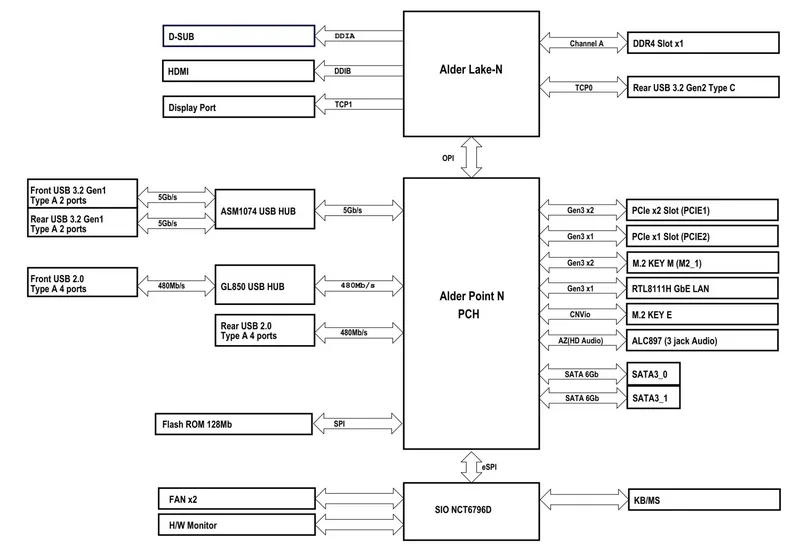
1x PCIe 3.0 x16 (x2), 1x PCIe 3.0 x1, 1x M.2/M-Key (PCIe 3.0 x2, 2280/2260/2242), 1x M.2/E-Key (PCIe/Intel CNVi, 2230)
External Connections
1x VGA (iGPU), 1x HDMI 2.1 (iGPU), 1x DisplayPort 1.4 (iGPU), 1x USB-C 3.1 (10 Gb/s), 2x USB-A 3.0 (5 Gb/s), 4x USB-A 2.0 (480 Mb/s), 1x Gb LAN (Realtek RTL8111H), 3x audio jack, 1x PS/2 combo
Internal Connections
1x USB 3.0 header (5 Gb/s, 2x USB 3.0), 2x USB 2.0 headers (480 Mb/s, 4x USB 2.0), 2x SATA 6 Gb/s (SoC), 1x TPM header, 1x speaker header, 1x chassis intrusion header
Cooling Headers
1x 4-pin CPU fan/pump, 1x 4-pin fan/pump
Lighting Headers
N/A
Buttons/Switches
N/A
Audio
7.1 (Realtek ALC887)
Graphics
Intel UHD Graphics (iGPU), 24 EU/192 SP, 0.75 GHz, "Gen 12.2" architecture (Alder Lake GT1)
Wireless
N/A
RAID Levels
N/A
Multi-GPU
N/A
Power Connections
1x 24-pin ATX
VRM
3 virtual phases (2+1)
Lighting
N/A
BIOS
1x 16 MB (128 Mb)
Special Features
Audio-grade solid capacitors, diagnostic LED (LED indicators), passively cooled
USB Naming
Link
Product Description
ASRock N100M - Read, Download & Print Free
The ASRock N100M is a compact Micro-ATX motherboard designed for practical, energy-conscious desktop builds. Powered by an integrated Intel Quad-Core Processor N100 with boost speeds up to 3.4 GHz, it provides a balanced foundation for home PCs, office systems, media stations, light server tasks, and compact everyday machines. Its solid capacitor design and straightforward layout support dependable operation while keeping system assembly approachable.
Compact Platform with Modern Essentials
Despite its space-saving Micro-ATX format, the ASRock N100M includes useful expansion and connectivity options. It supports up to 32 GB of unbuffered DDR4 non-ECC memory through one DDR4 DIMM slot, allowing builders to tailor capacity for ordinary productivity, multitasking, and media use. Storage can be configured with an M.2 Key M slot for PCIe Gen3 x2 NVMe SSDs and two SATA III ports for additional SSDs or hard drives.
Integrated Intel UHD Graphics provide flexible display support without requiring a dedicated graphics card. HDMI 2.1, DisplayPort 1.4, and D-Sub outputs allow compatibility with modern monitors, legacy displays, and multi-display workspaces. HDMI and DisplayPort can deliver resolutions up to 4K at 60 Hz, making the board a practical option for clear desktop visuals and high-resolution media playback.
Connectivity for Everyday Builds
The rear I/O selection includes a USB 3.2 Gen2 Type-C port with up to 10 Gb/s bandwidth, two USB 3.2 Gen1 Type-A ports, four USB 2.0 ports, Gigabit LAN, PS/2 support, and three analog audio jacks. Internal headers expand connectivity further with front USB 3.2 Gen1, four front USB 2.0 ports, front-panel audio, two chassis or water-pump fan headers, and an SPI TPM header.
For expansion, the board provides one PCIe 3.0 x16 physical slot operating in x2 mode and one PCIe 3.0 x1 slot. A dedicated M.2 Key E socket supports Intel CNVi wireless and Bluetooth modules in the 2230 format. The onboard Post Status Checker adds useful diagnostic feedback by indicating CPU, memory, graphics, or boot-device issues during startup.
A Sensible Choice for Efficient Systems
ASRock N100M - Read, Download & Print Free highlights a feature set focused on compact efficiency rather than high-end gaming or heavy workstation workloads. With UEFI BIOS support, Windows 10 and Windows 11 64-bit compatibility, 7.1-channel HD audio, and varied storage and display connections, it offers a versatile starting point for quiet and capable daily-use computers.
Notes
- The processor is integrated, so no separate CPU installation is required.
- The PCIe x16 physical slot operates with x2 lanes.
- The wireless M.2 socket supports Intel CNVi modules, not standard M.2 PCIe wireless cards.
- Check compatible memory and SSD lists before choosing components.
Search for 67,706 Manuals online


Type-in Brand or Model
Lukas_Schmidt
8 months ago
I want a low-power x86 home server for Linux with Plex and VMs. How much power does this board consume in practice, and are there any setup gotchas like BIOS settings or SATA limits?
Manual.ly
8 months ago
Based on user measurements, the board itself can run around 3 W with an NVMe SSD (for example, even if the overall system is around 23 W with two 10 TB drives). In a homelab setup, performance is usually more than enough for light NAS use, browsing, and virtualization with low idle CPU load, and users report multiple Docker containers and Plex streaming. Setup is generally straightforward on Linux. One gotcha reported on IPFire is that you may need to disable Trusted Computing in the BIOS. Also note the common hardware constraint: only 2 SATA ports are built in, but you can add more storage via a PCIe SATA controller/expansion card.