
ASRock Industrial 4X4 BOX-7000/D5 Series Manual
PDF manual · 2 Pages
English



Quick check
Incorrect answer, please try again.
Chat with your ASRock Industrial 4X4 BOX-7000/D5 Series manual using AI
Get instant AI answers from your ASRock Industrial 4X4 BOX-7000/D5 Series manual
Ask anything about the ASRock Industrial 4X4 BOX-7000/D5 Series. Answers come from this manual, with the pages they are based on.
Ask a Question
Do you recommend Industrial 4X4 BOX-7000/D5 Series?
Yes NoFrequently Asked Questions
No, the system is a barebone solution. You must purchase DDR5 memory separately for installation in the provided slots.
Is this answer helpful?
Locate the slot on the motherboard, insert the module carefully, and tighten the screw to secure it to the base.
Is this answer helpful?
The host and power adapter have a one-year warranty. The WiFi module also receives one-year coverage from the date of purchase.
Is this answer helpful?
Yes, it supports both vertical and horizontal positions. Vertical placement is recommended to ensure better cooling performance for the internal components.
Is this answer helpful?
Yes, it supports M.2 SSD types 2260 and 2280. You need to install standoff and secure it with a screw after insertion.
Is this answer helpful?
A 19V 90W power adapter is included. Using a different adapter may violate safety regulations or create hazards for the user.
Is this answer helpful?
No, the company does not offer data recovery services. You should back up your data regularly to prevent loss during repairs.
Is this answer helpful?
Advantages and Disadvantages
Advantages

- Supports DDR5 memory for high performance.
- Flexible VESA mounting for vertical or horizontal setups.
- Includes WiFi module slot for connectivity expansion.
- Multiple high-speed USB and DisplayPort outputs available.
- Compact industrial design suitable for embedded applications.
Disadvantages

- Does not include memory or storage drives in the package.
- Warranty excludes casing and packaging accessories from coverage.
- Requires specific identical DDR5 pairs for dual channel configuration.
- Data loss risk stated during repair or hard drive reformatting.
- Must use included power adapter to maintain safety compliance.
Product Specification
Type
Mini-PC
Chipset
System-on-Chip (SoC)
Socket
N/A
RAM
2x DDR5 SO-DIMM, dual PC5-38400S/DDR5-4800, max. 64GB (UDIMM)
Storage Slots
1x SATA 6Gb/s, 1x M.2 (PCIe 4.0 x4, 2280/2260/2242)
External Bays
N/A
Internal Bays
N/A
Rear Ports
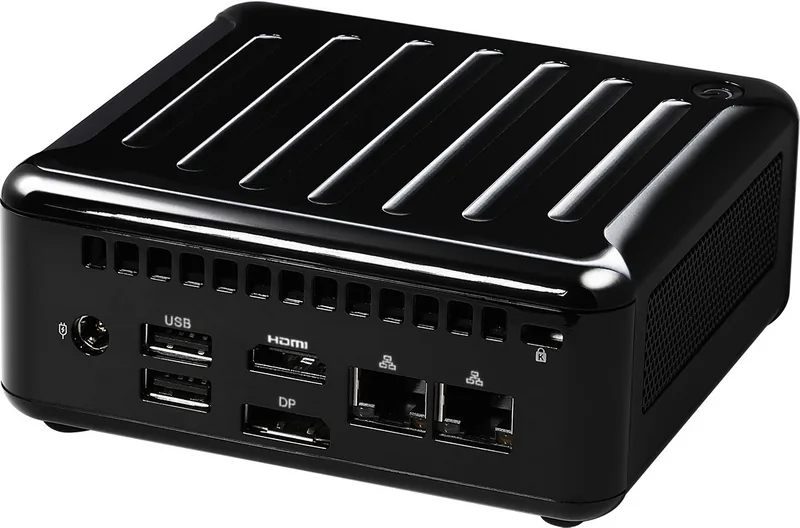
1x HDMI 2.1, 1x DisplayPort 1.4a, 2x USB-A 2.0 (480Mb/s), 1x RJ-45 2.5Gb LAN (Realtek RTL8125BG), 1x RJ-45 1Gb LAN (Realtek RTL8111FPV), 1x Power Jack
Front/Side Ports
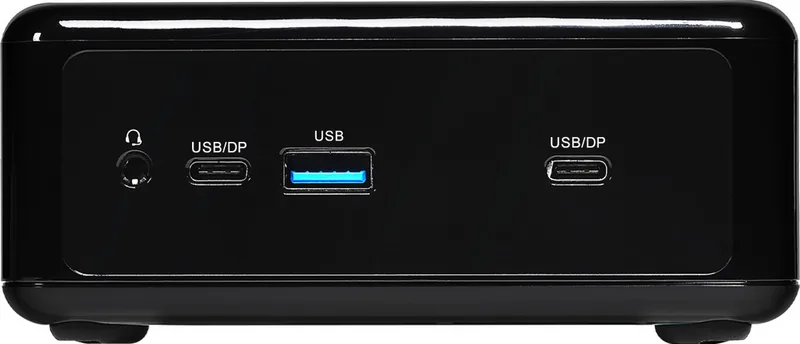
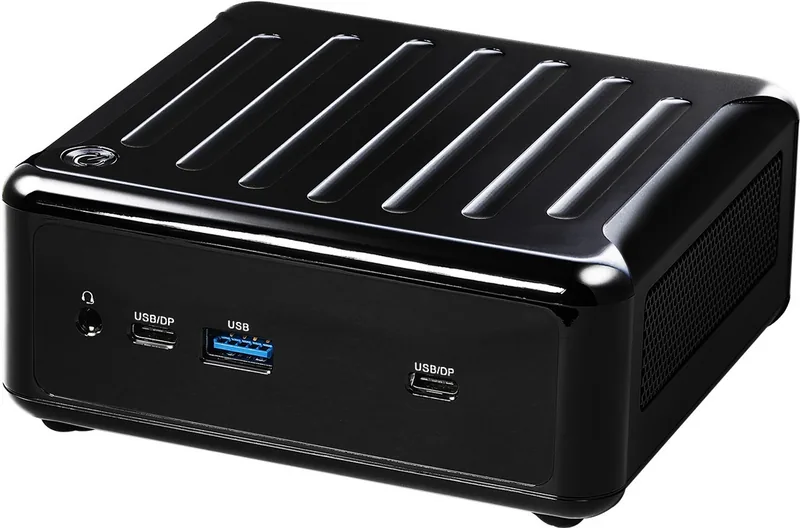
2x USB4 with DisplayPort 1.4a, 1x USB-A 3.1 (10Gb/s), 1x 3.5mm Audio Jack (Realtek ALC233)
Expansion Slots
1x M.2 (PCIe, 2230, occupied with WiFi+BT module)
Wireless
Wi-Fi 6E (WLAN 802.11a/b/g/n/ac/ax, 2x2), Bluetooth 5.2
Audio
2.0 (Realtek ALC233)
Card Reader
N/A
Power Adapter
External, 1x Barrel Plug (90W/19V)
VESA Mount
75x75/100x100 (included)
Dimensions (WxHxD)
4.63x1.88x4.33 in
Weight
2.20 lbs
Volume
36.61 cu. in
CPU Cooler
Included
Features
Security Lock Slot (Kensington), 4x Display Support, TPM 2.0, Remote Management with compatible CPU (DMTF DASH)
USB Layout
Link
Product Description
Overview of the 4X4 BOX-7000/D5 Series
The ASRock Industrial 4X4 BOX-7000/D5 Series represents a compact powerhouse designed for demanding industrial applications. This barebone system is engineered to deliver high performance while maintaining a small footprint. It is ideal for users who need robust computing solutions for embedded tasks or digital signage without the need for excessive size. Integrating modern components ensures longevity and efficiency in harsh environments.
Installation and Configuration
Setting up the system requires attention to detail regarding memory and storage modules. Users can find specific guidance found in every guide associated with the ASRock Industrial 4X4 BOX-7000/D5 Series Manual to ensure proper seating of the DDR5 SO-DIMM slots. It is vital to ensure they align correctly before pushing down to avoid damage. The manual emphasizes that identical pairs are necessary for dual channel configuration to maximize throughput. Additionally, installing the WiFi module is straightforward by locating the slot and securing it with the provided hardware.
Connectivity and Design
Storage options are flexible with support for M.2 SSDs and 2.5-inch hard drives. Connectivity is robust featuring USB 3.2 Gen2 ports, DisplayPort, and dual LAN options for high-speed networking. The system supports vertical or horizontal mounting, offering versatility for deployment in varying physical spaces. Vertical positioning is recommended specifically to enhance cooling performance within the chassis.
Warranty and Safety
Protecting your investment is crucial, and the product comes with a one-year warranty covering the host and power adapter components. However, the casing and packaging accessories are excluded from this standard coverage period. Users should adhere to safety regulations regarding the power adapter and battery disposal to prevent hazards. Backing up data is recommended frequently as repair work might lead to data loss on the storage drives included in future setups.
Important Reminders
Proper handling during installation prevents damage. Ensure you use the included 19V adapter. Do not remove the casing during warranty period if not allowed. Follow local disposal laws. Safety warnings are critical when dealing with lithium batteries and power connections. Using the wrong battery type creates an explosion risk according to global environmental standards. Always recycle used batteries properly to comply with local laws and minimize environmental impact. The system operates without a CD drive and does not include a hard drive by default. These steps ensure the machine runs smoothly over time.
Search for 67,706 Manuals online


Type-in Brand or Model