
ASRock DeskMini B660 Manual
PDF manual · 66 Pages
English



Quick check
Incorrect answer, please try again.
Chat with your ASRock DeskMini B660 manual using AI
Get instant AI answers from your ASRock DeskMini B660 manual
Ask anything about the ASRock DeskMini B660. Answers come from this manual, with the pages they are based on.
Ask a Question
Do you recommend DeskMini B660?
Yes No
james44
6 months ago
Is the WiFi antenna connection difficult to install on this barebone system?
Frequently Asked Questions
It supports DDR4 SO-DIMM modules with a maximum capacity of 64GB across two slots, running at speeds up to 3200MHz.
Is this answer helpful?
No, the chassis has a height limitation of 52mm, so you must use low-profile coolers or the standard Intel Box Fan.
Is this answer helpful?
No, this is a barebone system. You need to purchase and install your own memory, storage drives, and WiFi module separately.
Is this answer helpful?
There are two M.2 slots: one supports PCIe Gen5x4 (Type 2280) and the other supports PCIe Gen4x4 (Type 2280).
Is this answer helpful?
The 120W/19V power adapter is listed as optional in some regions but is primarily designed for this product and highly recommended.
Is this answer helpful?
Yes, the system supports VESA mounting, allowing you to attach it to compatible displays or wall brackets using the optional bracket.
Is this answer helpful?
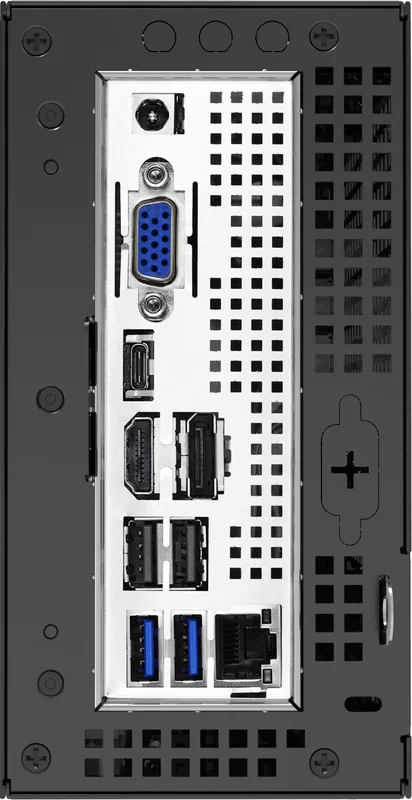
The rear panel includes VGA, HDMI, and DisplayPort 1.4 outputs for connecting multiple monitors.
Is this answer helpful?
Advantages and Disadvantages
Advantages

- Supports powerful 12th Gen Intel Core processors in a tiny 1.92L chassis
- Dual M.2 sockets support blazing fast PCIe Gen5 and Gen4 SSDs
- Flexible I/O includes VGA, HDMI, DP, and multiple USB 3.2 ports
- Intuitive UEFI interface with EZ Mode for quick system monitoring
- VESA mountable design allows for versatile installation options
Disadvantages

- CPU cooler height restricted to 52mm limits large aftermarket fans
- Barebone kit does not include RAM, storage, or WiFi module
- No 3.5-inch hard drive support as SATA ports only handle 2.5-inch drives
- Requires separate purchase of 120W power adapter for optimal operation
- Overclocking capabilities are limited by the compact thermal design
Product Specification
Type
Mini-PC
Chipset
Intel B660
Socket
Intel 1700
CPU
No (max. 65W TDP)
CPU Compatibility
Core i-14000, Core i-13000, Core i-12000, Pentium Gold G7000, Celeron G6000, TDP Limit: 65W (Manufacturer List)
RAM
2x DDR4 SO-DIMM, dual PC4-25600S/DDR4-3200, max. 64GB (UDIMM)
Drive Bay
2x SATA 6Gb/s, 1x M.2/M-Key (PCIe 5.0 x4, 2280), 1x M.2/M-Key (PCIe 4.0 x4, 2280)
External Slots
N/A
Internal Slots
2x 2.5"
Graphics
CPU (iGPU)
Rear Ports
1x VGA, 1x HDMI 2.0, 1x DisplayPort 1.4, 1x USB-C 3.1 with DisplayPort 1.4 (10Gb/s), 2x USB-A 3.0 (5Gb/s), 2x USB-A 2.0 (480Mb/s), 1x RJ-45 1Gb LAN (Intel I219-V), 1x Barrel Jack (Power Input)
Front/Side Ports
1x USB-C 3.2 (20Gb/s), 1x USB-A 3.1 (10Gb/s), 2x 3.5mm Jack (Realtek ALC269)
Expansion Slots
1x M.2/E-Key (PCIe/Intel CNVi, 2230)
Wireless
N/A
Audio
2.0 (Realtek ALC269)
Card Reader
N/A
Power Supply
External, 1x Barrel Jack (120W/19V)
VESA Mount
75x75/100x100 (optional)
Dimensions (WxDxH)
3.15x6.10x6.10 in
Volume
0.07 cu ft
CPU Cooler
Not included, max. 2.05 in
Features
Security Lock (Kensington), Mini-STX
USB Spelling
Link
Product Description
ASRock DeskMini B660: The Ultimate Compact Build
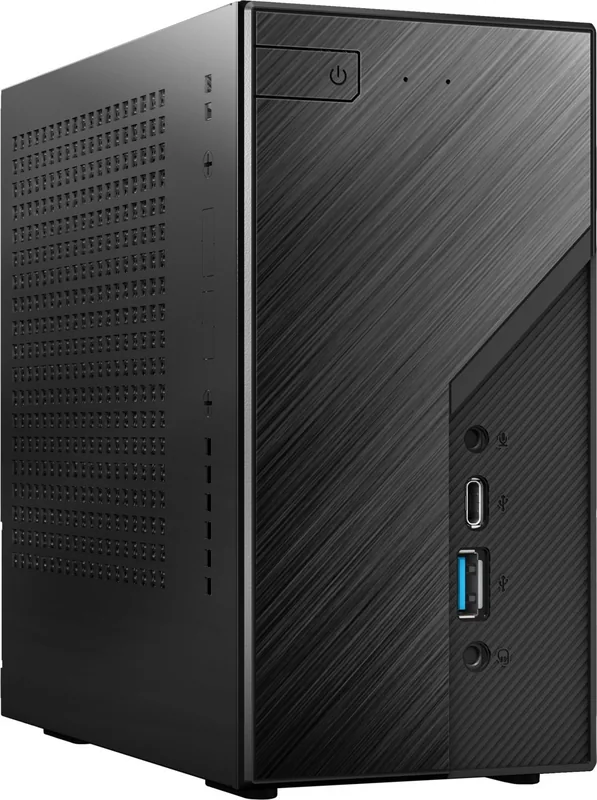
The ASRock DeskMini B660 represents a pinnacle of compact computing, designed for users who demand high performance without sacrificing desk space. This barebone system supports the latest 12th Gen Intel Core processors, delivering robust power for both productivity and entertainment in a mere 1.92-liter chassis. Its sleek design hides a powerhouse capable of handling demanding tasks while maintaining a quiet and cool operation environment.
Unmatched Performance in a Small Package
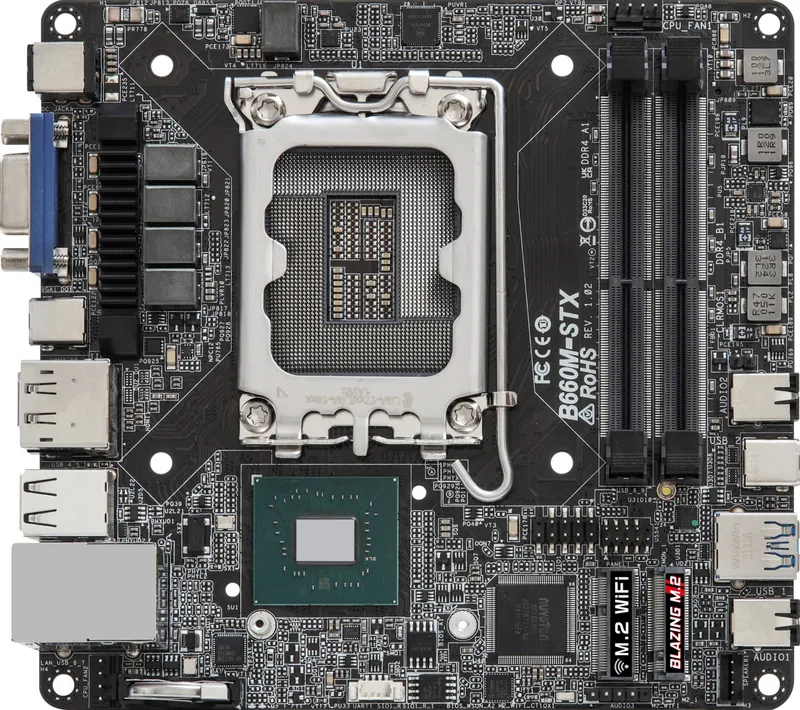
At the heart of the DeskMini B660 lies the B660M-STX chipset, which ensures compatibility with modern hardware standards. It features two SO-DIMM slots supporting up to 64GB of DDR4 memory at speeds up to 3200MHz. For storage enthusiasts, the system offers dual M.2 sockets supporting PCIe Gen5 and Gen4 drives, alongside two SATA3 connectors for additional HDD or SSD expansion. This flexibility allows users to build a system that perfectly matches their specific needs, whether for gaming, content creation, or office work.
Connectivity and Expansion
Despite its small footprint, the rear panel is packed with versatile I/O options. Users enjoy multiple display outputs including VGA, HDMI, and DisplayPort, making it easy to connect to various monitors. The front panel provides quick access to USB 3.2 Gen2 Type-C and Type-A ports, ensuring fast data transfers. Additionally, the inclusion of an Intel Gigabit LAN port and support for optional WiFi modules via the Key E socket guarantees reliable network connectivity. The system also supports VESA mounting, offering creative placement options beyond the traditional desktop setup.
User-Friendly Configuration
Managing the system is intuitive thanks to the UEFI Setup Utility. The EZ Mode provides a dashboard view of critical system stats like CPU speed and fan RPMs, while Advanced Mode offers deep customization for overclocking, boot settings, and security configurations. Features like Instant Flash allow for easy BIOS updates directly from a USB drive, keeping your system secure and up-to-date with minimal effort.
Notes:
- Ensure you use DDR4 SO-DIMM modules only; other types will cause damage.
- The CPU cooler height is limited to 52mm due to chassis constraints.
- Always unplug power cables before installing components to prevent electrical damage.
Search for 67,706 Manuals online


Type-in Brand or Model
Thomas Weber
4 months ago
Does the ASRock DeskMini get too hot, especially for M.2 SSDs installed in the lower part of the case?
Manual.ly
4 months ago
The ASRock DeskMini is designed to be compact and efficient, but thermal management can vary based on component selection and airflow. Some users have reported that M.2 SSDs located near the CPU cooler may run warmer than expected, particularly during idle or light loads, even with additional cooling solutions. This is more pronounced with high-performance PCIe 4.0 drives. We recommend ensuring adequate ventilation around the chassis and considering a dedicated SSD heatsink if you plan to use fast NVMe drives. The system itself remains stable under load, and BIOS options allow for custom fan curves to optimize cooling performance.