
ASRock Beebox-S Manual
PDF manual · 58 Pages
English



Quick check
Incorrect answer, please try again.
Chat with your ASRock Beebox-S manual using AI
Get instant AI answers from your ASRock Beebox-S manual
Ask anything about the ASRock Beebox-S. Answers come from this manual, with the pages they are based on.
Ask a Question
Do you recommend Beebox-S?
Yes NoFrequently Asked Questions
It is a compact barebone mini PC platform that includes the chassis, motherboard, and WiFi module, while memory and storage must be added separately.
Is this answer helpful?
The Beebox-S is designed around Intel Core i3-6100U and Core i5-6200U processors, giving it a balance of efficiency and everyday performance.
Is this answer helpful?
It uses DDR4 2133MHz SO-DIMM memory with two slots and supports up to 32GB total. For dual-channel operation, matched pairs are recommended.
Is this answer helpful?
It supports one M.2 SSD in 2260 or 2280 size and one 2.5-inch SATA HDD or SSD, so users can combine speed and capacity.
Is this answer helpful?
Yes. The rear panel includes HDMI and DisplayPort outputs, and the system supports dual-display use for multitasking or media setups.
Is this answer helpful?
Yes. It includes a VESA bracket for mounting behind compatible displays, making it ideal for a clean, space-saving installation.
Is this answer helpful?
It offers driver installation tools, ASRock Live Update & APP Shop, and a UEFI setup with options for power, boot, storage, security, and hardware monitoring.
Is this answer helpful?
Advantages and Disadvantages
Advantages

- Very compact 0.6L chassis that fits easily in tight spaces.
- Supports flexible storage: M.2 SSD plus 2.5-inch HDD/SSD.
- Dual-display output and VESA mounting improve setup versatility.
- UEFI tools and ASRock utilities simplify tuning, updates, and maintenance.
Disadvantages

- Barebone design means you must buy memory and storage separately.
- Limited to low-power U-series CPUs, so heavy workloads may feel restricted.
- Some video outputs do not support hot plug, which can limit convenience.
- Small size requires careful assembly and cable routing during upgrades.
Product Specification
Type
Mini-PC
Chipset
System-on-Chip (SoC)
Socket
N/A
RAM
2x DDR4 SO-DIMM, dual PC4-17000S/DDR4-2133, max. 32GB (UDIMM)
External bays
N/A
Internal bays
1x 2.5"
Rear ports
1x HDMI 1.4, 1x HDMI 2.0, 1x DisplayPort 1.2, 1x USB-C 3.1 (10Gb/s), 3x USB-A 3.0 (5Gb/s), 1x RJ-45 1Gb LAN, 1x 3.5mm jack (Realtek ALC283), 1x DC power jack (power connection)
Wireless
Wi-Fi 5 (WLAN 802.11a/b/g/n/ac), Bluetooth 4.0
Audio
2.0 (Realtek ALC283)
Card reader
N/A
Power supply
external, 1x barrel connector (65W/19V)
VESA mount
75x75/100x100 (included)
Dimensions (WxHxD)
4.33x1.81x4.65in
Volume
0.63qt
CPU cooler
included
Special features
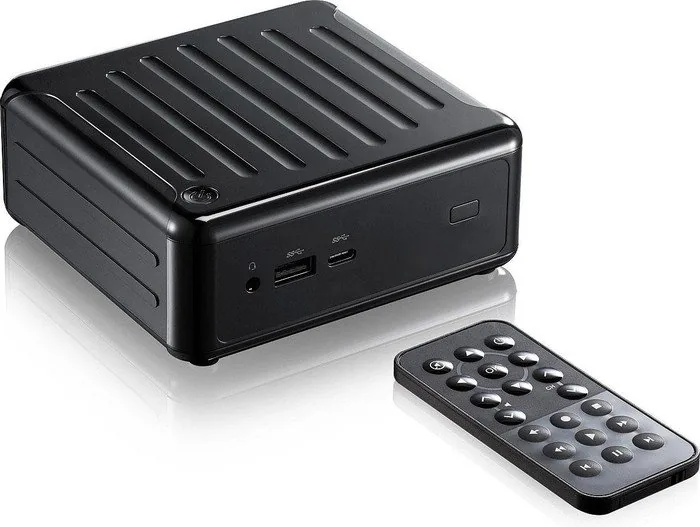
Infrared sensor, incl. remote control, security lock (Kensington)
USB notation
Link
Product Description
ASRock Beebox-S: Compact Power for Everyday Computing
The ASRock Beebox-S is a tiny barebone system that packs a surprising amount of flexibility into a very small chassis. Designed for users who want a clean desktop setup without sacrificing useful expansion options, it blends compact size, modern connectivity, and practical performance in a form factor that fits almost anywhere. For anyone looking up the ASRock Beebox-S Manual, the system stands out as a straightforward, buildable mini PC that rewards careful customization.
Inside, the Beebox-S supports Intel Core i3 and Core i5 U-series processors, DDR4 SO-DIMM memory, M.2 storage, and a 2.5-inch drive bay. That means it can be shaped into a light office machine, a media center, or a compact home workstation depending on the parts you choose. The design focuses on efficiency, with features like power-saving modes, thermal controls, and a small 0.6-liter footprint that makes it easy to place on a desk, shelf, or behind a monitor.
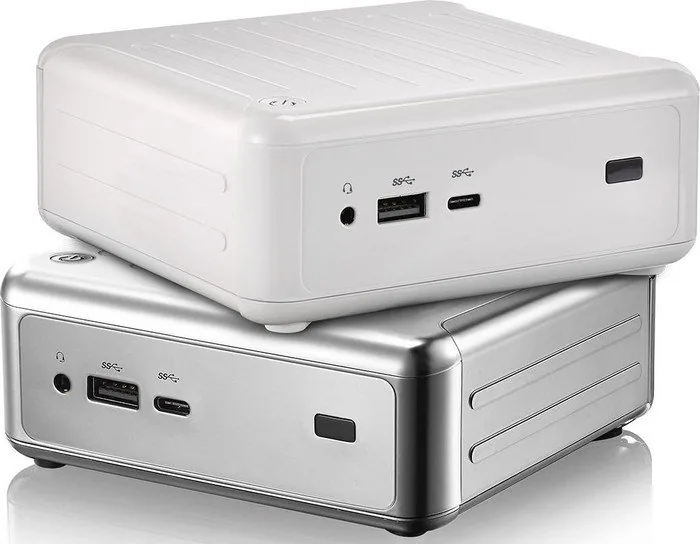
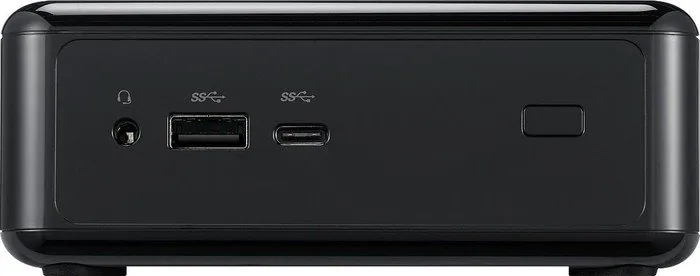
Connectivity is another strength. The front panel includes USB 3.0, USB 3.1 Type-C, headphone/mic audio, and an IR sensor, while the rear offers HDMI, DisplayPort, USB 3.0, LAN, and a Kensington lock slot. Dual-display support adds convenience for multitasking or entertainment setups, and the included VESA bracket lets the Beebox-S disappear neatly behind a display. Vertical placement is also supported, with better cooling performance when standing upright.
ASRock also gives users plenty of control through its UEFI settings and bundled utilities. BIOS options cover boot behavior, CPU behavior, memory tuning, storage modes, wake functions, security, and power management. Tools such as Instant Flash, Internet Flash, and driver utilities help keep the system updated with minimal hassle. Remote power-on support, USB wake features, and LAN wake options make it a practical choice for flexible living-room or office use.
Overall, the Beebox-S is best suited to users who value small size, upgrade options, and quiet practicality over raw desktop-level power. It is a compact foundation that can be adapted to everyday workloads with the right memory and storage choices.
Notes
- Memory, hard drive, and M.2 SSD are not included.
- Vertical installation may improve cooling.
- Some display ports do not support hot plug.
- Dual-channel memory works best with matched DDR4 SO-DIMM pairs.
Search for 67,706 Manuals online


Type-in Brand or Model