
ARKA myAQUA 1900 Manual
PDF manual · 16 Pages
English



Quick check
Incorrect answer, please try again.
Chat with your ARKA myAQUA 1900 manual using AI
Get instant AI answers from your ARKA myAQUA 1900 manual
Ask anything about the ARKA myAQUA 1900. Answers come from this manual, with the pages they are based on.
myAQUA 1900 Maintenance Schedule
Change the fine filter and carbon filters every 6 to 12 months from first use. Actual duration depends on water quality and usage.
Replace the RO membrane every 12 to 24 months from first use. Actual duration depends on water quality and usage.
Free maintenance reminders
Timed to your purchase date. Always free, unsubscribe anytime.
Ask a Question
Do you recommend myAQUA 1900?
Yes NoFrequently Asked Questions
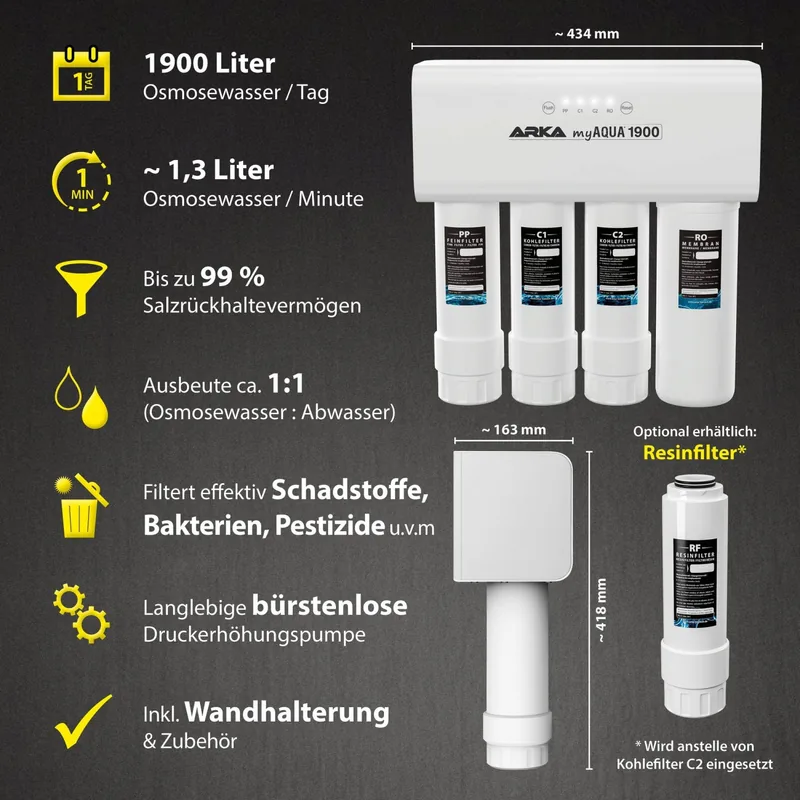
The system filters up to 99 percent of salts, bacteria, and pollutants, ensuring TDS values remain below 50 ppm for clean water.
Is this answer helpful?
Filters generally need replacement every six to twelve months, while the membrane should be changed every twelve to twenty-four months.
Is this answer helpful?
No, the resin filter is an optional accessory that can be connected instead of the C2 carbon filter after the rinse cycle.
Is this answer helpful?
An automatic protection function interrupts production after twelve hours to preserve the pump and membrane longevity during extended use.
Is this answer helpful?
Yes, with the included accessories, it can be connected to standard household water pipes with a pressure between 1 and 4 Bar.
Is this answer helpful?
Yes, the device uses smart reminder lights and audible signals to indicate when filters or membranes require replacement or resetting.
Is this answer helpful?
The maximum flow rate is 1.32 liters per minute with a water yield ratio of approximately 1:1 to 1:5 depending on source conditions.
Is this answer helpful?
Advantages and Disadvantages
Advantages

- Filters up to 99 percent of salts, bacteria, and harmful pollutants for safe aquarium use.
- Natural filter materials without chemical additives ensure pure water quality.
- Built-in protection function stops production after twelve hours to protect the pump.
- Smart reminder lights and reset function simplify filter maintenance scheduling.
- Compact dimensions and easy connection to standard household plumbing lines.
Disadvantages

- Resin filter must be installed only after the initial rinse cycle completes.
- Performance depends on water pressure staying strictly between 1 and 4 Bar.
- Filters require replacement every six to twelve months for optimal efficiency.
- System automatically shuts down, requiring a power reset to resume production.
- Membrane lifespan is limited and must be replaced every twelve to twenty-four months.
Product Specification
Category
Reverse Osmosis, Water Treatment
Type
Reverse Osmosis Unit (Pressure Booster Pump with Automatic Shutoff, Fine Filter, 2x Activated Carbon Filters, Filter Membrane, Conductivity Meter)
Specifications
501.93 gal/d, Ratio to Waste Water 1:1
Suitability
Fresh Water, Seawater, Aquarium, Terrarium
Power Consumption
Max. 70 W
Dimensions
17.09x16.46x6.42in (WxHxD)
Product Description
Comprehensive Guide to Clean Aquarium Water
Introducing the ARKA MyAqua 1900 Reverse Osmosis System
Are you searching for the ultimate purification method for your aquarium? The ARKA MyAqua 1900 Reverse Osmosis System with 24V Boost Pump, 1900l Manual delivers exceptional clarity and safety for your aquatic pets. This advanced unit filters up to 99 percent of salts, bacteria, and harmful pollutants such as nitrate, phosphate, and heavy metals from standard tap water. It transforms ordinary source water into a pristine environment suitable for sensitive saltwater and freshwater species.
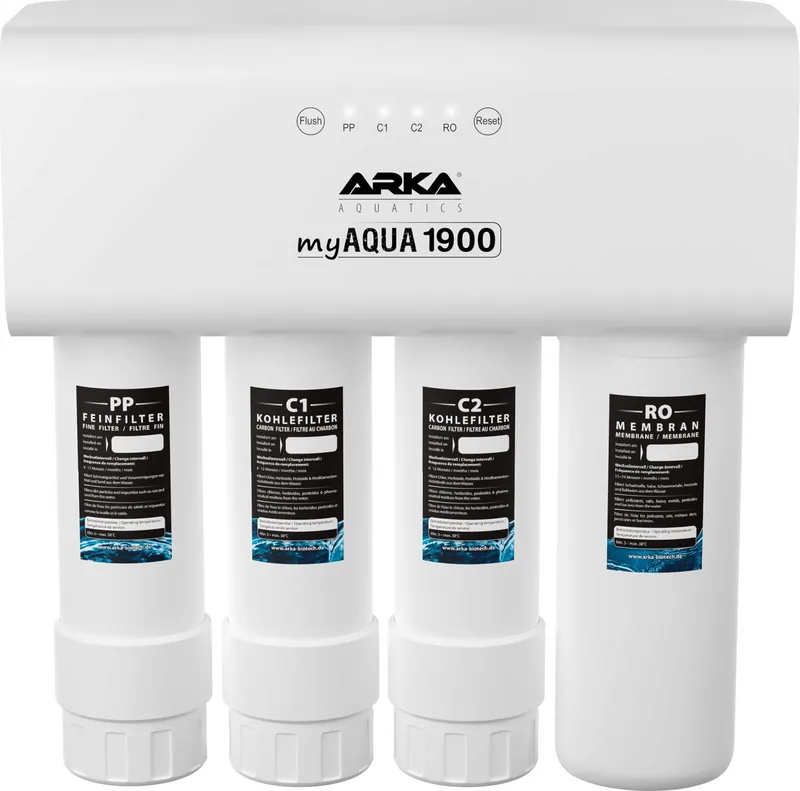
The filtration process involves multiple stages for maximum effectiveness. Tap water first enters a PP fine filter with a one-micron pore size to trap dirt and rust particles. It then moves through a C1 carbon filter which eliminates odors, chlorination, and pesticide residues. The critical RO membrane follows, blocking 0.0001 microns to remove dissolved solids effectively. A second carbon filter or optional resin filter completes the process, ensuring the TDS value stays below 50 ppm. This setup guarantees chemical-free filtration using only natural materials.
Technical Specifications and Setup
Operating with a 24 V power supply, this system balances performance with energy efficiency. It boasts a maximum flow rate of 1.32 liters per minute and maintains a water yield ratio of approximately 1:1 to 1:5. Dimensions are compact at 434 mm x 163 mm x 418 mm. It consumes 70 W during production and as low as 2 W in standby. Water temperature must be between 5 and 38 degrees Celsius. Pressure requirements are strict, ranging from 1 to 4 Bar for safe operation. Installation is easy, connecting directly to standard household plumbing lines with the provided hoses and adapters. The system includes a built-in protection function that automatically shuts down production after twelve hours of continuous running. This feature preserves the pump and membrane longevity during extended use.
Regular maintenance is key to optimal performance. The device features smart reminder lights and audible signals when filters or membranes require replacement. Standard intervals suggest changing filters every six to twelve months and the membrane every twelve to twenty-four months. A flush program takes sixty seconds to clear sediment, and the reset function keeps track of component usage. Ensure hoses are secured with blue clips. Check for leaks regularly to maintain efficiency. The system will warn you if maintenance is needed. Proper care extends the lifespan of all internal parts. Always disconnect power before unplugging connections to avoid pump damage from air ingestion. Keep the unit above zero degrees Celsius to prevent freezing. Follow the detailed instructions provided to maintain warranty validity and ensure safe operation for the best aquascaping results.
Note: Resin filters should be installed only after the initial rinse cycle completes.
Search for 67,706 Manuals online


Type-in Brand or Model