Manual.ly Logo

Arcam HDA SA20 Manual

0.0 · 0 Ratings

PDF manual · 136 Pages

English

M: OA-GPT-54-NAN
page

/ 136

Loading...
093a34d5a30bbe45e9785ae750598d62aa24 page 4
EN-2
Safety Guidelines
Important Safety Instructions
1. Read these instructions.
2. Keep these instructions.
3. Heed all warnings.
4. Follow all instructions.
5. Do not use this apparatus near water.
6. Clean only with dry cloth.
7. Do not block any ventilation openings. Install in
accordance with the manufacturer’s instructions.
8. Do not install near any heat sources such as radiators,
heat registers, stoves, or other apparatus (including
amplifiers) that produce heat.
9. Do not defeat the safety purpose of the polarized or
grounding-type plug.
A polarized plug has two blades with one wider
than the other. A grounding type plug has two
blades and a third grounding prong. The wide blade
or the third prong are provided for your safety. If the
provided plug does not fit into your outlet, consult
an electrician for replacement of the obsolete outlet.
10. Protect the power cord from being walked on
or pinched particularly at plugs, convenience
receptacles, and the point where they exit from the
apparatus.
11. Only use attachments/accessories specified by the
manufacturer.
12. Use only with the cart, stand, tripod, bracket, or
table specified by the manufacturer, or sold with the
apparatus.
When a cart is used, use caution
when moving the cart/apparatus
combination to avoid injury from tip-
over.
13. Unplug this apparatus during lightning storms or
when unused for long periods of time.
14. Refer all servicing to qualified service personnel.
Servicing is required when the apparatus has been
damaged in any way, such as power-supply cord or
plug is damaged, liquid has been spilled or objects
have fallen into the apparatus, the apparatus has
been exposed to rain or moisture, does not operate
normally, or has been dropped.
15. Object or liquid entry
WARNING – Take care that objects do not fall and
liquids are not spilled into the enclosure through
any openings. The equipment shall not be exposed
to dripping or splashing. Liquid-filled objects such
as vases should not be placed on the equipment.
16. Climate
The equipment has been designed for use in
moderate climates and in domestic situations.
17. Cleaning
Unplug the unit from the mains supply before
cleaning.
The case should normally only require a wipe with
a soft, lint-free cloth. Do not use chemical solvents
for cleaning.
We do not advise the use of furniture cleaning
sprays or polishes as they can cause permanent
white marks.
18. Power sources
Only connect the equipment to a power supply of
the type described in the operating instructions or
as marked on the equipment.
The primary method of isolating the equipment
from the mains supply is to remove the mains plug.
The equipment must be installed in a manner that
makes disconnection possible.
19. Abnormal smell
If an abnormal smell or smoke is detected from the
equipment, turn the power off immediately and
unplug the equipment from the wall outlet. Contact
your dealer and do not reconnect the equipment.
20. Damage requiring service
The equipment should be serviced by qualified
service personnel when:
A. The power-supply cord or the plug has been
damaged, or
B. Objects have fallen, or liquid has spilled into the
equipment, or
C. The equipment has been exposed to rain, or
D. The equipment does not appear to operate
normally or exhibits a marked change in
performance, or
E. The equipment has been dropped or the
enclosure damaged.
CAUTION: To reduce the risk of electric shock, do not
remove cover (or back). No user serviceable parts inside.
Refer servicing to qualified service personnel.
WARNING: To reduce the risk of fire or electric shock, do
not expose this apparatus to rain or moisture.
The lightning flash with an arrowhead
symbol within an equilateral triangle, is
intended to alert the user to the presence of
uninsulated ‘dangerous voltage’ within the
product’s enclosure that may be of sufficient magnitude
to constitute a risk of electric shock to persons.
The exclamation point within an equilateral
triangle is intended to alert the user to the
presence of important operating and
maintenance (servicing) instructions in the
literature accompanying the product.
CAUTION: In Canada and the USA, to prevent electric
shock, match the wide blade of the plug to the wide slot
in the socket and insert the plug fully into the socket.
Class II product
This equipment is a Class II or double insulated electrical
appliance. It has been designed in such a way that it
does not require a safety connection to electrical earth
(“ground” in the U.S.)
Warning
Mains plug/appliance coupler is used to disconnect
device and it shall remain readily operable.
Safety Compliance
This equipment has been designed to meet the IEC/EN
60065 international electrical safety standard.
This device complies with Part 15 of the FCC Rules.
Operation is subject to the following two conditions:
1. This device may not cause harmful interference, and
2. This device must accept any interference received,
including interference that may cause undesired
operation.
The building installation shall be regarded as providing
protection in accordance with the rating of the wall
socket outlet.
Caution on installation
For proper heat dispersal, do not install this unit in a
confined space, such as a bookcase or similar enclosure.
More than 0.3m (12in) is recommended.
Do not place any other equipment on this unit.
zz
z
Wall
z

Chat with your Arcam HDA SA20 manual using AI

Get instant AI answers from your Arcam HDA SA20 manual

Ask anything about the Arcam HDA SA20. Answers come from this manual, with the pages they are based on.

HDA SA20 Maintenance Schedule

Before cleaning
Unplug unit from mains supply

Always disconnect the power before cleaning to ensure safety.

As needed
Wipe case with soft cloth

Clean the case using a soft, lint-free cloth. Do not use chemical solvents or polishes.

M: QW-35-FL

Ask a Question

0/1000

Do you recommend HDA SA20?

Yes No

Frequently Asked Questions

A

It is a high-performance integrated stereo amplifier designed for music playback with both analogue and digital source support. It combines amplification, DAC functionality, and system control in one unit.

Is this answer helpful?

A

Yes, but only with an MM (moving magnet) cartridge connected to the phono input. A standard line-level source must never be connected there, as it can damage the amplifier and speakers.

Is this answer helpful?

A

Yes. It includes a 3.5 mm headphone output for headphones in the 16 ohm to 2 k ohm range. When headphones are connected, the speaker and pre-out outputs are muted unless configured otherwise.

Is this answer helpful?

A

The SA20 offers coaxial and optical digital inputs for devices like TVs, streamers, Blu-ray players, and receivers. It supports two-channel PCM audio, so it is best suited to standard stereo digital playback.

Is this answer helpful?

A

Yes. It includes a pre-amplifier output, processor mode options, network control, and RS232 support, which makes it suitable for bi-amping or home automation setups.

Is this answer helpful?

A

It offers auto standby, adjustable display brightness, input selection from the front panel or remote, and balance control. These features make it easy to fit into daily listening routines.

Is this answer helpful?

M: OA-GPT-54-NAN

Advantages and Disadvantages

Advantages

  • Strong stereo output with low distortion and a detailed, energetic sound signature.
  • Wide source support: phono, line-level, digital inputs, headphone out, and pre-out.
  • Flexible setup options including balance, standby timing, display control, and processor mode.
  • Network and RS232 support make it easy to fit into smart-home or custom systems.
VS

Disadvantages

  • Phono input is for MM cartridges only, so some turntables may need an external phono stage.
  • Digital input support is limited to two-channel PCM, with no mention of advanced multi-format playback.
  • The unit needs good ventilation and careful placement to avoid heat buildup.
  • Using the wrong phono source or incorrect speaker wiring can cause serious damage.
M: OA-GPT-54-NAN

Product Specification

Channels

2

Power per Channel

90W (8 ohm), 180W (4 ohm)

Audio Connections

Digital Audio In (coaxial), Digital Audio In (optical), 3x Stereo Line In (RCA), Phono In (RCA), AUX In (3.5 mm Jack), Pre Out (RCA)

Color

black

M: OA-GPT-54-NAN

Product Description

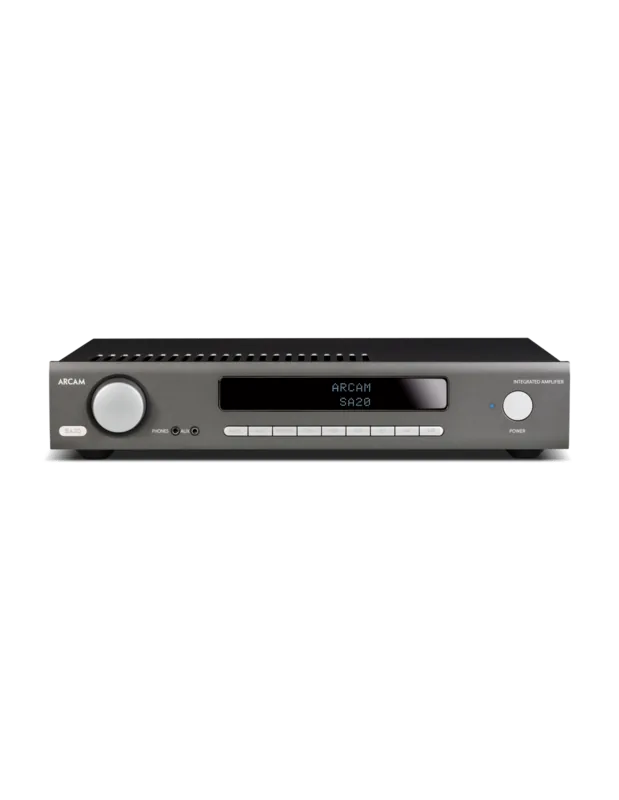
Arcam HDA SA20: refined power for serious listening

The Arcam HDA SA20 Manual reflects an integrated amplifier designed for listeners who want music to feel alive, controlled, and effortless. Built on Arcam’s long history in hi-fi engineering, the SA20 focuses on clean amplification, practical connectivity, and everyday usability without losing sight of sound quality. It is positioned as a serious stereo center for modern systems, whether your source is a turntable, CD player, streamer, TV, or network-connected device.

What stands out first is the balance between simplicity and flexibility. The SA20 supports analogue and digital sources, including a dedicated MM phono input, multiple line inputs, coaxial and optical digital connections, and a front-panel AUX socket for portable gear. That makes it easy to mix classic and modern playback styles in one system. The amplifier also includes a pre-out stage, so it can serve as part of a bi-amped setup or a dedicated preamp chain when your system grows.

Sound-wise, the SA20 is presented as a high-performance stereo amplifier with strong output, low distortion, and a DAC section tuned for detailed playback. It is engineered to deliver a composed, dynamic presentation that can handle both subtle recordings and demanding tracks. For many listeners, that means a listening experience that feels open, stable, and musically engaging rather than overly clinical.

Day-to-day operation is equally thoughtful. Front-panel controls, a clear remote layout, adjustable display brightness, auto-standby, balance control, and headphone support all add convenience. The setup menu also allows customization of standby timing, processor mode, network behavior, and display preferences, which is helpful if the amplifier will be used in a more complex home audio environment.

From a practical standpoint, the SA20 is also built with care for installation. Good ventilation, proper speaker wiring, and cable management are emphasized, and the unit can integrate with network control or RS232-based automation. That makes it a strong choice for users who want a premium amplifier that is both audiophile-oriented and system-friendly.

Notes

  • Use an MM cartridge only on the phono input.
  • Keep ventilation space around the amplifier.
  • The SA20 supports two-channel PCM digital audio.
  • Speaker wiring should be checked carefully before first use.
M: OA-GPT-54-NAN

© Copyright 2026 Manual.ly