
Arcam AVR5 Manual
PDF manual · 402 Pages
English



Quick check
Incorrect answer, please try again.
Chat with your Arcam AVR5 manual using AI
Get instant AI answers from your Arcam AVR5 manual
Ask anything about the Arcam AVR5. Answers come from this manual, with the pages they are based on.
AVR5 Maintenance Schedule
Unplug the unit before cleaning. Wipe the case with a soft, lint-free dry cloth. Do not use chemical solvents or furniture polishes.
Replace AAA batteries when you notice a reduction in operating range or when the backlight flashes briefly upon button press.
Ask a Question
Do you recommend AVR5?
Yes NoFrequently Asked Questions
The Arcam AVR5 is designed as a central surround amplifier for home cinema and stereo systems. It connects video, digital audio, analogue audio, network, radio, and wireless sources while powering a multi-speaker setup.
Is this answer helpful?
The AVR5 has seven channels of built-in amplification. Five channels support front left, center, front right, surround left, and surround right speakers. The remaining channels can be assigned for surround backs, height speakers, or bi-amping compatible front speakers.
Is this answer helpful?
Yes. The AVR5 supports Dolby Atmos and also supports DTS:X, DTS Virtual:X, IMAX Enhanced, and Auro-3D. Correctly installed and configured height channels are needed to experience immersive height-based surround formats.
Is this answer helpful?
Yes. Output 1 supports eARC. With a compatible television, audio from the TV's internal tuner and connected TV functions can be returned to the receiver through the HDMI connection.
Is this answer helpful?
Yes. The AVR5 supports Bluetooth and Wi-Fi. Attach the specified antennas before using these wireless functions. Ethernet can also be used for a wired network connection.
Is this answer helpful?
The AVR5 is compatible with Dirac Live, but its use requires an additional license and calibration microphone. Dirac Live can measure speaker delays and levels and create room equalization filters to help address room acoustic issues.
Is this answer helpful?
Advantages and Disadvantages
Advantages

- Seven channels of built-in amplification can support surround, height, surround-back, or bi-amped front speaker configurations.
- HDMI 2.0b inputs, HDCP 2.2 support, and eARC output accommodate modern TV, video, and gaming setups.
- Supports Dolby Atmos, DTS:X, DTS Virtual:X, IMAX Enhanced, and Auro-3D surround formats.
- Includes Wi-Fi, Bluetooth, Ethernet, FM, and DAB/DAB+ radio capabilities for varied listening options.
- Preamplifier outputs enable expansion with external power amplifiers and active subwoofers.
Disadvantages

- Dirac Live room correction requires an additional license and calibration microphone for AVR5.
- The AVR5 has no Zone 2 trigger or Zone 2 IR connections listed for the model.
- Accurate speaker placement, wiring, and menu configuration require time and careful setup.
- The receiver runs warm in normal use and needs open space for adequate ventilation.
Product Specification
Channels
7.1
Power per Channel
60 W (8 ohms), 85 W (6 ohms)
Tuner
FM, DAB, DAB+, Internet radio
Audio Decoders
Dolby Atmos, Dolby Atmos Height Virtualizer, Dolby Digital, Dolby Digital Plus, Dolby TrueHD, Dolby Surround, DTS, DTS:X, DTS Neural:X, DTS Virtual:X, DTS ES, DTS 96/24, DTS-HD Master Audio, IMAX Enhanced
Streaming Clients
Apple AirPlay 2, Google Cast, Roon, Spotify
HDR
Dolby Vision, HDR
Video Connections
7x HDMI 2.0b In, 2x HDMI 2.0b Out, HDCP 2.2
Audio Connections
eARC, 4x Digital Audio In (coaxial), 2x Digital Audio In (optical), 1x Digital Audio Out (optical), 6x Stereo Line In (RCA), 1x AUX In (3.5 mm jack), 11.2 Multi-Channel Pre Out (RCA), 1x Pre Out (RCA), Headphones (3.5 mm jack)
Additional Connections
USB-A 2.0, RJ-45
Wireless
Bluetooth, aptX, aptX HD, Wi-Fi (WLAN)
Special Features
HDMI Pass-Through, 4K Pass-Through, 4K Upscaling, MQA
Power Consumption
1,500 W max, 90 W muted, 0.5 W standby
Color
gray
Dimensions
17.05 x 6.73 x 16.73 in (W x H x D)
Weight
36.38 lb
Product Description
Arcam AVR5 - Read, Download & Print Free
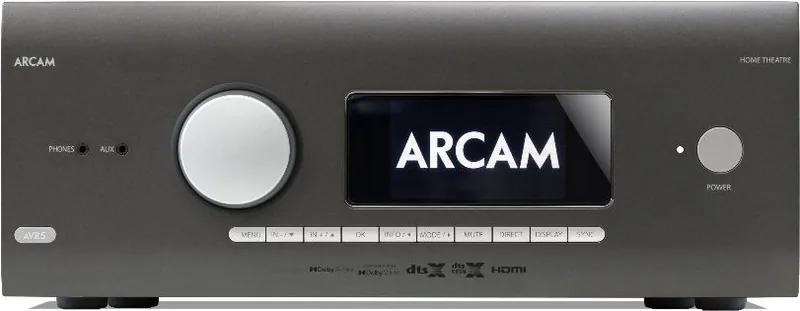
The Arcam AVR5 is a versatile surround amplifier designed to become the centerpiece of a modern home cinema and music system. Built with Arcam's focus on detailed, engaging sound, it combines multi-channel amplification, flexible source connections, and network-ready features in a refined AV receiver for movies, television, games, and stereo listening.
Home Cinema Connectivity
The AVR5 provides a broad selection of connections for everyday entertainment equipment. Its HDMI inputs support HDMI 2.0b and HDCP 2.2 signals, while the primary HDMI output includes eARC compatibility for returning audio from a compatible television. Digital and analogue audio inputs make it easy to connect disc players, set-top boxes, game consoles, media devices, and legacy components.
For wireless and radio listening, the receiver supports Wi-Fi, Bluetooth, Ethernet networking, FM, and DAB/DAB+ radio where available. It also includes a front-panel auxiliary input and a headphone output, allowing private listening with compatible 3.5 mm headphones.
Immersive Audio and Speaker Flexibility
With seven channels of built-in amplification, the Arcam AVR5 can power a conventional surround system while offering flexible channel assignment. The extra channels can be used for surround back speakers, height speakers, or bi-amping compatible front speakers. Additional preamplifier outputs allow the system to be expanded with external amplification and active subwoofers.
The receiver supports major immersive and surround technologies, including Dolby Atmos, DTS:X, DTS Virtual:X, IMAX Enhanced, and Auro-3D. This gives users the freedom to build a system that delivers spacious effects, clear dialogue, and a more enveloping presentation for films, concerts, and games.
Setup and Everyday Control
Proper speaker setup is central to performance. The AVR5 includes manual settings for speaker size, crossover frequency, distance, and level, helping match playback to a room and speaker layout. It is also compatible with Dirac Live room correction through an additional license and calibration microphone, providing a route to more precise acoustic adjustment.
Control is available from the front panel, the supplied universal learning remote, IP networking, or RS232 integration. The remote can operate multiple devices and learn selected commands from other remotes, reducing clutter in a home entertainment setup.
Note: Allow adequate ventilation around the AVR5, use correctly matched speaker wiring, and switch the unit off before making speaker connections. Careful placement and calibration can make a substantial difference to surround performance.
For listeners seeking an adaptable, high-quality hub for both cinema and music, the Arcam AVR5 brings together expansive format support, practical connectivity, and thoughtful system control.
Search for 67,732 Manuals online


Type-in Brand or Model