SEIT warrants its products to be free from defects in materials and workmanship under normal use and service by
the original owner for the lifetime of the product, (in Germany the period is 20 years from the purchase date of the
product). For units purchased and/or used in countries not belonging to the European Community, the warranty
period is 2-5 years from the date of purchase. The SEIT obligation under this warranty is limited to repairing or
replacing, at its sole option, any such defective products. To obtain service under warranty you must obtain a
Returned Material Authorization (RMA) number from SEIT or a SEIT Service Center with transportation charges
prepaid and must be accompanied by a brief description of the problem and proof of date and place of purchase.
This warranty applies only to the original purchaser. More details can be found by visiting www.apc.com.
PM5PM5UPM5VPM5T
Input Voltage250V
USB Charger/Secondary protectionNA
2 ports (5V, 2.4A in
total)
Coaxial
1 in /1 out
Telephone
1 in /1 out
Input Frequency50 Hz +
5 Hz
Maximum Line Current per phase10A
Cord Length1.8 meters (5.90 ft.)
Joule Rating918 Joules
EMI/RFI Noise rejection< 40db
Dimensions (WxDxH)72.6 x 370.4 x 55.8 mm (2.86 x 14.58 x 2.20 in)
Fiche technique
Garantie limitée
SEIT garantit à l’acheteur initial que ses produits sont exempts de défauts de matériaux et de fabrication dans des
conditions d’utilisation normales, sur la durée de vie du produit (ou pendant 20ans à compter de la date d’achat en
ce qui concerne l’Allemagne). Pour les unités achetées et/ou utilisées dans les pays hors de la communauté
européenne, la garantie est de 2 à 5 ans à compter de la date d’achat. La garantie SEIT porte uniquement sur la
réparation ou le remplacement, exclusivement, des produits défectueux. Pour obtenir un service au titre de la
garantie, vous devez obtenir de SEIT ou d’un centre de services SEIT un numéro d’autorisation de retour de
matériel. Le produit doit être envoyé à SEIT ou à un centre de services SEIT port payé, accompagné d’une brève
description du problème et de la preuve d’achat indiquant la date et le lieu d’achat. Cette garantie est offerte
exclusivement à l’acheteur initial. De plus amples détails sont disponibles sur le site www.apc.com.
PM5PM5UPM5VPM5T
Tension d’entrée230V
Chargeur USB/protection secondaireNA
2 ports
(5 V, 2,4A au total)
Coaxial
1 entrée / 1 sortie
Téléphone
1 entrée / 1 sortie
Fréquence d’entrée50 Hz +
5 Hz
Intensité maximale de la ligne par phase10 A
Longueur du cordon1,8 mètre (5,90 ft.)
Caractéristiques joules918 joules
Antibruit EMI/RFI< 40 db
Dimensions (LxPxH)72,6 x 370,4 x 55,8 mm (2,86 x 14,58 x 2,20 in)
Dati tecnici
Garanzia limitata
SEIT garantisce che i propri prodotti saranno esenti da difetti di materiali e fabbricazione, in condizioni di normale
uso e manutenzione da parte del proprietario originale, per l'intera durata del prodotto (in Germania, il periodo è di 20
anni dalla data di acquisto del prodotto). Per gli apparati acquistati e/o utilizzati in paesi non appartenenti alla
Comunità Europea la garanzia è di 2-5 anni a partire dalla data di acquisto. L’obbligazione di SEIT è limitata, a sua
sola discrezione, alla riparazione o sostituzione di eventuali prodotti difettosi. Per richiedere un intervento in garanzia
occorre ottenere un codice di autorizzazione alla restituzione (RMA) da SEIT o da un centro di assistenza SEIT prima
di spedire il prodotto, franco destinatario; al prodotto vanno allegate una breve descrizione del problema e la prova
della data e del luogo di acquisto. Questa garanzia viene offerta solo all'acquirente originario. Per ulteriori dettagli,
visitare il sito Web www.apc.com.
PM5PM5UPM5VPM5T
Tensione ingresso250 V
Caricatore USB/Protezione
secondaria
NA
2 porte
(5V, 2,4 A in totale)
Coassiale
1 in / 1 out
Telefono
1 in / 1 out
Frequenza ingresso50 Hz ± 5 Hz
Corrente linea massima per fase10 A
Lunghezza cavo1,8 metri (5,90 ft)
Potenza nominale in Joule918 Joule
Reiezione disturbi EMI/RFI< 40 db
Dimensioni (L x P x A)72,6 x 370,4 x 55,8 mm (2,86 x 14,58 x 2,20 in)
Parasurtenseur domestique/de bureau
Modèles PM5 -FR, -GR, -IT
PM5U -FR, -GR
PM5T / PM5V -FR, -GR
Safety
• Do not install this device during a lightning storm.
• For indoor use only.
• Do not install the surge protector in a hot or excessively moist location.
• Do not use with aquarium equipment.
Installation
1. Plug the surge protector into a grounded outlet only.
2. Plug the power cord from your computer and/or other electrical equipment into the surge protector outlets .
Note: Verify the device to be protected operates correctly before plugging it into the surge protector.
3. For PM5T series models, connect the supplied modular telephone cord between the telephone wall outlet and the
surge protector jack marked . Connect another modular telephone cord between the surge protector jack
marked and the telephone, modem or fax machine.
4. All PM5Vseries models provide coaxial connectors, connect the supplied coaxial cable from the cable source to
the connector marked . Connect another coaxial cable from the connector marked to the
equipment to be protected (CATV box, VCR, TV, cable modem).
5. For PM5U series models, plug in the USB charging cable to the connector to charge smartphones, tablets, or
other USB devices.
6. Press the Power switch to the “I” position.
Circuit Breaker
- When an output overload condition occurs, the power automatically turns off, disconnecting
all equipment from the SurgeArrest product. Unplug all connected equipment, then press the circuit breaker to
reset the surge protector. Then re-plug all equipment.
Surge protection indicator - When the unit is plugged in and turned on, the green Surge protection indicator
illuminates to show the surge protector is capable of protecting equipment from harmful electrical surges. If the
indicator does not illuminate when the unit is plugged in and turned on, the unit has sustained damage and is no
longer capable of protecting your equipment. It should be returned according to the instructions provided by
Schneider Electric IT (SEIT) Technical Support.
Ground OK Indicator - When the surge protector is plugged in and power is turned on, the Ground OK Indicator
illuminates (green) to show that the power source outlet is properly grounded. If the Ground OK Indicator does
not illuminate, there is a problem with the building wiring. Employ a qualified and licensed electrician to correct
the problem.
USB Charging Port
- Two convenient USB charging ports power any USB enabled devices, including
smartphones, tablets, digital cameras, etc. Smart Charging recognizes your devices and maximizes charging speed.
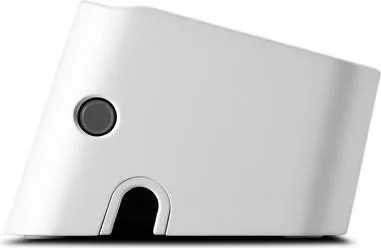
Cord Management Guide - Keeps power cords connected to the unit neat and organized, and can also be wall-
mounted with the surge protector (see below).
Home/Office Surge Protector
Models PM5 -FR, -GR, -IT
PM5U -FR, -GR
PM5T / PM5V -FR, -GR
Protezione da sovratensioni per la casa/
l’ufficio
Modelli PM5 -FR, -GR, -IT
PM5U -FR, -GR
PM5T / PM5V -FR, -GR
Sicurezza
• Non installate questo dispositivo durante un temporale.
• Solo per uso in ambienti chiusi.
• Non installate questo dispositivo in un luogo caldo o eccessivamente umido; non utilizzatelo con un’apparecchiatura
per acquari.
Installazione
1. Collegate il limitatore di sovratensione solo a una presa di corrente con messa a terra.
2. Collegate il cavo di alimentazione del computer e/o di altre apparecchiature elettriche alle prese
del limitatore di
sovratensione.
Nota
: verificate che il dispositivo da proteggere funzioni correttamente prima di collegarlo al limitatore di sovratensione.
3. Per i modelli serie PM5T, collegare il cavo telefonico modulare in dotazione tra la presa telefonica a parete e il
connettore di protezione da sovratensione con il simbolo . Collegare un altro cavo telefonico modulare in
dotazione tra il connettore di protezione da sovratensione con il simbolo e il telefono, il modem o il fax.
4. Tutti i modelli serie PM5V forniscono connettori coassiali. Collegare il cavo coassiale in dotazione dalla
sorgente del cavo al connettore con il simbolo . Collegare un altro cavo coassiale dal connettore con il
simbolo all’apparecchiatura da proteggere (CATV, videoregistratore, televisore, modem via cavo).
5. Per i modelli serie PM5U, inserire il cavo di ricarica USB nel connettore
per caricare smartphone, tablet o altri
dispositivi USB.
6.
Portare l'interruttore di alimentazione sulla posizione “I”.
Interruttore di circuito
-
Quando si verifica un sovraccarico in uscita, l'alimentazione viene automaticamente interrotta,
scollegando tutte le apparecchiature da SurgeArrest. Scollegare tutte le apparecchiature connesse, quindi premere l'interruttore
di circuito
per ripristinare il limitatore di sovratensione. Collegare nuovamente tutte le apparecchiature.
Indicatore di protezione da sovratensioni
-
Quando si collega e accende l'unità, l'indicatore di protezione da
sovratensioni si illumina per indicare che il dispositivo di protezione da sovratensioni è in grado di proteggere
l'apparecchiatura da pericolose sovratensioni elettriche.
se la spia non si accende, il limitatore di sovratensione è danneggiato
e non può offrire protezione. Va restituito seguendo le istruzioni del servizio di assistenza Schneider Electric IT (SEIT).
Spia di messa a terra -
Quando il limitatore di sovratensione è collegato alla presa di corrente ed è acceso, la spia verde
si accende per segnalare che la presa di corrente è dotata di messa a terra; se la spia non si accende, esiste un problema
nella rete di alimentazione dell’edificio. Rivolgetevi a un elettricista qualificato.
Porta di ricarica USB
-
Due comode porte di ricarica USB consentono di alimentare qualsiasi dispositivo abilitato
USB, inclusi smartphone, tablet, videocamere digitali ecc.
La carica intelligente riconosce i dispositivi e ottimizza la
velocità di carica.
Guida per la gestione dei cavi
-
Mantiene i cavi di alimentazione collegati all'unità puliti e organizzati, e può
anche essere montato a parete con il dispositivo di protezione da sovratensioni (vedere di seguito).
Sécurité
• N’installez pas cet appareil pendant un orage.
• Pour utilisation à l’intérieur uniquement.
• N’installez pas le parasurtenseur dans un endroit chaud ou excessivement humide. Ne l’utilisez pas avec un équipement
pour aquarium.
Installation
1. Branchez le parasurtenseur sur une prise mise à la terre uniquement.
2. Branchez le cordon d’alimentation de l’ordinateur et/ou d’un autre équipement électrique sur les prises
du
parasurtenseur.
Remarque
: Assurez-vous que l’appareil à protéger fonctionne correctement avant de le brancher sur le parasurtenseur.
3. Pour les modèles de la série PM5T, raccordez le cordon téléphonique modulaire fourni entre la prise
téléphonique murale et la prise du parasurtenseur marquée . Raccordez un autre cordon téléphonique
modulaire entre la prise du parasurtenseur marquée et le téléphone, le modem ou le fax.
4. Tous les modèles de la série PM5V disposent de connecteurs coaxiaux, raccordez le câble coaxial fourni de la
source du câble au connecteur marqué . Raccordez un autre câble coaxial du connecteur marqué
à l’équipement à protéger (décodeur TV câble, VCR, TV, modem câble).
5. Pour les modèles de la série PM5U, branchez le câble de chargement USB au connecteur
pour charger des smartphones,
tablettes ou d'autres appareils USB.
6. Mettez l'interrupteur
sur la position
“I”
.
Disjoncteur
-
En cas de surcharge en sortie, l’alimentation se coupe automatiquement, déconnectant tous les
équipements du parasurtenseur. Débranchez tous les équipements connectés, puis appuyez sur le disjoncteur pour
réinitialiser le parasurtenseur. Rebranchez ensuite tous les équipements.
Voyant de protection contre les surtensions
-
Quand l'appareil est branché et mis en marche, le voyant de protection
vert Surtension s'allume pour indiquer que le parasurtenseur protège l'équipement connecté contre les surtensions
dangereuses. Si le voyant reste éteint alors que l’appareil est branché et sous tension, celui-ci est endommagé et il ne
protège plus l’équipement. Retournez alors l’appareil conformément aux instructions fournies par le service de support
technique de Schneider Electric IT (SEIT).
Voyant de mise à la terre OK
-
Quand le parasurtenseur est branché et sous tension, le voyant de mise à la terre OK
s’allume (vert) pour indiquer que la prise secteur employée est correctement mise à la terre. Si le voyant de mise à la terre
OK reste éteint, le câblage du bâtiment est défectueux. Demandez à un électricien professionnel de corriger le problème.
Port de chargement USB
-
Deux ports de chargement USB pratiques alimentent les appareils USB, y compris les
smartphones, tablettes, appareils photo numériques, etc.
Le chargement intelligent Smart Charging reconnaît vos
appareils et maximise la vitesse de chargement.
Guide de gestion des câbles
-
Permet d'ordonner les cordons d'alimentation branchés à l'appareil, peut également être
fixé au mur
avec le parasurtenseur (voir ci-dessous).
srg036a
ModelsPM5GR / FR / IT: -
/7
%
Quick check
I'm not a robot
Incorrect answer, please try again.
Chat with your APC SurgeArrest Essential 5-Outlet manual using AI
Get instant AI answers from your APC SurgeArrest Essential 5-Outlet manual
Ask anything about the APC SurgeArrest Essential 5-Outlet. Answers come from this manual, with the pages they are based on.
Ask a Question
0/1000
Do you recommend SurgeArrest Essential 5-Outlet?
YesNo
0
Julia Weber
6 months ago
Does the surge protection component have a warranty, and how do I know if it is still functioning correctly?
0
Manual.ly
6 months ago
The surge protection is covered by a 20-year warranty under proper use conditions in Germany. The unit features LEDs that remain on when the protection circuit is active. This visual signal confirms that the device is protecting your electronics. If the LED goes dark, the protection may have triggered and the unit needs replacement. Please keep your order receipt for warranty validation support.
M: qwen/qwen3.5-flash-20260224
M: qwen/qwen3.5-flash-20260224
Frequently Asked
Questions
A
The unit has a joule rating of 918 joules which indicates its capacity to absorb energy from power spikes efficiently.
Is this answer helpful?
A
The cord length is 1.8 meters providing flexibility in placement for optimal convenience during setup.
Is this answer helpful?
A
Select models like the PM5U series include USB charging ports for smartphones and tablets with smart charging technology.
Is this answer helpful?
A
Yes, the warranty covers defects in materials for the original owner and lasts twenty years in Germany or two to five years elsewhere.
Is this answer helpful?
A
No, do not use with aquarium equipment due to safety risks associated with water and electrical connections.
Is this answer helpful?
A
If the surge protection indicator does not illuminate, the unit may be damaged and is no longer capable of protecting your equipment.
Is this answer helpful?
A
Unplug all connected equipment, press the circuit breaker button to reset the unit, then re-plug all equipment safely.
Is this answer helpful?
M: qwen/qwen3.5-flash-20260224
Advantagesand
Disadvantages
Advantages
Robust 918 joule surge protection rating absorbs energy effectively.
Long 1.8 meter power cord provides flexible placement options.
USB charging ports on select models for convenient device charging.
Circuit breaker prevents damage from overload conditions automatically.
Indicator lights confirm proper operation and grounding status.
VS
Disadvantages
Only covers specific models under the Equipment Protection Policy.
Registration required within ten days for warranty eligibility.
Not suitable for outdoor use or humid environments.
Data recovery does not cover software restoration costs.
Grounding check light may remain off if building wiring is faulty.
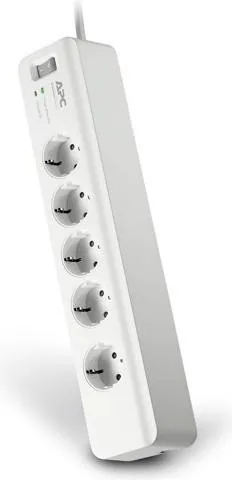
Securing home electronics requires reliable protection against surges. The APC SurgeArrest Essential 5-outlet Surge Protection 1.8m offers defense to keep devices running smoothly. It handles electrical spikes effectively, ensuring equipment stays safe from damage. With five outlets, connect appliances without clutter. The unit features a 1.8 meter cord for flexibility. It boasts a 918 joule rating for energy absorption during transients.
Select models like the PM5U series include USB charging ports for smartphones. Smart charging recognizes devices and maximizes speed for tablets. Indicator lights inform you of status. A green surge protection light confirms the unit works. If off, the unit may need replacement. A ground OK indicator checks wiring. If dark, check for wiring issues in your building.
Safety protocols are a priority. It is indoor use only. Do not install during storms. Avoid hot or moist locations. Do not use with aquarium equipment. A circuit breaker shuts off power during overload. Reset the unit after unplugging devices. Consulting the APC SurgeArrest Essential 5-outlet Surge Protection 1.8m Manual provides insight into specifications and usage limits for safe application.
The warranty covers defects for the original owner. In Germany coverage lasts twenty years, others span two to five years. The Equipment Protection Policy may offer reimbursement for damaged electronics if registered. Registration within ten days is required on the web site. Ensure connected equipment has a CE mark. Using other adapters can void coverage. Reimbursement is limited to dollar limits.
This protector balances performance with use. Compact dimensions suit desks. Proper grounding is essential for lights. Consult an electrician if dark. Adhere to warnings for reliability. Protect your investment with trusted brand APC. EMI rejection levels are less than 40 db. Protection applies only to specific models listed in the policy.
Installation involves plugging into a grounded outlet. Connect computer and equipment to protected outlets. Connect telephone or coaxial cables for data models. The cord management guide keeps cords neat. It can be wall-mounted. Keep product free from dust. Unplug equipment before resetting the circuit breaker.
Data recovery services exist under terms but exclude software. The Policy limits liability to repair costs or fair market value. Follow steps to avoid damage or injury. This ensures your setup remains secure and functional.




Julia Weber
6 months ago
Does the surge protection component have a warranty, and how do I know if it is still functioning correctly?
Manual.ly
6 months ago
The surge protection is covered by a 20-year warranty under proper use conditions in Germany. The unit features LEDs that remain on when the protection circuit is active. This visual signal confirms that the device is protecting your electronics. If the LED goes dark, the protection may have triggered and the unit needs replacement. Please keep your order receipt for warranty validation support.