
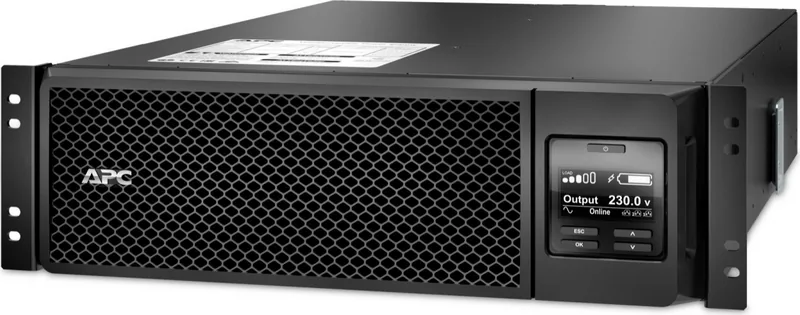
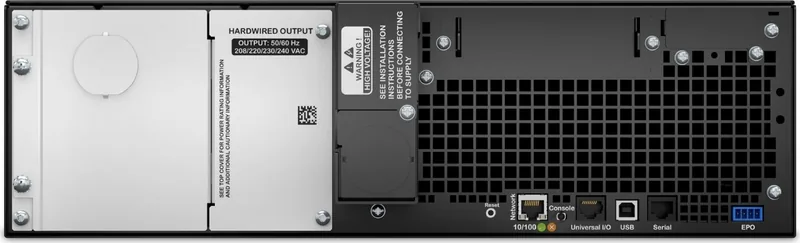
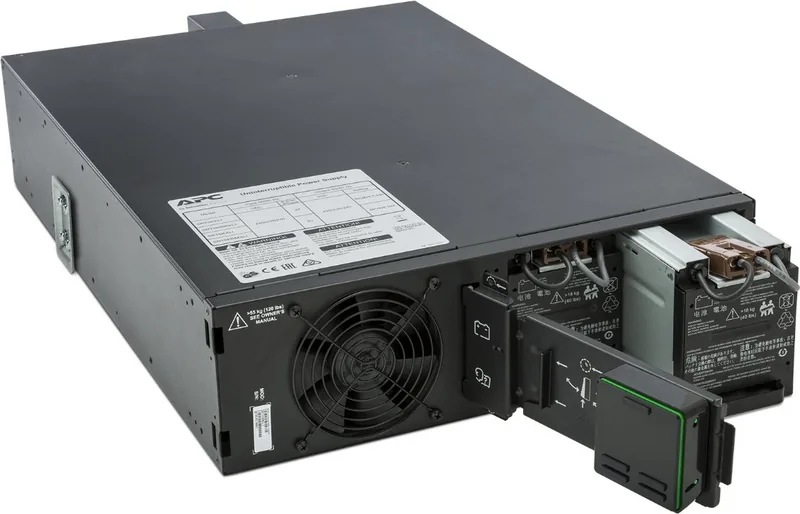
APC Smart-UPS SRT 5000VA Manual
PDF manual · 2 Pages
English



Quick check
Incorrect answer, please try again.
Chat with your APC Smart-UPS SRT 5000VA manual using AI
Get instant AI answers from your APC Smart-UPS SRT 5000VA manual
Ask anything about the APC Smart-UPS SRT 5000VA. Answers come from this manual, with the pages they are based on.
Ask a Question
Do you recommend Smart-UPS SRT 5000VA?
Yes NoFrequently Asked Questions
Install it indoors in a restricted-access area. Keep the unit away from direct sunlight, excessive dust, moisture, liquids, and blocked ventilation openings. Allow adequate clearance for airflow and service access.
Is this answer helpful?
A qualified electrician should perform all wiring, especially hardwired input and output connections. Installation must follow applicable electrical codes, use correctly sized conductors, and include proper grounding and strain relief.
Is this answer helpful?
Yes. Internal batteries can continue to supply hazardous energy even when AC and DC power sources are disconnected. Before service, turn off the input breaker, remove internal batteries, and disconnect external battery modules.
Is this answer helpful?
Typical battery life is two to five years. High ambient temperatures, poor utility power quality, and frequent short-duration discharges can reduce service life. Replace batteries promptly when the UPS signals that replacement is needed.
Is this answer helpful?
Use only the same battery type and quantity as the original installation. Remove rings, watches, and other jewelry, use insulated tools, and avoid opening, burning, or damaging batteries. Recycle used batteries responsibly.
Is this answer helpful?
Install external battery packs at the bottom of the rack. Mount the UPS above them, and place peripheral equipment above the UPS. This arrangement helps maintain a safer, more stable rack configuration.
Is this answer helpful?
Advantages and Disadvantages
Advantages

- Rack-oriented 3U design supports organized deployment in professional equipment enclosures.
- Supports external battery units, with the UPS able to recognize up to 10 connected battery packs.
- Clear safety guidance covers ventilation, grounding, hardwiring, shutdown, and battery replacement.
- Sealed lead-acid batteries are maintenance-free during normal operation and handling.
- Indoor, restricted-access installation guidance supports controlled IT and electrical environments.
Disadvantages

- The UPS and battery modules are heavy, requiring safe lifting practices and careful rack installation.
- Hardwired connections must be completed by a qualified electrician in accordance with local regulations.
- Battery life can decline because of heat, unstable utility power, or frequent short discharge cycles.
- The unit can retain hazardous electrical energy after disconnection if batteries remain connected.
- External battery packs require additional rack space and must be installed below the UPS.
Product Specification
Type
Rackmount
Classification
VFI (Online)
Apparent Power
5,000 VA
Real Power
4,500 W
Voltage
208-240 V
Input
2 x hardwired (3-wire)
Outputs
2 x hardwired (3-wire)
Interfaces
USB, LAN, serial (RJ45)
Data Line Protection
N/A
Runtime
11.7 min (50%), 4 min (100%)
Charging Time
1.5 h
Weight
123 lb
Dimensions (W x H x D)
17.01 x 5.12 x 28.31 in
Rack Units
3U
Special Features
LCD
Manufacturer Warranty
three years
Product Description
APC Smart-UPS SRT 5000VA Rack 3U Manual
The APC Smart-UPS SRT 5000VA Rack 3U is designed for demanding IT environments where dependable power protection, careful installation, and disciplined maintenance are essential. Its rack-mount format helps data rooms, network closets, and business-critical systems organize backup power within a structured equipment enclosure. Before installation, consult the APC Smart-UPS SRT 5000VA Rack 3U Manual to understand the required safety procedures, electrical conditions, and battery-handling practices.
Installation and handling priorities
This UPS is a heavy electrical unit, so safe lifting methods are important from the first stage of deployment. Battery modules should be removed before mounting the UPS or external battery packs in a rack. When external battery packs are used, they belong at the bottom of the rack, with the UPS installed above them. Peripheral equipment should be placed above the UPS to support a stable rack layout.
The unit is intended for indoor, restricted-access locations. Keep it away from direct sunlight, excessive dust, moisture, and liquids. Unblocked ventilation openings and sufficient clearance around the chassis help maintain proper airflow. These precautions support reliable operation and reduce the risk of overheating.
Electrical and shutdown safety
All wiring must comply with applicable electrical regulations and should be completed by a qualified electrician. Never work alone in hazardous conditions. For hardwired installations, ensure every connected high-voltage and low-voltage circuit is switched off and free of voltage before making connections. Wiring openings must be covered, and cables need suitable strain relief.
A UPS can retain hazardous energy because of its batteries, even after it has been disconnected from AC and DC sources. Before servicing, verify that the input circuit breaker is off, internal batteries have been removed, and external battery pack modules are disconnected. Proper grounding is equally important because the UPS grounding conductor carries leakage current from connected equipment.
Battery care and practical maintenance
APC uses sealed, maintenance-free lead-acid batteries. Typical battery life is two to five years, although high temperatures, poor utility power, and frequent short discharges may shorten that period. Replace batteries promptly when the UPS indicates that replacement is required, and use only the same battery type and quantity originally installed.
Remove jewelry before battery work and use insulated-handled tools. Batteries must never be burned, opened, or damaged because they can release harmful electrolyte and may create serious safety hazards. Used batteries and packaging should be recycled responsibly.
Note: Keep the product model and serial number available for maintenance planning, support requests, and battery replacement coordination.
Search for 67,706 Manuals online


Type-in Brand or Model