
APC Smart-UPS SRT 3000VA RM Manual
PDF manual · 12 Pages
English



Quick check
Incorrect answer, please try again.
Chat with your APC Smart-UPS SRT 3000VA RM manual using AI
Get instant AI answers from your APC Smart-UPS SRT 3000VA RM manual
Ask anything about the APC Smart-UPS SRT 3000VA RM. Answers come from this manual, with the pages they are based on.
Smart-UPS SRT 3000VA RM Maintenance Schedule
Configure the UPS to perform automatic self-tests. The default interval is every 14 days after startup.
Charge XLBPs immediately after receipt or first installation and at least every 6 months during storage or non-use.
Replace the battery at least every 10 years or at the end of its useful life, whichever comes first.
Free maintenance reminders
Timed to your purchase date. Always free, unsubscribe anytime.
Ask a Question
Do you recommend Smart-UPS SRT 3000VA RM?
Yes NoFrequently Asked Questions
The battery typically lasts between 8 to 10 years depending on usage and environment.
Is this answer helpful?
Yes, the 5-year warranty applies but terms may vary by region support center.
Is this answer helpful?
Yes, it supports both tower and rackmount installation modes seamlessly.
Is this answer helpful?
Yes, it supports up to 10 external battery packs for extended runtime.
Is this answer helpful?
Via the LCD display locally or through remote network management software.
Is this answer helpful?
It depends on the model suffix NC which indicates the NMC3 card is installed.
Is this answer helpful?
It provides 220V, 230V, or 240V AC depending on the regional configuration setting.
Is this answer helpful?
Advantages and Disadvantages
Advantages

- Extended Li-ion battery life typically 8 to 10 years
- 2U Rack or Tower mounting flexibility for server rooms
- Network management card support for remote monitoring
- Controllable outlet groups for power sequencing devices
- On-line double conversion protects against all power anomalies
Disadvantages

- Professional use only not suitable for consumer electronics
- Unit weight is significant at 25 kilograms empty
- Requires qualified electrician for hardwiring installation
- External battery packs add cost and complexity
- Warranty only valid if purchased within 10 days and registered online
Product Specification
Type
Rackmount
Classification
VFI (Online)
Apparent Power
3000 VA
Real Power
2700 W
Voltage
230 V
Input
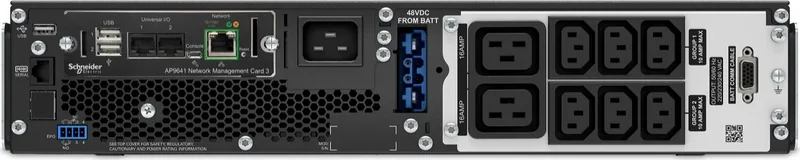
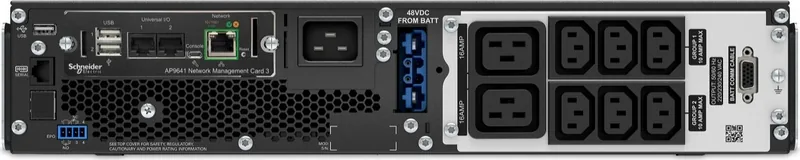
1x C20
Outputs
6x C13, 2x C19
Interfaces
USB-A, Serial (RJ-45)
Data Line Protection
N/A
Weight
48.50 lbs
Dimensions (WxHxD)
17.01x3.35x20.00 in
Height Units
2 RU
Features
LCD, including UPS Network Management Card (1x LAN, 2x USB-A, 2x Sensor), including Li-Ion Battery, IP20
Manufacturer Warranty
5 years
Product Description
Protecting Your Critical Business with APC Smart-UPS SRT 3000VA RM 230V
Maintaining power continuity is absolutely essential for the modern data center and business environment. The APC Smart-UPS SRT 3000VA RM 230V offers robust protection against serious power disturbances. This unit is specifically designed for professional applications where uninterrupted reliability is absolutely paramount. It features an integrated Li-ion battery that provides a significantly longer operational life compared to traditional lead-acid alternatives commonly found in older models. The design focuses on minimizing downtime and protecting expensive hardware from voltage surges.
Power Stability and Efficiency
The on-line double conversion technology ensures clean power delivery to your sensitive electronics. It filters out voltage sags, surges, and frequency variations before they ever reach your connected equipment. The 3000VA capacity supports significant loads without unnecessary strain during peak usage times. Advanced monitoring capabilities allow system administrators to track performance metrics remotely through network interfaces. The output voltage ranges typically accommodate 230V standards for regions utilizing that grid configuration efficiently.
Physical Design and Connectivity
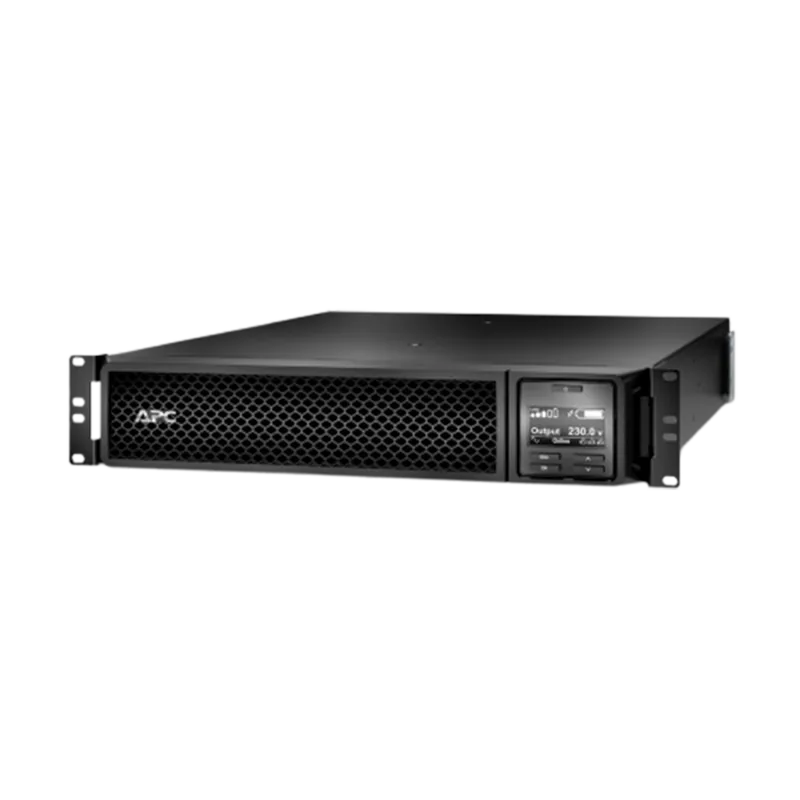
This system fits into a standard 2U rackmount configuration found in server rooms. Tower installation is also possible for more flexible deployment options in server closets. The front panel includes a clear LCD display for real-time status monitoring and diagnostics. Users can manage outlets via USB or serial ports locally when network access is restricted. Network connectivity is available through the SmartSlot for remote management cards to enable advanced control and detailed logging.
Safety and Maintenance
Lithium-Ion chemistry offers superior performance and longevity over time. The battery typically lasts between 8 to 10 years under normal operating conditions. Regular self-tests keep the system vigilant against potential failures before they occur. Safety mechanisms prevent dangerous situations like overcharging and overheating during extended outages. Always consult the manufacturer manual for specific wiring instructions regarding grounding and cabling. Controllable output groups allow for power sequencing of connected devices to prevent inrush current issues.
Conclusion and Notes
This unit represents a significant investment in infrastructure security and data protection. It supports external battery packs for extended runtime during prolonged grid outages. The 5-year warranty covers material defects and ensures manufacturer support availability. Always follow manufacturer guidelines strictly for installation to ensure optimal safety. Ensure proper ventilation around the chassis to maintain efficiency and prevent thermal issues. Emergency Power Off functionality is also available for critical shutdown scenarios in dangerous situations. Contact support for specific troubleshooting needs regarding the firmware installation process and update schedules for your specific hardware unit.
Search for 67,706 Manuals online


Type-in Brand or Model