
APC Smart-UPS 1500VA RM Manual
PDF manual · 8 Pages
English



Quick check
Incorrect answer, please try again.
Chat with your APC Smart-UPS 1500VA RM manual using AI
Get instant AI answers from your APC Smart-UPS 1500VA RM manual
Ask anything about the APC Smart-UPS 1500VA RM. Answers come from this manual, with the pages they are based on.
Ask a Question
Do you recommend Smart-UPS 1500VA RM?
Yes NoFrequently Asked Questions
It provides battery backup and power conditioning for rack-mounted equipment such as servers, switches, and storage devices. It helps keep systems online during outages and protects against unstable power conditions.
Is this answer helpful?
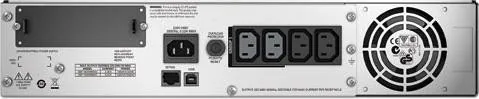
These ports allow the UPS to communicate with computers or management systems. They are useful for monitoring status, configuring shutdown behavior, and tracking battery conditions more easily.
Is this answer helpful?
No. It should be installed according to rack safety guidance, typically below peripheral equipment, with batteries and heavy components handled carefully. Proper placement helps prevent damage and improves stability.
Is this answer helpful?
Yes. The Smart-UPS family can work with external battery packs to extend runtime. This is helpful when connected equipment needs longer backup power during extended outages.
Is this answer helpful?
Battery life is usually two to five years, depending on temperature, power quality, and discharge frequency. The battery should be replaced when the UPS signals replacement or if it shows signs of failure.
Is this answer helpful?
Use a grounded outlet, avoid surge protectors and extension cords, keep vents unobstructed, and install the UPS indoors away from moisture, dust, and direct sunlight.
Is this answer helpful?
Advantages and Disadvantages
Advantages

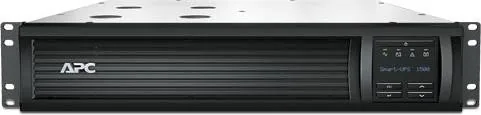
- Compact 2U rack-mount design fits efficiently into server cabinets.
- USB and serial connectivity support flexible monitoring and control.
- Controlled outlet groups help manage startup and shutdown behavior.
- Supports battery expansion for longer runtime when needed.
Disadvantages

- Heavy hardware requires careful handling during installation.
- Indoor-only use limits deployment to controlled environments.
- Battery replacement and maintenance must be monitored regularly.
- Incorrect rack placement can increase risk and reduce reliability.
Product Specification
Type
Rackmount
Classification
VI (Line-Interactive)
Apparent Power
1500VA
Active Power
1000W
Voltage
230V
Input
1x C14
Outputs
4x C13
Interfaces
USB, RJ-45 serial
Runtime
26min (50%), 7min (100%)
Charging Time
3h
Weight
63.15lb
Dimensions (WxHxD)
17.01x3.50x17.99in
Height Units
2U
Depth 19" Rack Mount
N\/A
Special Features
LCD, rack-mountable
Manufacturer's Warranty
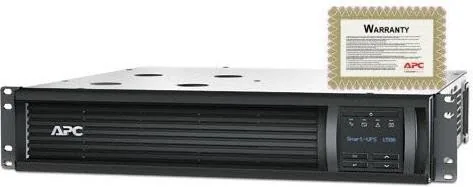
six years
Product Description
APC Smart-UPS 1500VA RM, USB/serial
The APC Smart-UPS 1500VA RM is a practical rack-mount power protection solution for small servers, networking gear, and business-critical electronics. Built in a compact 2U format, it fits neatly into rack environments where space matters and uptime is essential. Its role is simple but important: keep equipment running through outages, stabilize power delivery, and give administrators time to shut systems down safely.
What makes this model especially useful is its balance of capacity and control. The 1500VA rating is well suited for mixed IT loads, while the USB/serial connectivity offers flexible monitoring and communication with connected systems. For environments that need smarter power management, the unit includes a display interface, status indicators, and support for controlled outlet groups, helping teams sequence power and reduce unnecessary drain on battery reserves.
Installation is designed around rack best practices. The UPS should be mounted below peripheral devices, with heavier battery components handled carefully and placed in the correct order. It is also intended for indoor use only, on grounded circuits, and without extension cords or surge strips that can interfere with protection. These guidance points are not just formalities; they help preserve reliability and reduce risk in busy server rooms.
Battery care is another key part of the experience. Like most enterprise UPS systems, service life depends on temperature, power quality, and how often the unit discharges. The Smart-UPS line is built to support replacement batteries and external battery packs, giving organizations a path to extend runtime as needs grow. That makes the 1500VA RM a sensible choice for users who want both everyday protection and room for future expansion.
Notes
- Best suited for rack-based IT and networking setups.
- Keep airflow clear and install in a grounded environment.
- Replace aging batteries on schedule to maintain performance.
- Use controlled outlet groups to manage power efficiently.
- Follow rack placement rules to protect both the UPS and connected devices.
Search for 67,706 Manuals online


Type-in Brand or Model