
APC Network Management Card 2 Manual
PDF manual · 9 Pages
English



Quick check
Incorrect answer, please try again.
Chat with your APC Network Management Card 2 manual using AI
Get instant AI answers from your APC Network Management Card 2 manual
Ask anything about the APC Network Management Card 2. Answers come from this manual, with the pages they are based on.
Ask a Question
Do you recommend Network Management Card 2?
Yes NoFrequently Asked Questions
It connects a compatible APC UPS to an IP network for remote monitoring, configuration, alerts, logging, and control. Administrators can review battery and load data, manage supported outlet groups, and respond to power events from a web interface, CLI, or SNMP platform.
Is this answer helpful?
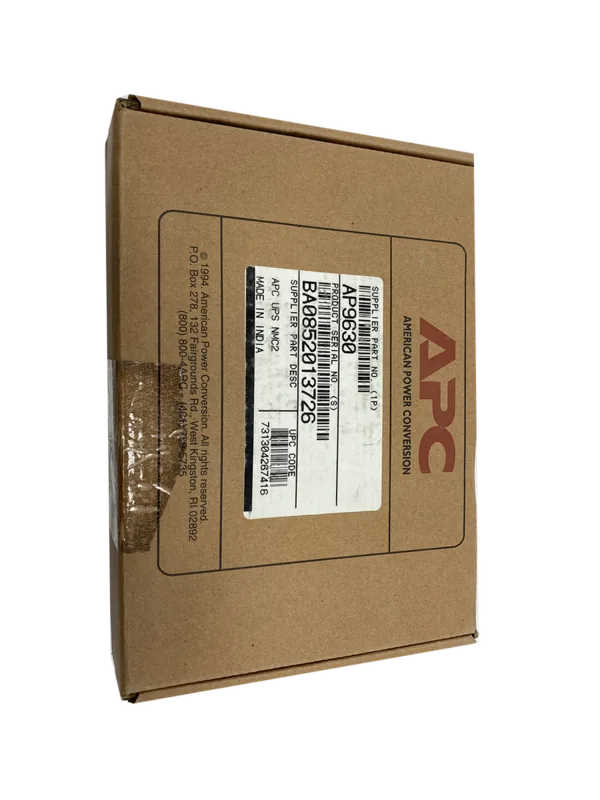
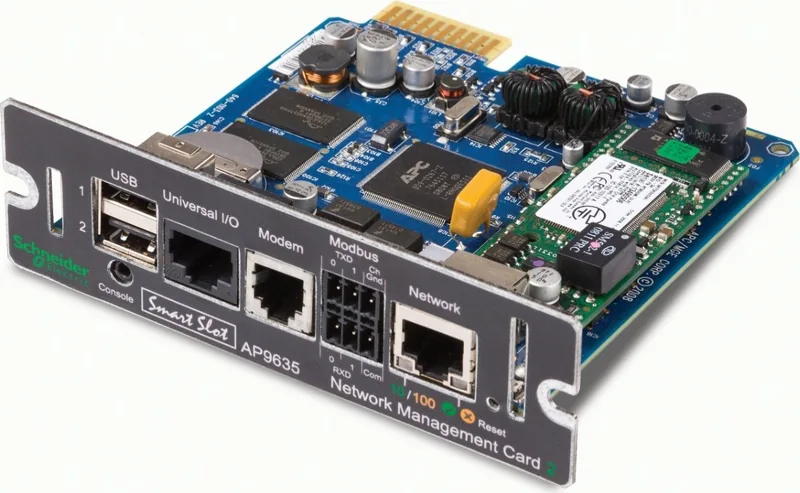
The range includes AP9630, AP9631, and AP9635. AP9630 supplies core network management. AP9631 adds two USB ports and two universal I/O ports. AP9635 adds USB, one universal I/O port, modem access for out-of-band management, and Modbus RTU through RS485.
Is this answer helpful?
Yes. The card supports IPv4 and IPv6 addressing. IPv6 settings can be configured manually, automatically, or through DHCP, depending on network requirements.
Is this answer helpful?
Yes. It can generate event log entries and send notifications through email, Syslog, and SNMP traps. Alerts can be configured for power, battery, environmental, communication, and other monitored events.
Is this answer helpful?
Yes. PowerChute Network Shutdown integration supports controlled shutdowns of registered systems during prolonged power events. Shutdown timing can be coordinated with available battery runtime and supported outlet-group settings.
Is this answer helpful?
Security features include local user roles, password management, HTTPS, SSH, RADIUS authentication, firewall configuration, TLS certificates, SSH host keys, and 802.1X network access controls. Default login credentials should be changed during initial setup.
Is this answer helpful?
Advantages and Disadvantages
Advantages

- Provides remote UPS monitoring, control, event logs, and configurable alarms.
- Supports IPv4, IPv6, SNMP, HTTPS, SSH, Syslog, Modbus TCP/IP, and BACnet/IP.
- Works with PowerChute Network Shutdown for coordinated, orderly server shutdowns.
- AP9631 and AP9635 support USB-based firmware updates and environmental accessories.
- Role-based access, RADIUS, firewall, TLS, SSH, and 802.1X options strengthen security.
Disadvantages

- Compatibility depends on the UPS model and available SmartSlot support.
- Some functions, such as outlet groups and UPS I/O, are not available on every UPS.
- AP9630 lacks USB ports and universal I/O support offered by higher models.
- Default credentials require immediate replacement to avoid security risks.
- The web interface does not operate through a proxy server.
Product Specification
Type
Network card
Dimensions
4.76 x 4.25 x 1.5 in
Weight
4.94 oz
Special features
includes temperature sensor
Manufacturer warranty
two years
Product Description
APC Network Management Card 2: Smarter UPS Control
The APC Network Management Card 2 adds secure, network-based visibility and control to compatible APC UPS systems. Designed for SmartSlot-equipped devices, it helps IT teams supervise power conditions, battery health, load levels, outlet groups, and network status from a centralized interface. For administrators looking for practical setup and operating guidance, the APC Network Management Card 2 Manual keyword points to the core functions that make this card valuable in server rooms, branch offices, and data center environments.
Remote Monitoring and UPS Management
With web, command-line, and SNMP access, the card allows authorized users to review UPS performance without being physically present. Status information can include input and output values, battery capacity, remaining runtime, temperature, event activity, and alarms. The interface also supports controls for restarting, turning on, shutting down, or placing supported UPS equipment into sleep mode.
For UPS models with switched outlet groups, administrators can sequence startup and shutdown actions for connected equipment. This can help protect critical loads by turning off nonessential devices during an extended battery event, preserving available runtime for servers, storage, or communications hardware.
Flexible Network and Automation Support
The APC Network Management Card 2 supports IPv4 and IPv6 configuration, with DHCP, BOOTP, and manual addressing options. It works with common management protocols including HTTP, HTTPS, SSH, SNMP, Syslog, Modbus TCP/IP, and BACnet/IP. These capabilities make it suitable for integration with monitoring platforms, building management systems, and broader infrastructure management workflows.
Event notifications can be delivered through email, Syslog, and SNMP traps, allowing teams to respond quickly to changes such as a low battery, overloaded UPS, environmental threshold breach, or communication issue. PowerChute Network Shutdown support also helps coordinate orderly shutdowns of connected systems when utility power is unavailable for too long.
Model Differences and Environmental Monitoring
The AP9630 provides the core network management features. The AP9631 adds two USB ports and two universal I/O ports for supported temperature, humidity, input-contact, and relay accessories. The AP9635 includes USB ports, one universal I/O port, modem-based out-of-band access, and Modbus RTU support through RS485.
Security options include local user roles, password controls, HTTPS, SSH, RADIUS, firewall settings, and 802.1X configuration. Multiple account types allow organizations to separate full administration from device-only, read-only, and network-focused access.
Note: Change default credentials immediately, configure secure protocols, and confirm UPS compatibility before installation. Firmware and configuration exports can simplify consistent deployments across multiple cards.
Search for 67,706 Manuals online


Type-in Brand or Model