
APC NBAC0303 Manual
PDF manual · 2 Pages
English



Quick check
Incorrect answer, please try again.
Chat with your APC NBAC0303 manual using AI
Get instant AI answers from your APC NBAC0303 manual
Ask anything about the APC NBAC0303. Answers come from this manual, with the pages they are based on.
Ask a Question
Do you recommend NBAC0303?
Yes NoFrequently Asked Questions
Power over Ethernet allows electrical power to be sent along with data over a single Ethernet cable, removing the need for separate power lines.
Is this answer helpful?
Plug the appliance ethernet into the LAN-DC port of the injector, then connect the LAN port to your network hub or wall jack.
Is this answer helpful?
Amber means power on or detection mode, while green indicates full power injection and successful startup of the connected device.
Is this answer helpful?
Yes, it is designed for desktop use, but ensure the outlet is grounded to maximize safety during continuous electrical operation.
Is this answer helpful?
The amber LED will indicate detection mode or power issues, alerting you to check the power cord and outlet connection.
Is this answer helpful?
Standard ethernet cables will work, but verify lengths match your layout needs for best physical connectivity results.
Is this answer helpful?
Customer support and warranty details are available at the APC website, ensuring access to official documentation and help.
Is this answer helpful?
Advantages and Disadvantages
Advantages

- Simplifies power distribution by combining data and power over single Ethernet cable.
- Clear two-color LED status indicator for easy troubleshooting and monitoring.
- RoHS compliant power cords ensure environmental safety and regulatory compliance.
- Eliminates need for separate power adapters for network endpoint devices.
- Straightforward installation process requiring minimal technical expertise.
Disadvantages

- Single port configuration limits connection to one network device at a time.
- Requires a grounded power outlet to ensure maximum safety during operation.
- Cable lengths may not be sufficient for complex layouts without extension.
- Power output is fixed at 48 VDC and not adjustable by the user.
- Outdated model may have less compatibility with modern high-power devices.
Product Specification
Function
PoE Injector (1x Data, 1x Data/PoE)
Type
Standalone
Network Ports
1x RJ-45
Speeds
1x RJ-45 (10/100Base-T)
PoE
1x RJ-45 PoE
Backplane
N/A
Configuration
unmanaged
Cooling
passive
Dimensions (W x H x D)
2.36x1.26x4.02 inches
Weight
0.37 lbs
Color
Black
Manufacturer Warranty
2 years
Product Description
APC Desktop PoE Injector Overview
In office environments, powering network devices often requires running separate electrical cables alongside data lines. This can complicate setup and increase clutter, leading to tripping hazards. The APC Desktop PoE Injector offers a streamlined solution by delivering both power and data over a single Ethernet connection. This device is ideal for powering switches, access points, and cameras from the network infrastructure without needing a nearby electrical outlet. It simplifies deployment and reduces dependency on local power sources.
How It Works
This equipment functions effectively as a bridge between your network switch and powered devices. It injects electrical current into the data stream without affecting signal integrity. Users simply connect their specific device to the LAN-DC port and link the main LAN port to the network switch hub. The system ensures connected appliances receive 48 VDC output while maintaining full network connectivity through the single physical link. This method eliminates the need for complex power adapters for every individual endpoint device connected to the network infrastructure.
Status Monitoring
Visual feedback is critical for efficient IT troubleshooting across the room. This injector features a two-color LED that indicates operational status clearly on the front panel. An amber light signals that the unit is powered on and in detection mode waiting for a device to connect. When the connection is successful and the device receives full power, the LED turns green to confirm operation. This visual indicator helps users quickly identify connection issues or power failures without needing external diagnostic tools to check status remotely.
Components and Package
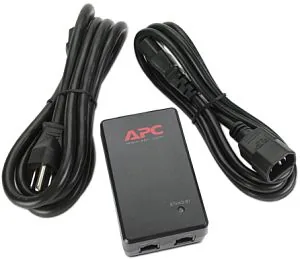
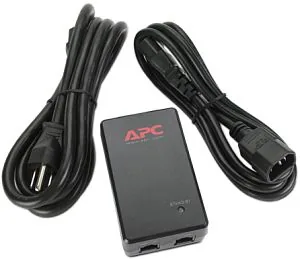
The product package includes essential items for immediate installation and operation. Users receive the PoE Injector unit along with a dedicated power supply unit for conversion. Two different power cords are provided to support various electrical outlet standards globally or regionally. One cord connects to interfaces while the other supports NEMA standards. All cables are RoHS compliant to ensure environmental safety and regulatory adherence during use. This ensures you are ready to plug in regardless of your location or country.
Installation Details
The installation process is straightforward for anyone with basic IT skills. You will need a standard Ethernet cable for the data connection and a power cord for electricity input. Ensure the power outlet is properly grounded to maximize safety during continuous operation. The included cords are typically long enough for desk configurations, but verify lengths match your layout needs. Always connect the appropriate cord type depending on the regional outlet standard available for your office space.
Key Specifications
- Input Voltage: 100-250 VAC
- DC Output: 48 VDC
- Port Type: 1x RJ45
- Compliance: RoHS Compliant Standards apply here
This guide provides essential guidelines for deploying this hardware effectively in various environments. By simplifying the power distribution process, teams can focus on network performance rather than electrical logistics. This tool remains a versatile component for basic PoE extension in legacy and modern network setups. It ensures reliable uptime for connected equipment regardless of location or distance from the main power source. This ensures stable connectivity for all connected devices.
Search for 67,706 Manuals online


Type-in Brand or Model