


APC Metered Rack PDU Manual
PDF manual · 28 Pages
English



Quick check
Incorrect answer, please try again.
Chat with your APC Metered Rack PDU manual using AI
Get instant AI answers from your APC Metered Rack PDU manual
Ask anything about the APC Metered Rack PDU. Answers come from this manual, with the pages they are based on.
Ask a Question
Do you recommend Metered Rack PDU?
Yes NoFrequently Asked Questions
The unit supports vertical mounting using toolless pegs or vertical brackets, and 1U horizontal mounting with supplied horizontal brackets and cage nuts. It also supports recessed horizontal mounting. Use only the supplied screws and follow rack U-space alignment guidance.
Is this answer helpful?
You can set TCP/IP using DHCP/BOOTP, the APC Device IP Configuration Wizard (Windows), local serial console, or remote ARP+Ping+Telnet provisioning. The PDU defaults to DHCP & BOOTP; if no server is available, use the serial console or APC wizard to assign a static IP.
Is this answer helpful?
Access options include the Web interface (HTTP/HTTPS), Telnet, SSH (if enabled), SNMP, FTP/SCP for file transfer, and a local serial control console. Administrator-level actions require proper credentials and appropriate network security settings.
Is this answer helpful?
Use a local serial connection and terminal settings (9600,8,N,1). Press Reset twice during the serial session when the status LED flashes to temporarily reset credentials to apc/apc, then log in and change the administrator username and password before resuming normal operation.
Is this answer helpful?
Download firmware from apc.com/tools/download and transfer it to the PDU via FTP or SCP. Do not interrupt the transfer; the PDU will reboot after a successful upgrade. Follow the User’s Guide file-transfer procedures for a safe update.
Is this answer helpful?
The front panel shows aggregate current per bank/phase on the digital display. Bank/phase LEDs indicate normal (green), warning (yellow), or alarm (red). Status and link LEDs reflect power and network conditions; flashing colors indicate BOOTP/DHCP activity or hardware issues.
Is this answer helpful?
No. APC explicitly advises against using this product in life-support or direct patient care applications unless written assurances and liability protections acceptable to APC are provided; the product is not intended or certified for such critical uses.
Is this answer helpful?
Advantages and Disadvantages
Advantages

- Compact 1U, 16A form factor fits standard EIA-310 racks and NetShelter enclosures for flexible vertical or horizontal installation.
- Onboard metering with front-panel display and configurable high/low alarms gives immediate visibility into aggregate current usage.
- Multiple access methods (Web/HTTPS, Telnet, SSH, SNMP, FTP/SCP, serial console) support local and remote management and monitoring.
- Simple TCP/IP provisioning via DHCP/BOOTP, APC Device IP Configuration Wizard, or ARP/Ping/Telnet for rapid network setup.
- Firmware upgrade support and event log access via FTP/SCP enable maintenance and auditability.
Disadvantages

- Default credentials (apc/apc) pose an immediate security risk if not changed during initial setup.
- Web interface HTTP default lacks encryption unless HTTPS is explicitly enabled and configured.
- Basic metering only shows aggregate current per bank/phase; it does not provide per-outlet switching or per-outlet metering.
- Some discovery and setup tools require disabling local software firewalls, complicating initial deployment.
- Not intended or certified for direct life-support or critical medical device applications.
Product Specification
Outputs
8x C13
Input
1x C20 (16A)
Input voltage
240V
Power
2400W (max.)
Additional ports
1x RJ-11, 1x RJ-45 (100Mbps)
Cable length
98.43in
Dimensions (WxHxD)
17.48x1.77x4.02in
Weight
3.11lb
Features
Display
Manufacturer warranty
two years
Product Description
APC Metered Rack PDU, 1HE, 16A Manual
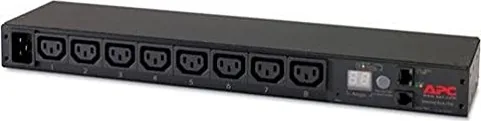
The APC Metered Rack PDU, 1HE, 16A is a compact, rack-mountable power distribution unit designed to give data center and server-rack administrators clear, reliable insight into power consumption and basic network-enabled management. The 1U form factor fits standard EIA-310 racks and NetShelter enclosures, offering vertical or horizontal mounting options with toolless pegs or brackets for flexible installation. With a built-in metering sensor, the unit measures aggregate current draw and displays it on a front panel LED screen, while providing alarm thresholds to alert you when consumption crosses configured high or low limits.
This PDU includes an Ethernet port for network connectivity and supports multiple access methods—Web (HTTP/HTTPS), Telnet, SSH, SNMP, FTP/SCP, and local serial console—allowing both local and remote administration. Initial TCP/IP setup can be completed via DHCP/BOOTP, APC’s Device IP Configuration Wizard, ARP/Ping/Telnet remote provisioning, or through a direct serial console session. The web interface supports authenticated access and optional SSL encryption for secure configuration and event log review; SSH encrypts console access when enabled.
Installation guidance emphasizes secure cord retention using provided trays and wire ties, correct grounding, and accessible power plugs. Mounting instructions cover one-U horizontal, recessed, and vertical placements, with notes on cage nuts, supplied screws, and the PDU occupying a single U. The front panel includes bank/phase LEDs, a control button to cycle displays and invert orientation, status/link LEDs, a reset switch, and a serial port for direct console work.
Operational features cover firmware updates (via FTP/SCP), event logging, and password recovery through the serial console. Default administrator credentials are noted as apc/apc; procedures to reset and reconfigure credentials via the reset sequence and serial access are described. The manual also details warranty terms (two-year limited warranty), obtaining service and RMA procedures, and APC’s life-support policy which restricts product use in critical medical applications.
Practical for small racks and distributed IT closets, this PDU balances straightforward metering with network manageability. It is ideal when real-time visibility of rack-level current consumption, simple alarm thresholds, and basic remote access are needed without the complexity or cost of full-featured switched PDUs.
Notes
- Default credentials are apc/apc for administrators unless changed. Change credentials immediately after setup.
- Use the supplied mounting hardware; improper screws may damage rack rails.
- Disable local software firewalls when using the APC discovery wizard.
- Do not interrupt firmware transfers; the unit will reboot when complete.
- APC disclaims use in life-support critical applications.
Search for 67,706 Manuals online


Type-in Brand or Model