
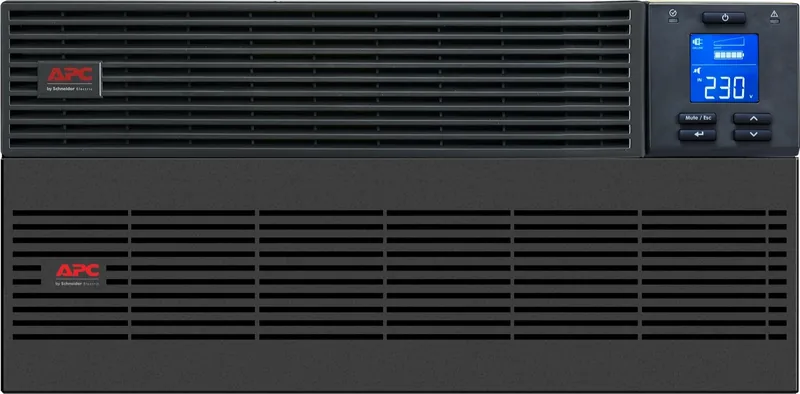
APC Easy UPS SRV 10000VA Manual
PDF manual · 1 Pages
English


Quick check
Incorrect answer, please try again.
Chat with your APC Easy UPS SRV 10000VA manual using AI
Get instant AI answers from your APC Easy UPS SRV 10000VA manual
Ask anything about the APC Easy UPS SRV 10000VA. Answers come from this manual, with the pages they are based on.
Ask a Question
Do you recommend Easy UPS SRV 10000VA?
Yes NoFrequently Asked Questions
Deploy the equipment in a secure location with restricted access. Ensure access is limited to maintenance personnel only. Use locked doors and mark restricted areas clearly. This prevents unauthorized physical access.
Is this answer helpful?
Yes, Schneider Electric strongly recommends updating devices before deployment. Ensure devices have the latest firmware versions available. This reduces vulnerability risks significantly.
Is this answer helpful?
Access to restricted areas must produce a physical or electronic audit trail. This records all personnel access for security incident investigation. Custodians must maintain these logs regularly.
Is this answer helpful?
Deploy the device in a rack or cage that can be locked with a suitable key. This physically prevents access to the front panel. It stops attackers with physical access.
Is this answer helpful?
Visit the Schneider Electric Security Bulletins web page for information. Review security bulletins related to your products regularly. This keeps you informed about new updates.
Is this answer helpful?
Access should be restricted to those who require access to maintain equipment. Restricted areas must display signs for authorized personnel only. Ensure only necessary personnel gain entry.
Is this answer helpful?
Physical access control devices should be tested prior to use and on a periodic basis. A periodic test is recommended annually. This ensures reliability of the security measures.
Is this answer helpful?
Advantages and Disadvantages
Advantages

- Clear physical access control measures to prevent unauthorized entry.
- Strong recommendations for firmware updates before deployment.
- Requirement for audit trails to track security incidents.
- Guidance on securing front panel and console ports.
Disadvantages

- Requires locked doors and restricted access areas.
- Mandates regular testing of access control devices.
- Needs frequent inventory reviews of personnel access.
- May limit general staff access to equipment.
Product Specification
Type
Rackmount
Classification
VFI (On-Line)
Apparent Power
10,000VA
Real Power
10,000W
Voltage
230V
Input
1x Fixed Connection (1PH+N+G)
Outputs
1x Fixed Connection (1PH+N+G)
Interfaces
USB, serial
Data Line Protection
N/A
Backup Time
8.9 min (50%), 2.5 min (100%)
Charge Time
5 h
Weight
171.96 lbs
Dimensions (WxHxD)
17.24x8.66x24.21 in
Features
LCD, IP20
Manufacturer Warranty
2 years
Product Description
Securing Your APC Power Infrastructure
Physical Access Control Measures
Access should be restricted to those who require access to maintain the equipment directly on site. Restricted areas should be clearly marked for authorized personnel only to prevent confusion among visitors. These areas should be secured by locked doors that control entry effectively at all hours to maintain safety standards. Access to the restricted areas should produce a physical or electronic audit trail for tracking movements. This logging is crucial for security incident investigation and accountability regarding who entered the room during normal operations. Custodians must ensure that access logs are kept current and available for review by security teams.
Protecting Device Ports and Firmware
Secure access to the device front panel and console port is vital for system integrity and long-term stability. Install the device in a rack or cage that can be locked with a suitable key or other physical methods. This prevents attackers from accessing the physical ports without authorization to manipulate settings. Attackers with physical access can access the device without authorization to cause damage. Firmware Updates are also necessary before deployment to patch known vulnerabilities. Schneider Electric strongly recommends that, prior to deployment, customers ensure their devices have been updated with the latest firmware versions.
Security Bulletins and Maintenance
Reviewing security bulletins is important for staying informed about potential threats to your system. For information on new and updated security bulletins, visit the Schneider Electric Security Bulletins web page regularly. This proactive step minimizes vulnerabilities in your power management systems effectively. Facilities should give minimum indication of their purpose with no obvious signs identifying the presence of related functions outside. This reduces the risk of targeted attacks based on facility identification and external observation.
Final Security Notes
Physical security must be in place to control physical access to restricted areas containing devices. Devices should be locked behind cabinets or protected by physical restraints preventing unauthorized removal. Personnel who require access must have a valid job function justification to enter zones. Physical access control devices should be tested prior to use and on a periodic basis annually for reliability. Inventory of who has physical access to control devices should be regularly reviewed. Any inappropriate access identified during the review should be promptly removed to ensure safety and compliance.
Introduction
When protecting critical business systems and essential servers, the APC Easy SRV Rackmount 10000VA 230V incl. Battery Module USB/Serial UPS Manual provides essential insights into hardware safety. Power continuity alone is not enough for total data protection. Physical security guarantees your hardware remains safe from unauthorized tampering, theft, or accidental damage. Deploying the equipment in a secure location is the primary defense against physical threats facing your data center. Custodians should secure equipment from unauthorized physical access to maintain operational integrity and data confidentiality.
Search for 67,706 Manuals online


Type-in Brand or Model