
APC Easy UPS SMV Manual
PDF manual · 8 Pages
English



Quick check
Incorrect answer, please try again.
Chat with your APC Easy UPS SMV manual using AI
Get instant AI answers from your APC Easy UPS SMV manual
Ask anything about the APC Easy UPS SMV. Answers come from this manual, with the pages they are based on.
Ask a Question
Do you recommend Easy UPS SMV?
Yes NoFrequently Asked Questions
This unit provides built-in surge protection on battery backup outlets to protect connected devices from voltage spikes and electrical noise.
Is this answer helpful?
Avoid connecting printers to battery backup outlets as they may draw excessive current and damage the unit or drain power too quickly.
Is this answer helpful?
Replace the battery at least every five years or immediately when the UPS indicates the battery is failing or over-temperature.
Is this answer helpful?
Continuous tones and illuminated icons indicate overload. Unplug nonessential equipment to resolve the condition.
Is this answer helpful?
No, this product is intended for indoor use only in temperature and humidity controlled areas to prevent fire or shock.
Is this answer helpful?
It typically takes 4-6 hours to recover to 90 percent capacity after fully charging from the AC power source.
Is this answer helpful?
Review troubleshooting steps first then contact Schneider Electric IT Customer Support if the problem persists for assistance.
Is this answer helpful?
Advantages and Disadvantages
Advantages

- Pure sine wave output protects sensitive electronics from damage effectively.
- LCD display provides real-time status and battery capacity monitoring easily.
- Multiple models available from 750 VA to 3000 VA capacity range.
- Includes management software for unattended system shutdowns reliably.
- Dry contact interface allows integration with external alert systems.
Disadvantages

- Battery replacement required every five years to maintain optimal performance.
- Indoor use only, not suitable for outdoor exposed environments ever.
- Cannot connect high power devices like heaters to backup outlets safely.
- Requires grounded AC power outlet for safe operation always necessary.
- Warranty replacement involves shipping costs depending on regional policies.
Product Specification
Type
Tower
Classification
VI (Line-Interactive)
Voltage
230V
Outputs
6x C13
Interfaces
USB, serial, Dry Contact
Data Line Protection
N/A
Runtime
No data (50%), 2.5min (100%)
Charge Time
4-6h (90%)
Height Units
2U
Features
LCD
Manufacturer Warranty
2 years
Product Description
Understanding Power Protection with the APC Easy UPS SMV Series
Protecting your critical computing equipment requires reliable power supply solutions that shield against disturbances from the utility grid. The APC Easy UPS SMV series offers robust protection tailored for personal computers and small workstations needing stability. Designed specifically for indoor environments, these uninterruptible power supplies ensure continuous operation during sudden outages or voltage fluctuations. Users often consult resources similar to the APC Easy UPS SMV UPS/USV Manual information to guide setup and maintenance procedures effectively without risking equipment damage. Proper installation is vital for safety and optimal performance longevity.
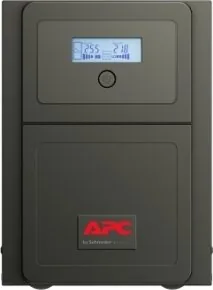
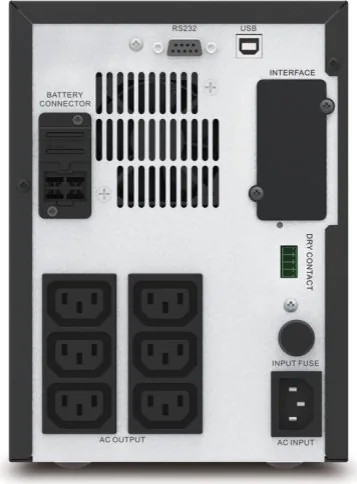
These units come in various capacities ranging from 750 VA to 3000 VA to suit different load requirements. Each model features pure sine wave output which is gentle on sensitive electronics and prevents overheating issues. The front panel includes an LCD display that shows status, battery capacity, and system load levels clearly. This visual feedback helps users monitor health without necessarily needing external monitoring tools initially. Installation requires strict adherence to local electrical codes and safety standards. The device must be grounded and placed in a controlled environment free from excessive dust or direct heat sources. Connecting the internal battery is a straightforward process handled via a dedicated rear panel connector.
Safety remains a top priority throughout the design and intended use lifecycle. Battery replacement is necessary every five years or when the device explicitly indicates low capacity is remaining. Always disconnect AC input power before changing components internally to avoid severe electrical shock risks. The system provides specific battery backup outlets with built-in surge protection capabilities integrated into the chassis. It is crucial not to connect printers, heaters, or copiers to these outlets as they may draw excessive power and damage the unit. The dry contact interface allows for integration with external building management systems or alerts during specific conditions like backup mode activation.
Management software supports unattended system shutdowns to prevent data loss during long outages. A USB connection allows for seamless communication between the UPS and the connected computer monitor. Audible indicators alert users to issues such as low battery warnings or overload conditions immediately. Troubleshooting is simplified through distinct beeping patterns and clear display messages on the screen. If problems persist despite basic checks, contacting technical support is recommended with the serial number ready on hand. The warranty covers two years from the purchase date, often involving a replacement unit procedure for defects. Maintaining clear communication during service ensures minimal downtime for your operations. Always follow voltage range specifications to ensure correct frequency handling.
Search for 67,706 Manuals online


Type-in Brand or Model