
APC Easy UPS 3S Manual
PDF manual · 56 Pages
English



Quick check
Incorrect answer, please try again.
Chat with your APC Easy UPS 3S manual using AI
Get instant AI answers from your APC Easy UPS 3S manual
Ask anything about the APC Easy UPS 3S. Answers come from this manual, with the pages they are based on.
Easy UPS 3S Maintenance Schedule
The default maintenance period for the dust filter is 3 months. Replace the filter and reset the timer in the display.
The auto maintenance discharge period defaults to 9 months (approx yearly). Test battery condition by discharging until low voltage alarm.
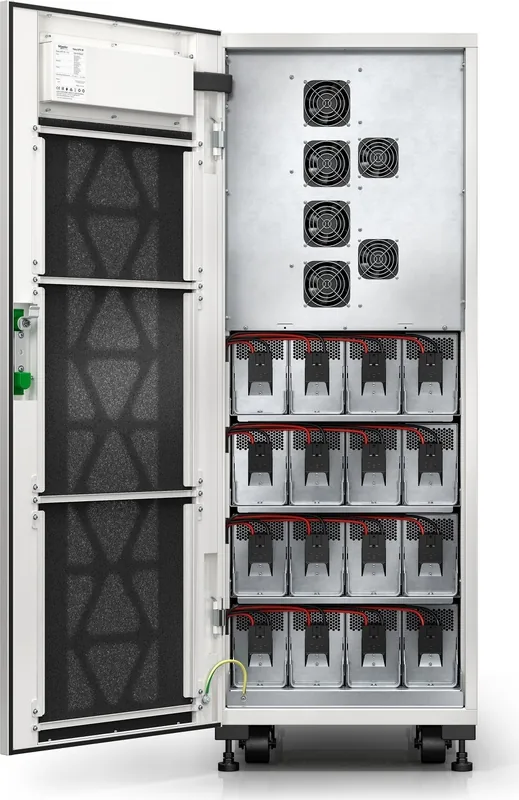
The default battery maintenance period is 4 years. Replace batteries when the service life expires or an expiration alarm occurs.
The default fan maintenance period is 34,560 hours (48 months). Check fans and replace if expired or inoperable.
The default DC capacitor maintenance period is 34,560 hours (48 months). Check capacitors and replace if expired.
The default AC capacitor maintenance period is 120 months. Check capacitors and replace if expired.
Free maintenance reminders
Timed to your purchase date. Always free, unsubscribe anytime.
Ask a Question
Do you recommend Easy UPS 3S?
Yes NoFrequently Asked Questions
The range includes 10-40 kVA models for 400 V applications and 10-20 kVA models for 208 V applications. It supports 3:3 systems and selected 3:1 configurations, depending on the model and electrical design.
Is this answer helpful?
The UPS transfers to battery mode and supplies the connected load from its batteries for a limited runtime. Once utility power is restored, it returns to normal operation and recharges the batteries.
Is this answer helpful?
Yes. It supports configured parallel systems, including capacity and redundancy designs. A UPS can be added to or isolated from a running parallel system when the system has been properly configured and load-sharing capability is verified.
Is this answer helpful?
ECO mode prioritizes the static bypass source under predefined acceptable conditions to improve operating efficiency. If the input source is interrupted, the UPS transfers to battery-backed inverter operation to continue supporting the load.
Is this answer helpful?
No. In maintenance bypass mode, the load is supplied through the maintenance bypass path. Battery backup is not available, so this mode should be used only when appropriate maintenance conditions and procedures are in place.
Is this answer helpful?
The system provides a battery test and a battery maintenance test through its interface. The battery test checks connection and capacity, while the maintenance test discharges batteries until the low-battery alarm threshold is reached.
Is this answer helpful?
Advantages and Disadvantages
Advantages

- Supports 10-40 kVA at 400 V and 10-20 kVA at 208 V for scalable three-phase protection.
- Offers normal, battery, static bypass, maintenance bypass, ECO, auto restart, and frequency converter modes.
- Supports single-unit and configured parallel systems, including 1+1 redundancy with shared batteries.
- Provides display-based status, alarms, logs, battery tests, lifecycle monitoring, and maintenance reminders.
Disadvantages

- Installation, commissioning, configuration changes, and service require qualified personnel.
- Maintenance bypass does not provide battery backup to the connected load.
- Frequency converter mode does not support static or maintenance bypass operation.
- Battery settings must precisely match the installed configuration before startup.
Product Specification
Type
Tower
Classification
VFI (Online)
Voltage
400 V
Input
Terminal
Outputs
Terminal
Interfaces
USB, 2x serial (1x RS-485/1x RS-232), 2x parallel
Data line protection
N/A
Special features
LCD
Manufacturer warranty
one year (on-site)
Product Description
APC Easy UPS 3S Tower Manual: Reliable Power Protection for Critical Loads
The APC Easy UPS 3S Tower is a three-phase uninterruptible power supply designed for organizations that need dependable power continuity for essential equipment. Available in 10-40 kVA configurations for 400 V systems and 10-20 kVA configurations for 208 V systems, it supports both 3:3 and selected 3:1 electrical arrangements. This makes it a flexible choice for server rooms, commercial facilities, light industrial sites, and other environments where power quality and uptime matter.
A key strength of the system is its ability to supply conditioned power during normal operation while maintaining battery charge. If the utility source fails, the UPS switches to battery operation and continues supporting connected loads for the available runtime. When utility power returns, it resumes normal operation. Static bypass capability also provides an alternate supply path when inverter operation cannot be maintained, helping protect continuity for the connected load.
Operating Modes and System Flexibility
The APC Easy UPS 3S Tower supports normal, battery, static bypass, maintenance bypass, ECO, automatic restart, and frequency converter modes. ECO mode can prioritize bypass operation under defined conditions to reduce energy use, while still transferring to battery-supported inverter operation if the source fails. Frequency converter mode delivers a stable 50 Hz or 60 Hz output, but requires careful planning because bypass operation is unavailable in that mode.
The unit can operate as a single UPS or as part of a parallel installation. Parallel configurations can improve capacity planning and resilience, including 1+1 redundant arrangements with shared battery banks. Adding or isolating an individual UPS in an active parallel system is supported when the installation has been configured correctly by qualified personnel.
Monitoring, Configuration, and Maintenance
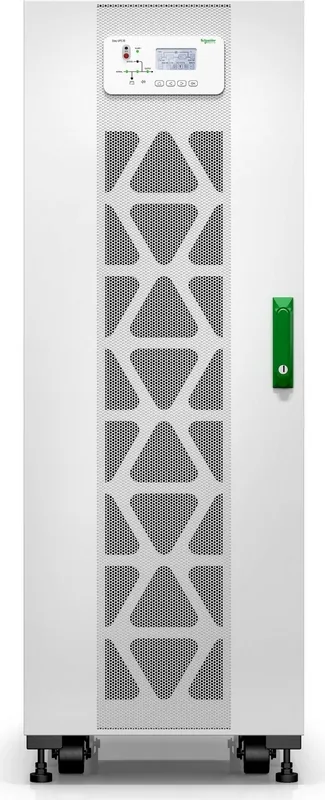
The front interface provides status LEDs and a display for input, output, battery, bypass, inverter, load, alarms, logs, and functional settings. Operators can set language, date, time, voltage, frequency, battery details, and lifecycle monitoring values. Battery and maintenance tests help verify battery connection and capacity, while alarms identify conditions such as overloads, high temperatures, unavailable bypass power, battery faults, or fan issues.
Routine upkeep includes replacing the dust filter at the configured interval and resetting its service timer afterward. Lifecycle settings can also track fans, capacitors, batteries, and warranty periods. The APC Easy UPS 3S Tower Manual emphasizes that installation, commissioning of external-battery or parallel systems, service work, and parameter changes must be performed by trained, qualified professionals.
Note: Use the emergency power off control only during an emergency. It immediately stops rectifier and inverter output, while control circuits may remain energized when utility power is present.
Note: Confirm battery settings match the installed battery arrangement before startup to support accurate charging, runtime behavior, and battery protection.
Search for 67,706 Manuals online


Type-in Brand or Model