
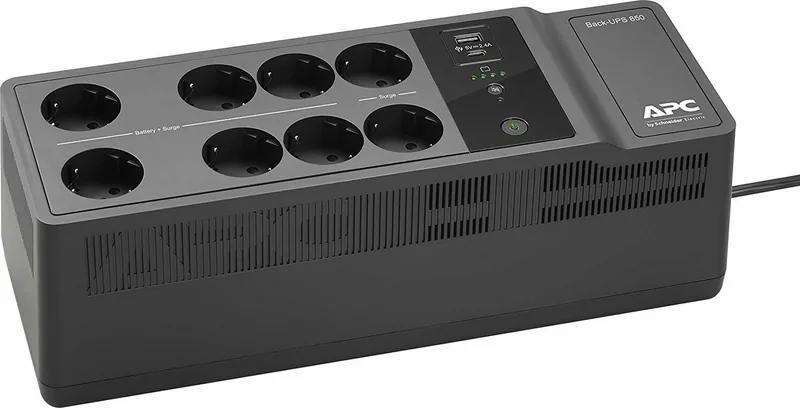
APC Back-UPS G2 Manual
PDF manual · 4 Pages
English



Quick check
Incorrect answer, please try again.
Chat with your APC Back-UPS G2 manual using AI
Get instant AI answers from your APC Back-UPS G2 manual
Ask anything about the APC Back-UPS G2. Answers come from this manual, with the pages they are based on.
Ask a Question
Do you recommend Back-UPS G2?
Yes NoFrequently Asked Questions
The battery typically requires 16 hours to reach full capacity when connected to utility power. During the first 24 hours after initial setup, the UPS will charge continuously but may not provide full runtime until this period is complete.
Is this answer helpful?
While you can physically plug a printer into the battery outlets, it is recommended to use the surge-only outlets for printers. Printers often draw high current spikes which can drain the battery quickly and are less critical during an outage compared to computers.
Is this answer helpful?
First, disconnect all non-essential equipment. Push the circuit breaker button fully inward to reset it. Then, reconnect one device at a time to identify if a specific item is causing the overload. If it trips again, check the connected devices or replace the battery.
Is this answer helpful?
Yes, the hardware works with Macs, but the PowerChute Personal Edition software is only compatible with Windows. Mac users should utilize the native shutdown features provided by their operating system to save files and shut down safely during an outage.
Is this answer helpful?
Turn off the unit, then press and hold the power button for 10 seconds to enter program mode. The LEDs will flash to show the current setting (Green for Low, Red for Medium, Amber for High). Wait five seconds to exit the mode without changing anything.
Is this answer helpful?
Batteries generally have a service life of 3 to 5 years. You should replace them immediately if the unit indicates a replacement is necessary, if there is electrolyte leakage, or if the runtime has significantly decreased despite a full charge.
Is this answer helpful?
No, USB cables are no longer shipped in the box to reduce electronic waste. You must order the cable separately from the APC website or use an existing compatible USB cable to connect the unit to your computer for software installation.
Is this answer helpful?
Advantages and Disadvantages
Advantages

- Fast 6-millisecond transfer time prevents data loss during power cuts
- Dual outlet types protect all devices while powering critical ones
- USB charging ports support fast charging for phones and tablets
- Adjustable voltage sensitivity adapts to different power environments
- Wall-mountable design saves desk space and improves airflow
Disadvantages

- Battery life may decrease in high ambient temperatures
- Initial battery charge requires 16 to 24 hours before full capacity
- Step-approximated sine wave may not work with some motor-driven equipment
- USB charging speed is slower than using original wall chargers
- Replacement batteries require a specific part number purchase
Product Specification
Type
Power strip with integrated UPS
Classification
VFD (Off-Line)
Voltage
230V
Data line protection
3x RJ-45
Dimensions (WxDxH)
5.1x4.7x14.4in
Manufacturer warranty
three years
Product Description
Protect Your Tech with the APC Back-UPS G2 Power Strip
The APC Back-UPS G2 series, specifically models like the BE650G2-IT and BE850G2-IT, stands as a robust solution for safeguarding your valuable electronic equipment against unpredictable power events. Designed for indoor use, this device acts as a critical barrier between your sensitive computers, monitors, and peripherals and the erratic nature of utility power. Whether you are facing sudden brownouts, voltage spikes, or complete outages, the Back-UPS ensures that your data remains safe and your workflow continues uninterrupted.
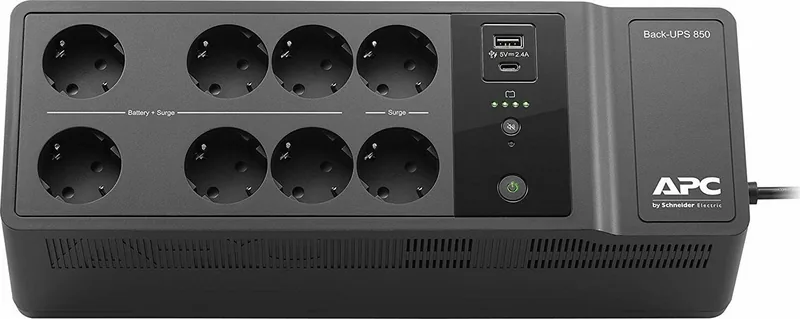
At the heart of this unit is a sealed maintenance-free lead-acid battery system that provides essential backup power when needed. The device features distinct outlet groups: surge-only outlets for non-critical devices like printers, and battery-backed outlets dedicated to computers and monitors that must stay on during an outage. With a transfer time of just 6 milliseconds, the switch from utility power to battery power is virtually instantaneous, preventing any disruption to your active sessions. Additionally, the inclusion of Type A and Type C USB charging ports allows you to keep mobile devices powered up, offering a maximum output of 2.4 amps for efficient charging even when the main grid fails.
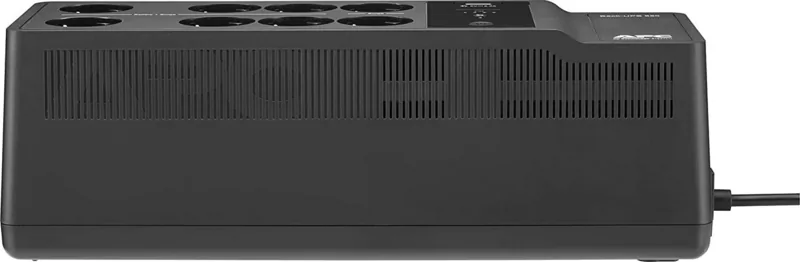
Installation is straightforward, supporting both horizontal placement and vertical wall mounting with appropriate clearance for ventilation. The unit includes intuitive status indicators, such as LED lights that display battery charge levels and operational states, along with an audible alarm system that can be muted via a dedicated button. For advanced users, the optional Voltage Sensitivity Adjustment feature lets you fine-tune the input voltage range to match specific equipment needs, ensuring optimal performance in environments with fluctuating power quality.
Key Takeaways
- Ensures continuous operation of critical devices during power failures.
- Features separate outlets for battery backup and surge protection only.
- Includes modern USB-A and USB-C ports for charging mobile gadgets.
- Offers adjustable voltage sensitivity for sensitive electronics.
- Provides clear visual and audible status alerts for easy monitoring.
Search for 67,706 Manuals online


Type-in Brand or Model