Manual.ly Logo

APC Back-UPS Compact Manual

0.0 · 0 Ratings

PDF manual · 1 Pages

English

M: qwen/qwen3.5-flash-20260224
page

/ 1

Loading...
02679c12f76bc6fb4512dd5d5f4c6b67da85 page 1
Inventory
Safety and General Information
Inspect the package contents upon receipt. Notify the carrier and dealer if there is any
damage.
SAVE THESE INSTRUCTIONS - This section contains important instructions that should
be followed during installation and maintenance of the UPS and batteries. Failure to
follow these instructions can result in equipment damage.
Getting Started
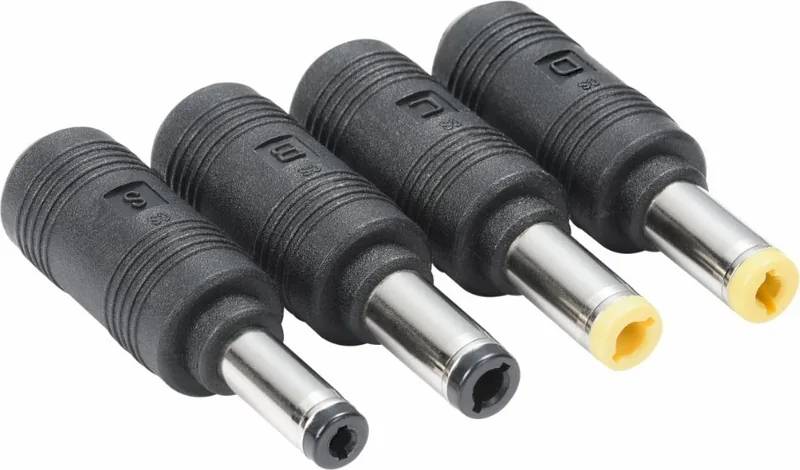
Select DC tips based on connected device. To
change from the original 2.5mm tip size to
2.1mm, use the pair of adaptor tips and
provided that are yellow in colour. To change the
original 2.5mm tip size to 1.7mm, use the pair of
adaptor tips provided that are black in colour.
Connect the existing power adaptor of your 12V
networking device to the input port of
CP12036LI. Using the attached wire provided
with the CP12036LI, connect CP12036LI to your
12V networking device.
CP12036LI will turn on automatically when
plugged in using a power adaptor.
To manually switch CP12036LI off and on, press
and hold the power button for 2 seconds.
Refer to the table below to interpret the LED
indicators
.
UPS and Power Status Indicators
UPS Specifications
Warranty
Schneider Electric IT (SEIT) warrants its products to be free from defects in materials and
workmanship for a period of two (2) years from the date of purchase. SEIT obligation under
this warranty is limited to repairing or replacing, at its sole discretion, any such defective
products. This warranty does not apply to battery wear from use, equipment that has been
damaged by accident, negligence or misapplication or has been altered or modified in any
way. For full warranty information refer to www.apc.com.
Service
If the unit requires service, do not return it to the dealer. Follow these steps:
1. Review the Status Indicators section of the manual to eliminate common problems.
2. If the problem persists, contact Schneider Electric IT (SEIT) Customer Support
through the APC by Schneider Electric Web site, www.apc.com.
a. Note the model number and serial number and the date of purchase. The model
and serial numbers are located at the bottom side of the unit.
b. Call SEIT Customer Support and a technician will attempt to solve the problem
over the phone.
c. Service procedures and returns may vary internationally. Refer to the APC by
Schneider Electric Web site for country specific instructions.
APC by Schneider Electric IT Customer
Support Worldwide
For country specific customer support, go to the APC by Schneider Electric Web site,
www.apc.com.
DANGER
HAZARD OF ELECTRIC SHOCK, EXPLOSION, OR ARC FLASH
• This UPS is intended for indoor use only.
• Do not operate this UPS in direct sunlight, in contact with fluids, or where there is
excessive dust or humidity.
• Do not short circuit this UPS. To avoid short circuit, keep the UPS away from any metal
objects (e.g., hair clips and keys).
• Use this UPS as instructed to avoid electric shock. Do not disassemble.
• The battery in this UPS is not user replaceable. Contact APC for tech support related issues.
• Do not heat this UPS or throw it into a fire.
• Keep this UPS away from high temperature, wet, or dusty environments.
• During normal usage, keep the UPS out in the open to allow excess heat to dissipate.
Failure to follow these instructions will result in death or serious injury.
NOTICE
RISK OF EQUIPMENT DAMAGE
• This UPS is designed for low power devices less than 36 Watts. CP12036LI will shut down
automatically to protect itself once the load on the UPS is greater than 36 Watts.
• The battery typically lasts for three to five years. Environmental factors impact battery life.
Elevated ambient temperatures, poor quality DC power, and frequent short duration
discharges will shorten battery life.
Failure to follow these instructions can result in equipment damage.
Status
Power
LED
LED Indicators Description Troubleshoot
Normal
Operation
GREEN Fully Charged
No
troubleshooting
Charging
Mode
GREEN
The flashing
LED indicates
the current
battery level as
it is charging
No
troubleshooting
Battery
Mode
FLASHING
GREEN
Battery level is
as indicated
No
troubleshooting
Low
Battery
Alert
FLASHING
GREEN
Battery low,
UPS will turn
off soon
Connect UPS
to a power
source
Bad
Battery
FLASHING
RED
Battery is
faulty
Call customer
service for
support if the
unit is still
under warranty
Adapter Color
1.7 to 2.5 mm Black
2.5 to 1.7 mm Black
Adapter Color
2.1 to 2.5 mm Yellow
2.5 to 2.1 mm Yellow
User Manual
Yellow Ring
25% 50% 75% 100%
25% 50% 75% 100%
Status Power LED
LED Indicator
Description Troubleshoot
Low Input
Power
FLASHING
RED AND
GREEN
Input power
is lower than
the needed
output power.
The 4 LED
indicators
continue to
indicate the
battery level.
Be sure that the
input power
adaptor used is
compatible with
the load. Restart
the device after
using the
appropriate
adaptor.
Over
Temperature
protection
RED
Temperature
is too high
Unplug the
connected device
until the
temperature
returns to normal.
Please call
customer service
if this issue
persists
Over Voltage
Protection
RED
Output
voltage is too
high
Unplug the
connected
device.
CP12036LI can
only support
loads up to 12V
3A. If the load is
within 12V 3A,
please call
customer service
if this issue
persists
Overload
Protection
RED
Extreme
heavy load
detected,
output
current is too
high
DC Input Nominal Voltage 12 VDC
DC Output
(On-line
mode)
Voltage 12 VDC ± 5%
Maximum power (On-line mode) 36 W with battery fully charged
User Output
(On-battery
mode)
Output voltage 12 VDC
Rated output current 3 A
Capacity indicator 4 LEDs (25% increment per LED)
Backup time 240 minutes @ 5 W
200 minutes @ 6 W
60 minutes @ 20 W
Battery Type Li-ion
Nominal voltage 11.1 VDC
Capacity 27.75 Wh
Typical recharge time 12 hours
Physical Net weight 300 g
Dimension in mm (D* W* H) 109 mm x 99 mm x 25 mm
Input DC Jack 5.5 mm x 2.5 mm Female
Output cable 80 cm length DC Male Jack,
(OD 5.5 mm, ID 2.5 mm)
25% 50% 75% 100%
User Manual
Back-UPS™
Connect CP12036LI
TME20748
03/2023

Chat with your APC Back-UPS Compact manual using AI

Get instant AI answers from your APC Back-UPS Compact manual

Ask anything about the APC Back-UPS Compact. Answers come from this manual, with the pages they are based on.

Ask a Question

0/1000

Do you recommend Back-UPS Compact?

Yes No

Frequently Asked Questions

A

The battery typically lasts three to five years. However, environmental factors such as elevated ambient temperatures, poor quality DC power, and frequent short duration discharges can shorten this life. Backup time depends on load, offering 240 minutes at 5 Watts and 60 minutes at 20 Watts.

Is this answer helpful?

A

No, the battery in this UPS is not user replaceable. If there are issues, you must contact APC for tech support related issues. Schneider Electric IT Customer Support can assist or guide you through the warranty process if applicable.

Is this answer helpful?

A

The CP12036LI will shut down automatically to protect itself once the load on the UPS is greater than 36 Watts. This is an overload protection feature to prevent equipment damage inside the unit.

Is this answer helpful?

A

Service procedures and returns may vary internationally. You should refer to the APC by Schneider Electric Web site for country specific instructions. However, the base warranty is limited to repairing or replacing defective products within two years from the date of purchase.

Is this answer helpful?

A

Red lights signal critical issues. A flashing red light means the battery is faulty. A solid red light could indicate over temperature or over voltage protection. A flashing red and green light indicates input power is lower than needed. Consult the manual for full troubleshooting.

Is this answer helpful?

A

When contacting support, note the model and serial number. These numbers are located at the bottom side of the unit. You will need them to register the product or contact customer service for troubleshooting assistance.

Is this answer helpful?

A

The unit supports loads up to a maximum of 12 Volts DC at 3 Amps. The output voltage is rated at 12 VDC with a tolerance of plus or minus 5 percent. It maintains this while in on-line mode or on-battery mode.

Is this answer helpful?

M: qwen/qwen3.5-flash-20260224

Advantages and Disadvantages

Advantages

  • Li-ion battery lasts three to five years
  • Includes multiple adapter tip sizes
  • Clear LED status indicators
  • Two year warranty included
  • Compact and lightweight design
VS

Disadvantages

  • Maximum power limit of 36 Watts
  • Battery is not user replaceable
  • Indoor use only specification
  • 12 hour recharge time required
  • No warranty for accidental damage
M: qwen/qwen3.5-flash-20260224

Product Specification

Type

Compact UPS

Active Power

36W

Voltage

12V

Input

Jack

Outputs

Jack

Interfaces

N/A

Runtime

120 min (25%), 60 min (50%), 30 min (100%)

Charge Time

9 hr

Weight

0.66 lb

Dimensions (WxHxD)

3.90x0.98x4.29 in

Rack Units

N/A

19" Insert Depth

N/A

Features

Lithium-Ion Battery (27.75 Wh)

Manufacturer Warranty

2 years

M: qwen/qwen3.5-flash-20260224

Product Description

Protect Your Equipment with the APC Back-UPS Compact-UPS 36W

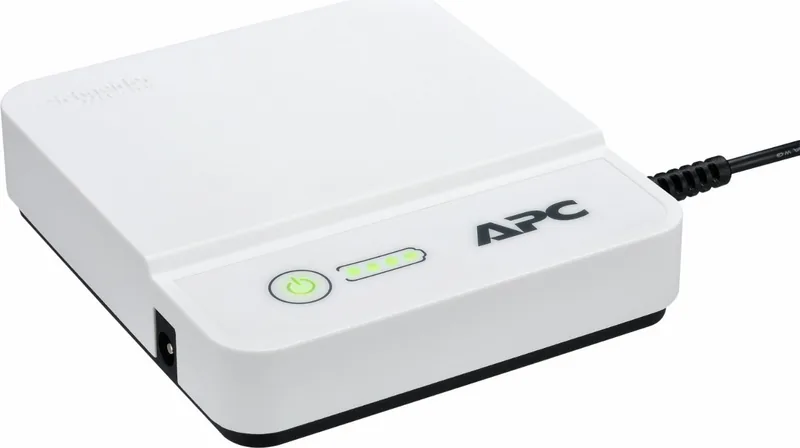
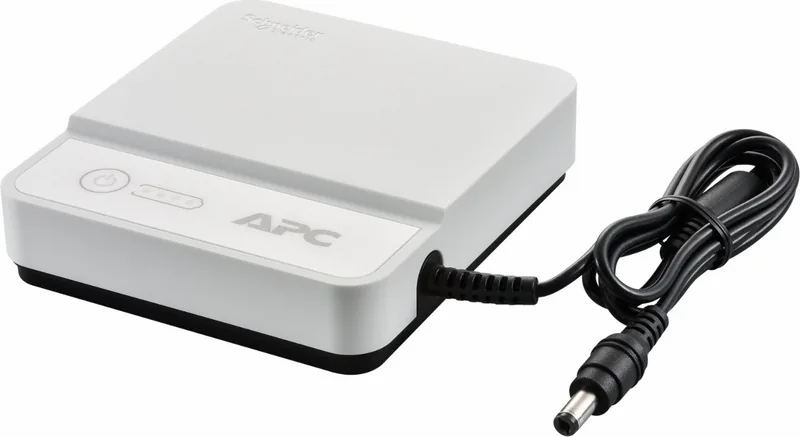
Protect your sensitive 12V networking devices with the APC Back-UPS Compact-UPS, 36W. This reliable power solution ensures your equipment stays online during power outages. Designed for low power consumption, the unit delivers up to 36 Watts of protection. It features a built-in Li-ion battery that typically lasts three to five years, depending on environmental factors like ambient temperature and discharge frequency.

Installation is straightforward for most users. You can adjust DC tips to match your connected devices, using included yellow or black adapter tips to switch between 2.5mm, 2.1mm, and 1.7mm sizes. Simply plug the power adaptor into the input port and connect the device to the output cable. The unit powers on automatically when plugged in. To manually switch it off and on, press and hold the power button for two seconds.

Monitoring status is easy with the LED indicators located on the front. A green light means normal operation or charging. A flashing green light indicates battery mode or low battery alert. Red lights signal critical issues like bad battery, over temperature, or overload protection. The capacity indicator shows charge levels in 25 percent increments up to full charge.

Safety is a major priority. Use only indoors and keep away from direct sunlight, fluids, and excessive dust. Do not short circuit the unit by keeping it away from metal objects like keys. The battery is not user replaceable. If service is needed, contact Schneider Electric IT via the APC website before returning anything. Keep the UPS in an open space to allow excess heat to dissipate during operation.

The warranty covers defects in materials for two years from purchase. However, damage from neglect, accident, or misapplication is not covered. Backup time varies by load. At 5 Watts, you get 240 minutes. At 6 Watts, 200 minutes. At 20 Watts, 60 minutes. The physical net weight is 300 grams. Dimensions are 109 mm by 99 mm by 25 mm. Typical recharge time is 12 hours. The DC output voltage maintains 12 volts plus or minus 5 percent. The rated output current is 3 amps maximum.

Troubleshooting is built into the status checks. If the LED flashes red and green, input power is lower than needed. Unplug if the temperature is too high. Note model and serial number located at the bottom side for support. This ensures your equipment runs smoothly without interruption. For more details on installation and maintenance, refer to the APC Back-UPS Compact-UPS, 36W Manual for comprehensive guidance. Always save these instructions for future reference regarding equipment damage or maintenance.

M: qwen/qwen3.5-flash-20260224

© Copyright 2026 Manual.ly
