

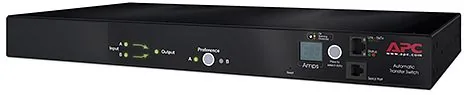

APC Automatic Transfer Switch Manual
PDF manual · 112 Pages
English



Quick check
Incorrect answer, please try again.
Chat with your APC Automatic Transfer Switch manual using AI
Get instant AI answers from your APC Automatic Transfer Switch manual
Ask anything about the APC Automatic Transfer Switch. Answers come from this manual, with the pages they are based on.
Ask a Question
Do you recommend Automatic Transfer Switch?
Yes NoFrequently Asked Questions
It automatically transfers connected equipment from one power source to another when the primary source becomes unavailable or out of range, helping prevent downtime for single-corded devices.
Is this answer helpful?
It is primarily a rack automatic transfer switch with power distribution capabilities. Its main job is source failover and power continuity, not surge suppression or heavy power conditioning.
Is this answer helpful?
Yes. It supports web access, CLI access, SNMP monitoring, and event notifications, making it suitable for remote administration in professional rack environments.
Is this answer helpful?
Yes. Operators can set preferred sources, transfer limits, sensitivity, network settings, and user access options manually through the interface or CLI.
Is this answer helpful?
It includes internal protection such as relays and fuses, and some models also have circuit breakers. However, it does not include surge protection, so upstream UPS support is recommended.
Is this answer helpful?
A 1U chassis fits neatly into standard rack space and preserves room for other equipment, which is valuable in high-density server and networking installations.
Is this answer helpful?
Advantages and Disadvantages
Advantages

- Dual-source input helps keep single-corded equipment running during a source failure.
- Compact 1U design saves rack space in crowded IT environments.
- Web, CLI, SNMP, and logging features improve visibility and remote management.
- Configurable thresholds and preferred-source settings add operational flexibility.
Disadvantages

- No built-in surge protection, so external protection is still needed.
- Initial network setup can be complex for new users.
- Some configuration changes require a reboot, which may interrupt management.
- 16A capacity may limit use in higher-demand power setups.
Product Specification
Outputs
1x C19, 8x C13
Input
2x C20 (16A)
Input Voltage
230V
Additional Connections
1x RS-232
Dimensions (WxHxD)
17.01x1.77x9.29in
Weight
8.25lb
Special Features
rack-mountable
Manufacturer's Warranty
two years
Product Description
APC Automatic Transfer Switch [PDU], 1U, 16A Manual
The APC Automatic Transfer Switch [PDU], 1U, 16A Manual is built for one clear purpose: keep single-corded equipment powered when one source fails. In dense rack environments, even a brief interruption can cause downtime, lost data, or service disruption. This compact rack-mounted unit helps reduce that risk by monitoring two incoming power sources and switching the load to the healthy source when needed.
Reliable power switching for critical racks
Designed for rack deployments, the 1U form factor makes the unit easy to integrate without consuming valuable space. The 16A rating suits many professional IT and networking setups, especially where orderly power distribution and source redundancy matter more than raw output. The ATS logic continuously watches voltage, frequency, and source quality so connected devices stay protected from unstable input conditions.
More than a simple power switch
What makes this model especially practical is the combination of local and remote control options. Administrators can use the front panel for quick status checks, while the web interface and command line interface offer deeper configuration and monitoring. Network visibility, event logging, user permissions, and notification support make it easier to manage the unit in structured environments. In other words, it is not only about switching power, but also about understanding what is happening before a problem becomes visible.
Built for control, visibility, and recovery
The manual control and configuration options give operators flexibility to set preferred sources, define transfer behavior, and adjust thresholds for overload or warning conditions. LED indicators and LCD screens provide immediate feedback, while the system logs events and supports alerts through email, SNMP, and syslog. That makes the unit a useful fit for teams that want both physical resilience and administrative oversight.
For larger deployments, the ability to manage settings through scripts, configuration files, and firmware updates adds another layer of convenience. It helps standardize setup across multiple racks and reduces the effort needed to maintain consistency over time.
Notes
- No surge protection is included, so upstream protection is still recommended.
- Best used with a Double Conversion On-Line UPS for stronger power quality.
- Network setup should be completed carefully before remote management is used.
Search for 67,706 Manuals online


Type-in Brand or Model