Manual.ly Logo

AOC Q27G4X Manual

0.0 · 0 Ratings

PDF manual · 568 Pages

English

M: QW-35-FL
page

/ 568

Loading...
8352e11b1b8e503632f47e67191cece81b2d page 1
i
Adjusting(English)................................................................................................................................................................. 1
Setting Optimal Resolution ........................................................................................................................................ 1
Windows 10 ................................................................................................................................................... 1
Windows 8 ..................................................................................................................................................... 3
Windows 7 ..................................................................................................................................................... 5
Driver(English) ...................................................................................................................................................................... 7
Monitor Driver ............................................................................................................................................................ 7
Windows 10 ................................................................................................................................................... 7
Windows 8 ....................................................................................................................................................11
Windows 7 ................................................................................................................................................... 15
G-Menu ................................................................................................................................................................... 18
e-Saver .................................................................................................................................................................... 19
Screen+ ................................................................................................................................................................... 20
 ................................................................................................................................................... Arabic)
 .............................................................................................................................................................
 ........................................................................................................................................................  Windows
 ......................................................................................................................................... : Windows
 .......................................................................................................................................................... Windows
 .......................................................................................................................................................... Windows
 ......................................................................................................................................... Arabic)
 .......................................................................................................................................................... 
 ........................................................................................................................................................  Windows
 .......................................................................................................................................................... Windows
 .......................................................................................................................................................... Windows
 ..................................................................................................................................................................... G-Menu
 ......................................................................................................................................................................e-Saver
 .....................................................................................................................................................................Screen+
 .................................................................................................................................................... 41
 ............................................................................................ 41
Windows 10 ................................................................................................................................................. 41
Windows 8 ................................................................................................................................................... 43
Windows 7 ................................................................................................................................................... 45
 ............................................................................................................................................................ 47
 ............................................................................................................................................ 47
Windows 10 ................................................................................................................................................. 47
Windows 8 ................................................................................................................................................... 51
Windows 7 ................................................................................................................................................... 55
G-Menu ................................................................................................................................................................... 58
e-Saver .................................................................................................................................................................... 59
Screen+ ................................................................................................................................................................... 60
调节显示器(

) ..........................................................................61
设定最佳分辨率 ....................................................................................61
Windows 10 ................................................................................................................................................. 61
Windows 8 ................................................................................................................................................... 63
Windows 7 ................................................................................................................................................... 65
驱动(

) ................................................................................67
显示器驱动 ........................................................................................67
Windows 10 ................................................................................................................................................. 67
Windows 8 ................................................................................................................................................... 71
Windows 7 ................................................................................................................................................... 75
G-Menu ................................................................................................................................................................... 78
e-Saver .................................................................................................................................................................... 79

Chat with your AOC Q27G4X manual using AI

Get instant AI answers from your AOC Q27G4X manual

Ask anything about the AOC Q27G4X. Answers come from this manual, with the pages they are based on.

Ask a Question

0/1000

Do you recommend Q27G4X?

Yes No

Frequently Asked Questions

A

Click Start, go to Control Panel, select Display, click Change display settings, and slide the resolution bar to the optimal preset resolution.

Is this answer helpful?

A

G-Menu allows you to adjust your monitor settings using on-screen menus from your desktop instead of pressing buttons on the monitor itself.

Is this answer helpful?

A

Yes, Screen+ is supported on Windows 10, Windows 8, and Windows 7, helping you split the screen into multiple panels for better multitasking.

Is this answer helpful?

A

Navigate to Device Manager, update the driver, browse to the CD-ROM directory, select the xxx.inf file, and follow the installation prompts.

Is this answer helpful?

A

e-Saver automatically shuts down the monitor after a specified time of inactivity to save power when the PC is turned off or in sleep mode.

Is this answer helpful?

A

Yes, the monitor and its associated software like G-Menu and Screen+ are fully compatible with Windows 7, 8, and 10.

Is this answer helpful?

M: QW-35-FL

Advantages and Disadvantages

Advantages

  • High refresh rate ensures smooth gameplay and reduces motion blur.
  • G-Menu software allows easy desktop-based monitor adjustments.
  • Screen+ feature enhances multitasking by splitting the display into panels.
  • e-Saver function promotes energy savings during idle periods.
  • Compatible with Windows 10, 8, and 7 for broad user support.
VS

Disadvantages

  • Driver installation requires navigating through multiple menu options.
  • Some advanced features may not be available on all monitor models.
  • Software installation must be completed via CD-ROM for full functionality.
  • Resolution settings might require manual adjustment for optimal clarity.
  • Physical OSD buttons are bypassed but still necessary for basic setup.
M: QW-35-FL

Product Specification

Function

Monitor (stationary)

Diagonal

27" (68.58cm)

Resolution

2560x1440 (QHD), 16:9, 109ppi

Panel

IPS

Backlight

LED, flicker-free

Brightness

450cd/m^2 (typical)

Contrast

1,000:1 (static), 80,000,000:1 (dynamic)

HDR

VESA DisplayHDR 400

Response Time

1ms (GtG), 0.5ms (MPRT)

Refresh Rate

180Hz (2560x1440)

Variable Synchronization

Adaptive Sync, NVIDIA G-Sync Compatible

Signal Frequency

30-280kHz (H) / 48-180Hz (V)

Connectors

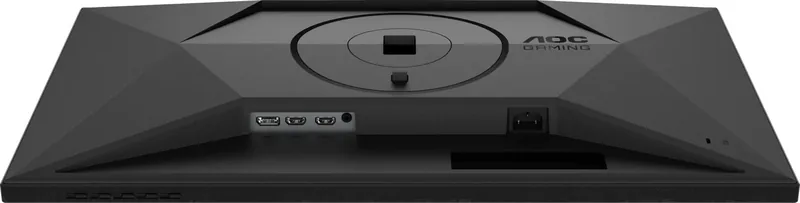
2x HDMI 2.0 (144Hz@2560x1440), 1x DisplayPort 1.4 (180Hz@2560x1440), 1x 3.5mm Jack (Line-Out), 1x AC-In C13 (Power Input)

Shape

straight (flat)

Viewing Angle

178°/178°

Coating

non-glare (matte)

Color Depth

10bit (1.07 Billion Colors)

FRC

yes (8bit+2bit)

sRGB

127%

Adobe RGB

90%

DCI-P3

94%

Speakers

Speakers

Control

mechanical buttons

Ergonomics

with stand, height adjustable (5.12in), Pivot (+/-90°), Rotatable (+/-28°), Tilt (+21°/-3°)

VESA

100x100 (occupied)

Power Consumption

50W (max), 29W (typical), 0.5W (Standby)

Energy Efficiency SDR (A to G)

21kWh/1000h (E)

Energy Efficiency HDR (A to G)

33kWh/1000h (G)

Features

Security Lock (Kensington Security Slot), Slim Bezel, HDCP 2.2

Screen-to-Body Ratio

89.37% (calculated)

Dimensions

24.17x15.22x8.18in (WxHxD) with stand compressed, 24.17x14.42x2.02in (WxHxD) without stand

Color

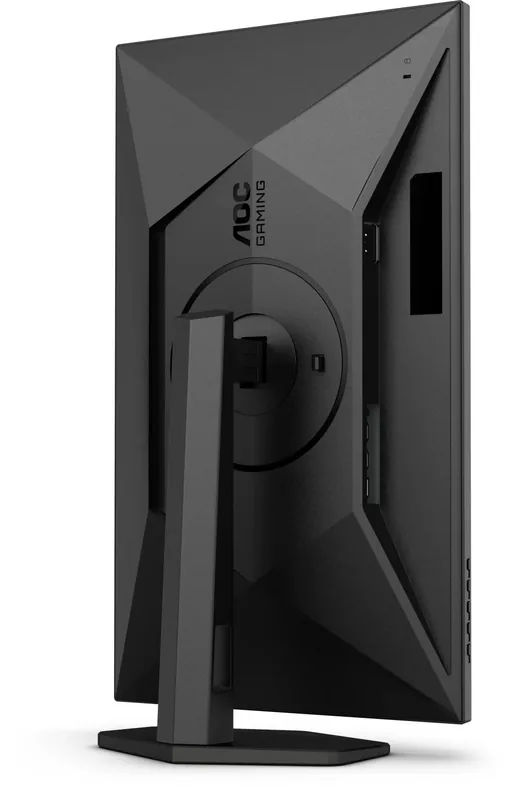
black (display frame) / black (lower bezel) / black (stand) / black (back)

Weight

11.66lbs (with stand), 7.54lbs (without stand)

Power Supply

internal

Warranty

three years

USB Spelling

Link

M: QW-35-FL

Product Description

AOC Q27G4X 27 inch - Read, Download & Print Free

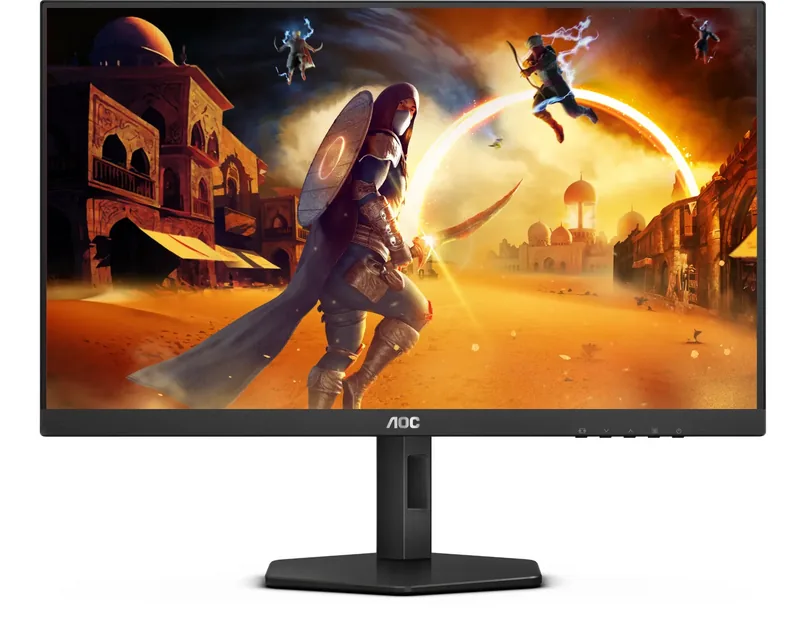
The AOC Q27G4X is a versatile 27-inch monitor designed to deliver exceptional visual performance for both gaming and professional tasks. This sleek display features a high refresh rate and sharp resolution, ensuring smooth motion and vivid colors that bring your content to life. Whether you are immersing yourself in fast-paced games or working on detailed graphics, the Q27G4X provides the clarity and responsiveness needed for an optimal experience.

Essential Setup and Drivers

To get the most out of your new monitor, proper configuration is key. The user guide outlines specific steps for setting the optimal resolution on Windows 10, 8, and 7 systems. Users can easily adjust settings through the Control Panel to ensure the screen displays at its native quality. For those looking to install specific drivers, the manual provides a clear path: navigate to the Display properties, select the Monitor tab, and update the driver software by browsing to the CD-ROM directory containing the .inf files. This process ensures full compatibility and unlocks all potential features of the hardware.

Advanced Software Features

Beyond standard display settings, the AOC Q27G4X supports several proprietary software tools accessible via the included CD. G-Menu allows users to adjust monitor settings directly from their desktop, eliminating the need to press physical buttons on the bezel. This utility offers a seamless way to tweak brightness, contrast, and color profiles while working. Additionally, e-Saver helps manage power consumption by automatically shutting down the monitor after a set period of inactivity, promoting energy efficiency without compromising convenience.

For multitaskers, Screen+ acts as a powerful desk organizer. It splits the screen into multiple panels, allowing different windows to be dragged into separate zones. This feature maximizes productivity by keeping reference materials, code, or chat logs visible alongside primary workspaces. All these utilities are compatible with Windows 10, 8, and 7, making them accessible to a wide range of users. By leveraging these tools, owners of the AOC Q27G4X can tailor their environment to suit specific workflows, enhancing both comfort and efficiency.

Important Notes

  • Ensure your operating system is updated before installing drivers.
  • Use the provided CD to access G-Menu, e-Saver, and Screen+ software.
  • Adjust resolution settings manually if automatic detection fails.
M: QW-35-FL

© Copyright 2026 Manual.ly
