
AOC I2269VWM Manual
PDF manual · 72 Pages
English



Quick check
Incorrect answer, please try again.
Chat with your AOC I2269VWM manual using AI
Get instant AI answers from your AOC I2269VWM manual
Ask anything about the AOC I2269VWM. Answers come from this manual, with the pages they are based on.
Ask a Question
Do you recommend I2269VWM?
Yes NoFrequently Asked Questions
The monitor supports a native Full HD resolution of 1920 x 1080 pixels at 60Hz for crisp visuals.
Is this answer helpful?
Yes, select HDMI ports support MHL to display content from certified mobile devices directly.
Is this answer helpful?
It comes with a three year limited warranty covering defects in materials and workmanship.
Is this answer helpful?
The stand allows tilting from negative five degrees to positive twenty three degrees.
Is this answer helpful?
Yes, VESA mount compatibility allows wall or arm mounting for space saving flexibility.
Is this answer helpful?
Drivers are available for Windows XP Vista 7 8 2000 and ME for compatibility.
Is this answer helpful?
Typical power consumption is under thirty watts during normal operation mode.
Is this answer helpful?
Advantages and Disadvantages
Advantages

- Full HD 1920x1080 resolution provides clear and sharp images for various tasks and colors
- Multiple connectivity options including HDMI VGA and DisplayPort for diverse devices
- Supports MHL for connecting mobile devices directly for media viewing easily
- Includes dedicated software for power saving and screen management enhancements efficiently
- VESA mountable for flexible installation on stands or wall mounts easily
Disadvantages

- Built-in speakers are not included requiring external audio solutions for sound
- OSD navigation can be slow without a joystick compared to direct buttons
- Base is not adjustable for height requiring additional support for ergonomics
- Resolution might limit use for ultra-wide multitasking compared to larger screens
- Stand tilt range is limited without height adjustment mechanism included
Product Specification
Function
Monitor (stationary)
Diagonal
21.5" (21.5 inches)
Resolution
1920x1080 (FHD), 16:9, 102 ppi
Panel
IPS
Backlight
LED
Brightness
250 cd/m^2 (typical)
Contrast
1,000:1 (static), 50,000,000:1 (dynamic)
Response Time
5 ms (GtG)
Refresh Rate
60 Hz (1920x1080)
Signal Frequency
30-83 kHz (H) / 50-76 Hz (V)
Connections
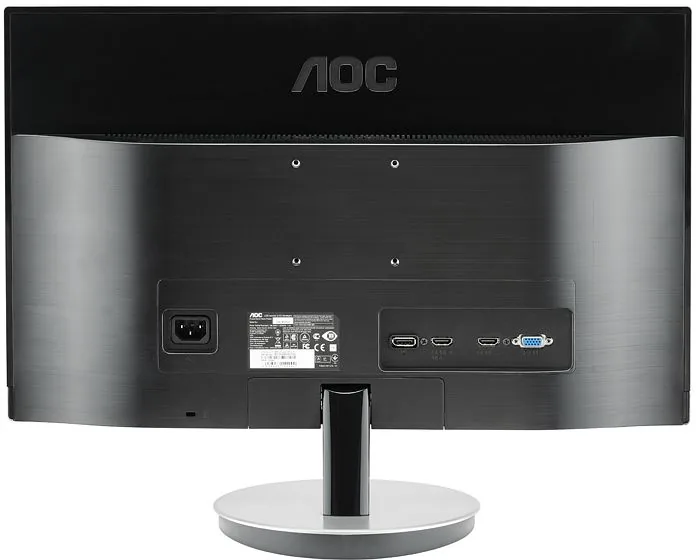
1x VGA (60 Hz @ 1920x1080), 1x HDMI, 1x HDMI, 1x DisplayPort, 1x 3.5mm Jack (Line-Out), 1x 3.5mm Jack (Line-In), 1x AC-In C13 (Power Input)
Shape
Straight (Flat)
Viewing Angle
178 deg / 178 deg
Coating
Non-glare (Matte)
Color Depth
8 bit (16.7 Million Colors)
FRC
Unknown
Certifications/Standards
EPEAT Gold
Speakers
Speakers (2x 2W)
Adjustability
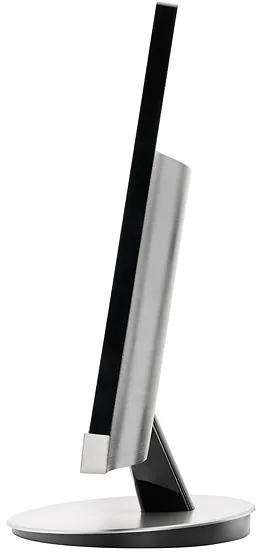
with Stand, Height Adjustable N/A, Pivot N/A, Swivel N/A, Tilt (+23 deg/-5 deg)
VESA
75x75 (Free)
Power Consumption
23 W (typical), 0.5 W (Standby)
Features
Security Lock (Kensington Security Slot), Slim Bezel
Screen-to-Body-Ratio
Inf% (calculated)
Dimensions
19.61 x 14.92 x 7.44 inches (WxHxD) with stand (folded)
Color
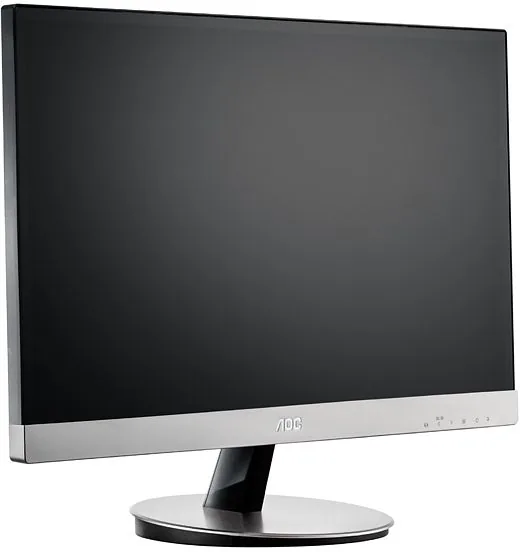
Black (Display Frame) / Silver (Bottom Bezel) / Silver (Stand)
Weight
9.15 lbs (with stand)
Power Supply
Internal
Warranty
3 Years
USB Labeling
Left
Product Description
AOC I2269VWM 21.5 Inch Monitor Overview
The AOC I2269VWM brings premium display technology to your workspace with its expansive 21.5 inch screen. This LCD panel features LED backlighting for superior energy efficiency and vibrant colors throughout the day. Users enjoy Full HD resolution which ensures sharp text and detailed images for office work and gaming alike. Setup is simple with standard HDMI and VGA inputs connecting easily to modern computers or legacy machines. The adjustable stand allows tilting between negative five degrees and positive twenty three degrees for ergonomic comfort during long hours. Clear Vision technology improves clarity on blurry content making it ideal for browsing web pages or reading texts. Software tools like e-Saver help reduce power consumption when the screen is not used actively by the user. Drivers support Windows versions ranging from 2000 to 8 for broad compatibility across different organizational environments. A solid three year warranty backs this hardware against defects in materials or workmanship within the specified region. The sleek black design fits modern interiors without taking up too much desk space in busy offices. Maintenance is straightforward using a soft cloth to keep the surface clean without causing scratches or damage.
Connectivity options include audio jacks for external speakers or headphones for sound output without disturbing others nearby. Cable management remains organized with a stable base supporting heavy use daily without wobbling or tipping over. The On Screen Display provides intuitive control over brightness and contrast settings quickly without removing hands from the keyboard. VESA compatibility offers flexibility for mounting on walls or arms for better viewing heights above monitor level. Energy consumption stays low under normal operation reducing electricity bills over time significantly for cost conscious buyers. Color calibration can be adjusted manually for professional photo or video editing needs requiring accurate representation. The frame is durable plastic designed to withstand regular handling and transport safely during moves or shipping. Signal stability is maintained through robust digital converters ensuring no flickering issues occur during display transitions. Input signal detection switches between sources automatically when multiple devices are connected nearby in the same room. Troubleshooting guides assist users if connection problems arise during initial configuration steps before daily usage starts.
Screen Plus software facilitates window management for multitasking efficiency on large displays with split screen capabilities. i Menu application allows on screen adjustment without physical button navigation for convenience. Response times are optimized to reduce ghosting during fast moving scenes in games or videos. Bezel design is minimal to maximize the viewing area relative to the chassis footprint for immersion. Heat dissipation is handled through passive ventilation slots located carefully near the back cover. Durability is key with protective plastic casing resistant to everyday handling drops and knocks. Power management ensures the unit sleeps efficiently when idle for extended periods saving power automatically. Connectivity includes digital and analog ports for legacy and modern hardware support universally. Drivers update automatically once the correct software from the disc is located and selected.
Search for 67,706 Manuals online


Type-in Brand or Model