
AOC CU34P2A Manual
PDF manual · 28 Pages
English



Quick check
Incorrect answer, please try again.
Chat with your AOC CU34P2A manual using AI
Get instant AI answers from your AOC CU34P2A manual
Ask anything about the AOC CU34P2A. Answers come from this manual, with the pages they are based on.
Ask a Question
Do you recommend CU34P2A?
Yes NoFrequently Asked Questions
Yes, the OSD Menu includes an HDR Mode setting that can be toggled On or Off to adjust HDR Picture settings for Movie or Game content.
Is this answer helpful?
The monitor supports up to 100Hz refresh rate with both HDMI and DisplayPort connections for fluid visuals at QHD resolution.
Is this answer helpful?
Yes, the PIP and PBP modes allow you to view two different video sources simultaneously on the screen.
Is this answer helpful?
Yes, if you use an approved mounting kit from the manufacturer, though a stand is included in the box.
Is this answer helpful?
Check your cable connections, ensure you use the highest supported refresh rate, and keep electronic devices away from the monitor.
Is this answer helpful?
Voltage requirements are 100-240V~, making it suitable for international use with proper grounding.
Is this answer helpful?
It supports VESA DDC2B plug and play, but AOC drivers are recommended for optimal functionality.
Is this answer helpful?
Advantages and Disadvantages
Advantages

- Large 34-inch Ultrawide Display
- QHD 3440x1440 Resolution
- Adaptive Sync Support
- PIP/PBP Multitasking
- Multiple Input Ports
Disadvantages

- Specific AMD Card Required
- No Wall Mount Kit Included
- Requires Proper Ventilation
Product Specification
Function
Monitor (stationary)
Diagonal
34" (34.02 in)
Resolution
3440x1440 (UWQHD), 21:9, 110 ppi
Panel
VA
Backlight
LED, Blue Light Filter, flicker-free
Brightness
300 cd/sq m (typical)
Contrast
3,000:1 (static), 50,000,000:1 (dynamic)
Response Time
4ms (GtG), 1ms (MPRT)
Refresh Rate
100 Hz (3440x1440)
Variable Synchronization
Adaptive Sync, AMD FreeSync
Ports
2x HDMI 2.0, 1x DisplayPort 1.2, 1x USB-B 3.0 (Upstream, 5Gb/s), 4x USB-A 3.0 (Downstream, 5Gb/s), 1x 3.5mm Jack (Line-Out), 1x AC-In C13 (Power)
Shape
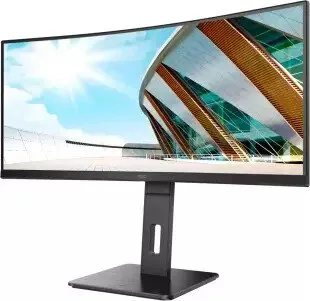
curved, 1500R (59.06 in)
Viewing Angle
178 deg/178 deg
Coating
non-glare (matte), Hardness 3H
Color Depth
8bit (16.7 Million Colors)
FRC
N/A (8bit native)
sRGB
120%
Adobe RGB
89%
DCI-P3
85%
Certifications / Standards
TCO 9
Speakers
Speakers (2x 3W)
Controls
mechanical buttons
Ergonomics
with stand, height-adjustable (5.91 in), Pivot N/A, swivel (+-180 deg), tilt (+24 deg/-6 deg)
VESA
100x100 (covered)
Power Consumption
55W (typical), 0.3W (Standby), 70W (Energy Label old A+++ to G)
Energy Efficiency SDR (A to G)
40 kWh/1000h (G)
Energy Efficiency HDR (A to G)
42 kWh/1000h (G)
Energy Efficiency old (A+++ to G)
102.2 kWh (C)
Features
Security Lock (Kensington Security Slot), Slim Bezel
Screen-to-Body Ratio
89.58% (calculated)
Dimensions
31.81x24.10x10.83 in (WxHxD) with stand compressed, 31.81x14.45x3.94 in (WxHxD) without stand
Color
black (Display Frame) / black (lower bezel) / black (stand) / black (back panel)
Weight
21.61 lbs (with stand)
Power Supply
internal
Warranty
3 years
USB Spelling
Link
Product Description
AOC CU34P2A Overview
AOC CU34P2A is a high-performance ultrawide monitor designed for enthusiasts. Spanning an impressive 34-inch diagonal, this TFT color LCD panel delivers a native resolution of 3440x1440 pixels. This QHD resolution provides clarity and a wide field of view, perfect for users who demand more workspace than a traditional 16:9 screen. The monitor supports multiple input sources, making it a central hub for your setup.
Gaming Performance
The CU34P2A incorporates Adaptive Sync functionality, synchronizing the refresh rate with supported AMD Radeon graphics cards from the RX and R9 series. This eliminates screen tearing and reduces input lag, making games smoother. The Game Setting menu allows choosing modes like FPS for dark details, RTS for strategy, Racing for speed, or custom profiles. Additional features include Shadow Control to brighten scenes, Low Input Lag, and a Frame Counter.
Multimedia and Settings
Multimedia consumption is enhanced by Picture Boost and Color Setup options. Adjust brightness, contrast, gamma, and RGB values, or use Low Blue Light modes for comfort. The OSD menu includes a Timeout and Break Reminder. The monitor supports PIP and PBP modes, allowing simultaneous display of two video sources, which is useful for monitoring feeds.
Installation and Connectivity
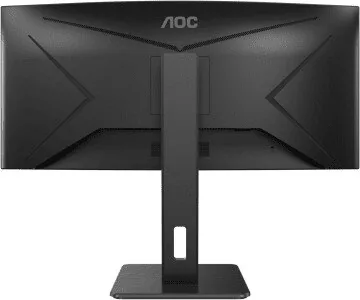
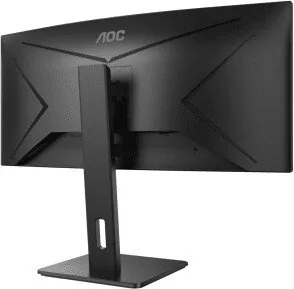
Connectivity is handled through HDMI and DisplayPort inputs, with an audio jack and USB upstream port. The rear panel is organized with numbered connection points. Installation requires attention to ventilation space to prevent overheating. Safety instructions highlight the need for a grounded power plug. Power consumption ranges from 55W typically to 115W at max brightness, with standby under 0.5W. The LED status indicator lights white when active and orange in standby. Troubleshooting steps are provided for issues like no signal or color defects.
Maintenance
Assembly instructions emphasize placing the monitor on a soft flat surface to avoid scratches. If using a wall mount, an approved mounting kit is required. Regular cleaning should be performed with a soft cloth. It is compatible with VESA DDC2B plug and play standards for automatic configuration. The screen can be tilted, but users are warned not to touch the LCD surface directly. Voltage requirements are 100-240V~, making it suitable for international use. Maximum resolution supports up to 100Hz with HDMI/DP connections. Users should ensure the display area is clear and the unit is stable.
Search for 67,706 Manuals online


Type-in Brand or Model