
Antec P5 Manual
PDF manual · 2 Pages
English



Quick check
Incorrect answer, please try again.
Chat with your Antec P5 manual using AI
Get instant AI answers from your Antec P5 manual
Ask anything about the Antec P5. Answers come from this manual, with the pages they are based on.
Ask a Question
Do you recommend P5?
Yes NoFrequently Asked Questions
It is designed for compact micro-ATX builds that prioritize quieter operation and practical hardware installation. It works well for users who want a tidy, efficient system with reduced noise and solid component support.
Is this answer helpful?
Yes. The case supports both 3.5-inch hard drives and 2.5-inch SSDs, making it easy to mix high-capacity storage with faster solid-state storage in one build.
Is this answer helpful?
Yes. The layout includes radiator and liquid cooling support, so builders can add cooling hardware for better thermal performance while keeping the system quiet and compact.
Is this answer helpful?
It can be a good choice for a compact gaming PC, especially if you want a quieter setup and use a micro-ATX motherboard. Just make sure your graphics card and cooling plan fit the chassis size.
Is this answer helpful?
Yes, the installation flow includes ODD support. That can be useful if you still rely on disc-based media, though many modern builds may not need it.
Is this answer helpful?
The sound-dampened structure helps lower noise from internal components such as fans and drives. This is especially useful for workstations, bedroom PCs, or anyone who prefers a calmer system.
Is this answer helpful?
Advantages and Disadvantages
Advantages

- Sound-dampened construction helps reduce case noise during daily use.
- Supports many build parts, including SSDs, HDDs, radiators, and fans.
- Micro-ATX layout keeps the system compact and space-efficient.
- Step-by-step installation flow makes assembly easier to plan.
Disadvantages

- Micro-ATX size limits expansion compared with larger towers.
- Quiet-focused design may trade some airflow flexibility.
- Optical drive support may feel outdated for some users.
- Smaller interior can require more careful cable management.
Product Specification
External
1x 5.25"
Internal
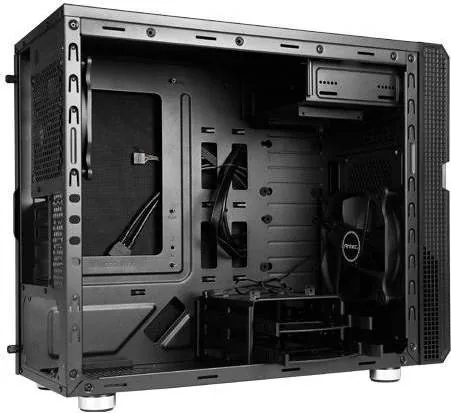
2x 2.5"/3.5" (transverse, drive rails), 4x 2.5"
Connections
2x USB-A 3.0 (5Gb/s), 1x 0.14 in jack (Line-Out), 1x 0.14 in jack (Line-In)
PCI Slots
4
Fans (front)
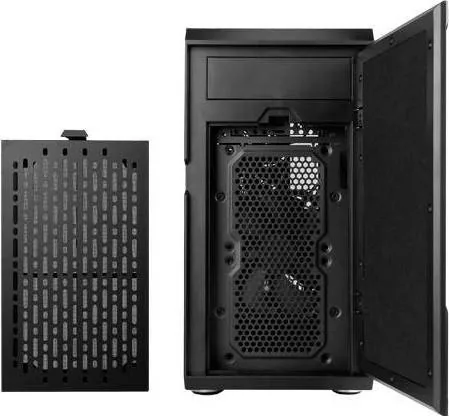
1x 5.51 in or 2x 4.72 in (optional)
Fans (rear)
1x 4.72 in
Fans (left)
N/A
Fans (right)
N/A
Fans (top)
N/A
Fans (bottom)
N/A
Fans (other)
N/A
Radiator sizes
9.45 in front
Motherboard
up to µATX
Supported Motherboards
µATX (9.6"x9.6")
Power supply
ATX
Power supply position
bottom
CPU cooler
max. 6.10 in height
Graphics cards
max. 14.17 in
Color
black
Lighting
without lighting
Dimensions (WxHxD)
7.68x15.55x18.70 in
Volume
9.67 gal
Weight
14.33 lb
Case type
Mini-Tower
Front
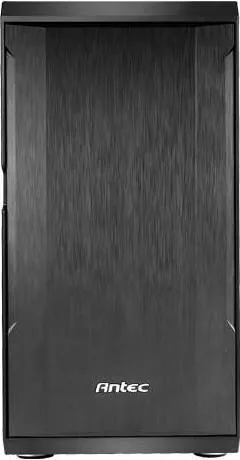
Door, closed, partially mesh, side ventilation slots, dust filter inside, insulation mat inside
Top
closed
Bottom
partially closed, rear fan grille, dust filter outside
Left
closed, front ventilation slots, insulation mat inside
Right
closed, front ventilation slots, insulation mat inside
Rear
partially closed, top right fan grille, PCI-Slots (4x horizontal)
Front I/O Position
Case side: top, Height: Front, Position: center
Special features
Front door, soundproofed
USB notation
Link
Product Description
Antec P5 Sound-Dampened Manual: A Quiet Foundation for a Clean Build
The Antec P5 is designed for builders who want a compact system with a calmer acoustic footprint and a straightforward assembly experience. Built as a micro-ATX case with a focus on silence, it combines practical layout choices with a simple installation flow that helps new and experienced users put together a tidy PC without unnecessary hassle. The overall approach is clear: reduce noise, organize hardware well, and support the essential parts of a modern setup.
One of the most appealing aspects of this case is how broad its compatibility feels for its size. The installation flow covers the power supply, motherboard, VGA/PCI-Express card, hard drives, 2.5-inch SSDs, fans, radiators, liquid cooling hardware, and even an optical drive. That makes the P5 a flexible base for a quiet workstation, a compact gaming machine, or a general-purpose system that still needs room for storage and cooling upgrades. The sound-dampened construction adds another layer of value by helping the build stay more restrained in everyday use.
From a builder’s perspective, the Antec P5 sound dampened Manual reflects a practical, step-by-step mindset. The case encourages a logical order of assembly, starting with core components and moving outward to drives, cooling, and accessories. That kind of structure can save time and reduce mistakes, especially when managing cable routes, drive mounting points, and radiator placement in a smaller chassis. It is the kind of case that rewards careful planning but does not feel overly complex.
The design also suits users who want a balanced mix of quiet operation and upgrade potential. Support for both traditional hard drives and modern SSDs makes it easy to combine speed and capacity, while radiator and fan installation options give enough room to tune airflow and thermal performance. In a compact enclosure, those choices matter because every part has to contribute to the final result: stable, efficient, and unobtrusive.
In short, the Antec P5 is a thoughtful option for anyone building a silent-leaning micro-ATX PC. It may not be flashy, but it focuses on the essentials that matter most: ease of installation, noise reduction, and versatile hardware support.
Notes
- Best suited for compact, quiet-focused builds.
- Supports a wide range of common components.
- Good choice when clean layout and low noise are priorities.
Search for 67,732 Manuals online


Type-in Brand or Model
mlewis60
9 months ago
I heard the power button can be loose or even get stuck. Is that true, and is the rear fan loud despite the case's sound damping?
Manual.ly
9 months ago
Some reviewers report that the power button may not sit perfectly and can feel unstable or occasionally stick. If you notice this, first verify the front panel/button is seated correctly and check for any case wiring or cables interfering. If it still sticks, please contact support for a replacement of the button/panel rather than forcing it. Regarding noise: the case includes rear fans that can be controlled via your motherboard/BIOS. Many users find them reasonably quiet under normal settings, but if they run at higher RPM they can be audible. We recommend setting a quieter fan curve in BIOS/PWM control to keep noise low while maintaining airflow.