
Antec P101 Silent Manual
PDF manual · 2 Pages
English



Quick check
Incorrect answer, please try again.
Chat with your Antec P101 Silent manual using AI
Get instant AI answers from your Antec P101 Silent manual
Ask anything about the Antec P101 Silent. Answers come from this manual, with the pages they are based on.
Ask a Question
Do you recommend P101 Silent?
Yes NoFrequently Asked Questions
It is designed to keep PC noise low while still offering practical support for common components. The case focuses on a quiet interior, clean layout, and flexible installation options for different build types.
Is this answer helpful?
The manual covers the side panel, motherboard, VGA or PCIe graphics card, power supply, optical drive, 3.5-inch hard drive, 2.5-inch SSD, and liquid cooling radiator. That makes the case suitable for a broad range of builds.
Is this answer helpful?
Yes. It supports both 3.5-inch HDDs and 2.5-inch SSDs, so you can combine large-capacity storage with faster solid-state performance. That is useful for media libraries, backups, and everyday multitasking setups.
Is this answer helpful?
Yes. The manual includes radiator installation, which shows that the chassis is prepared for liquid cooling configurations. This gives builders more freedom when planning thermal performance and noise levels.
Is this answer helpful?
People building in quiet rooms, shared spaces, or offices benefit most. The sound-dampened design helps reduce the impact of system noise, making the computer less distracting during work, study, or entertainment.
Is this answer helpful?
The process is straightforward if you follow the installation order carefully. It begins with the side panel and continues through the main components, so most builders can manage it without trouble as long as they plan ahead.
Is this answer helpful?
Advantages and Disadvantages
Advantages

- Sound-dampened construction helps reduce distracting fan and drive noise.
- Supports a wide range of hardware, including motherboard, GPU, PSU, HDD, SSD, and radiator.
- Black, understated styling fits professional and gaming environments alike.
- Clear installation steps make the build process more orderly and manageable.
Disadvantages

- Quiet-focused design may reduce airflow compared with more open case layouts.
- Multiple drive and cooling options can require extra planning for space and cables.
- The enclosed, soundproofed structure may feel heavier than simpler chassis designs.
- First-time builders may need to read the installation steps carefully to avoid mistakes.
Product Specification
External
1x 5.25"
Internal
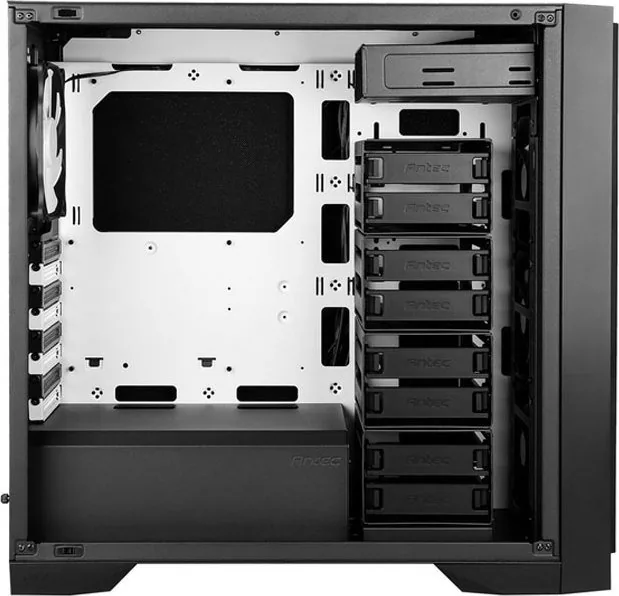
8x 2.5"/3.5" (transverse, drive rails), 2x 2.5"
Connectors
2x USB-A 3.0 (5Gb/s), 2x USB-A 2.0 (480Mb/s), 1x 3.5mm jack (Line-Out), 1x 3.5mm jack (Line-In)
PCI slots
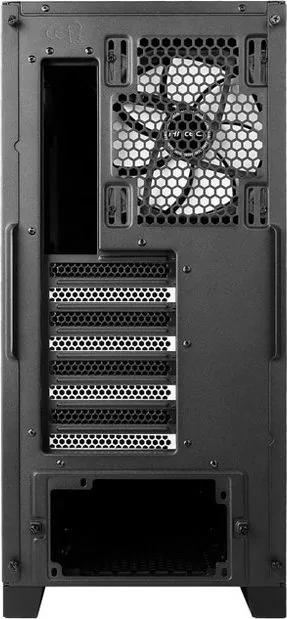
8
Fans (front)
3x 4.72" or 2x 5.51" (optional)
Fans (rear)
1x 5.51"
Fans (left)
N/A
Fans (right)
N/A
Fans (top)
N/A
Fans (bottom)
N/A
Fans (other)
N/A
Radiator sizes
4.72"/5.51"/9.45"/11.02"/14.17" front, N/A top
Motherboard
up to ATX (E-ATX with unknown dimensions possible)
Supported motherboards
Mini-ITX (6.7"x6.7")/µATX (9.6"x9.6")/ATX (12"x9.6")/E-ATX (unknown dimensions)
Power supply
ATX (max. 11.42" deep)
Power supply position
bottom
CPU cooler
max. 7.09" height
Graphics cards
max. 17.72"
Color
black, interior black/white
Lighting
integrated LED lighting
Dimensions (WxHxD)
9.13"x19.93"x20.75"
Volume
16.34 gal
Weight
26.07 lb
Case type
Midi-Tower
Front
door, closed, partially mesh, dust filter inside, insulation mat inside
Top
closed
Bottom
partially closed, rear fan grille, dust filter outside
Left
closed, insulation mat inside
Right
closed, insulation mat inside
Rear
partially closed, top right fan grille, PCI-Slots (8x horizontal)
Front I/O position
Case side: top, Height: Front, Position: right
Special features
Front door, Graphics card holder, sound-dampened
Note on E-ATX
Motherboard and case manufacturers designate different dimensions as E-ATX. This manufacturer does not provide information on supported E-ATX dimensions. Motherboards with E-ATX/SSI EEB dimensions of 12.01"x12.99" or 12"x13" may not be supported.
USB notation
Link
Product Description
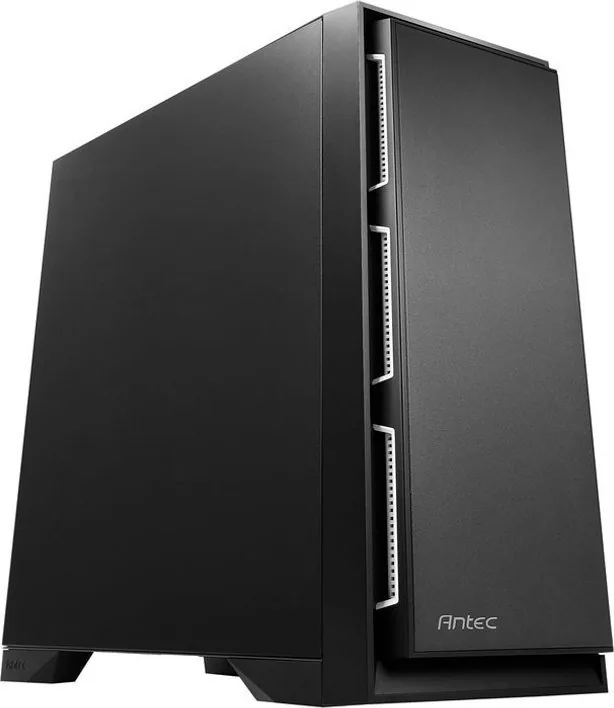
Antec P101 Silent, Black, Soundproofed: A Quiet Case with Practical Build Support
The Antec P101 Silent, black, soundproofed manual points to a case built for users who value calm operation and a clean, efficient assembly process. Its understated black finish gives it a professional look that blends easily into a home office, studio, or gaming setup. Rather than focusing on flash, the design leans into quiet performance and a layout that helps builders work step by step without unnecessary clutter.
Built to make installation feel organized
The assembly flow starts with removing the side panel and then moving through the main system components in a logical sequence. Motherboard installation, graphics card placement, and power supply mounting are all part of the guided setup, which makes the case approachable for builders who prefer structure. This practical order can reduce confusion during the build, especially when you want every part to fit neatly the first time.
Storage choices that support different builds
One of the most useful aspects of the P101 Silent is its ability to handle different storage needs. The manual includes installation for 3.5-inch hard drives and 2.5-inch SSDs, along with optical drive support. That mix makes the case versatile for users who want a combination of speed, capacity, and legacy compatibility. Whether you are building a quiet work PC, a media machine, or a balanced everyday system, the internal layout offers enough flexibility to plan around multiple storage goals.
Cooling support without losing the quiet focus
The case is not limited to basic air-cooled setups. It also includes radiator installation guidance for liquid cooling, giving builders more room to tailor thermal performance to their needs. That is important for users who want a quieter system, since a well-planned cooling setup can help maintain lower noise levels during everyday use. The soundproofed construction and flexible component support work together to create a case that is both functional and restrained.
A solid choice for thoughtful PC builds
Overall, the Antec P101 Silent feels like a case designed for people who appreciate a tidy interior, low-noise operation, and a build process that follows a clear path. It is especially appealing if you want a black chassis that looks discreet while still supporting modern hardware and practical upgrades. The manual reflects a design philosophy centered on stability, usability, and quiet confidence.
Notes
- Plan drive locations before installation to simplify cable routing.
- Check clearance for the graphics card and radiator before choosing parts.
- Follow the installation order carefully for the cleanest result.
Search for 67,732 Manuals online


Type-in Brand or Model
Lea Zimmermann
10 months ago
Is this PC case suitable for a heavy high-end build with many 3.5-inch HDDs, an E-ATX motherboard, and mainly air cooling (since top/back dual radiator mounting may be limited)?
Manual.ly
10 months ago
Yes. Reviewers report plenty of space for large hardware, including E-ATX boards, multiple 3.5-inch HDDs and 2.5-inch SSDs, plus room for long power supplies. The drive cages for 3.5-inch and 5.25-inch bays can be removed and reinstalled in different positions, so you can adapt the layout to your parts. For cooling, the case is well suited for air cooling: the front and side airflow is strong, and the included fans can be moved along rails to aim airflow where you need it. For water cooling, top or rear clearance may not easily support dual radiators, so single-radiator or alternative layouts are the safer choice.