


Alphacool NexXxoS Eisblock Aurora Mounting Screws Manual
PDF manual · 1 Pages
English


Quick check
Incorrect answer, please try again.
Chat with your Alphacool NexXxoS Eisblock Aurora Mounting Screws manual using AI
Get instant AI answers from your Alphacool NexXxoS Eisblock Aurora Mounting Screws manual
Ask anything about the Alphacool NexXxoS Eisblock Aurora Mounting Screws. Answers come from this manual, with the pages they are based on.
Ask a Question
Do you recommend NexXxoS Eisblock Aurora Mounting Screws?
Yes NoFrequently Asked Questions
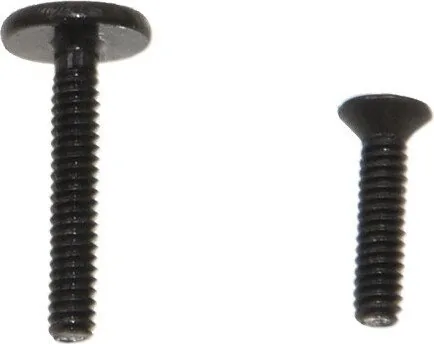
The kit includes mounting screws: 10x M2x11 and 10x M2x8. It references using at least four M2x5 spring screws around the GPU to secure the PCB, though those spring screws may need to be supplied separately depending on your card.
Is this answer helpful?
Installation is recommended only for experienced DIY enthusiasts. Alphacool explicitly disclaims warranty coverage for any graphics card damage resulting from installation, so users should be comfortable working with PC hardware and accepting responsibility for modifications.
Is this answer helpful?
Tighten screws carefully by hand to avoid over-torquing and stressing the PCB. The manual specifically advises hand-tightening and recommends rechecking and retightening screws after 24 hours of operation to ensure secure seating.
Is this answer helpful?
The manual advises securing the PCB with at least four M2x5 spring screws placed around the GPU as the initial step before attaching the backplate. This provides stable support for subsequent backplate attachment.
Is this answer helpful?
Yes, the documentation includes a mounting example illustrating alignment and mounting points. However, the visual guidance is concise; users who want more detailed step-by-step imagery may need supplementary references.
Is this answer helpful?
No specific torque values are provided. The manual expects users to determine which screw points to use and to rely on cautious hand-tightening. This approach assumes user judgment and experience to avoid damage.
Is this answer helpful?
The manual is provided in multiple languages, including English, German, and French, ensuring wider accessibility for international users.
Is this answer helpful?
Advantages and Disadvantages
Advantages

- Clear step-by-step sequence: secure PCB with spring screws, select mounting screws, attach backplate, hand-tighten, re-torque after 24 hours.
- Multilingual instructions (English, German, French) increase accessibility for international users.
- Kit supplies multiple screw sizes (10x M2x11, 10x M2x8) covering common mounting needs.
- Emphasizes hand-tightening to prevent over-torquing and potential PCB damage.
- Includes mounting example to help visualize proper alignment and contact points.
Disadvantages

- Recommended only for DIY enthusiasts; Alphacool disclaims warranty for installation-related damage.
- Instructions assume user knowledge of which screw points to use; may be unclear for beginners.
- No torque specification provided; relying on hand-tightening can lead to inconsistent results.
- Limited kit information — other needed hardware (e.g., M2x5 spring screws) may not be included.
- Visual guidance may be brief; some users could require more detailed photos or stepwise images.
Product Specification
Type
Other
Color
black (matte)
Product Description
Alphacool NexXxos Eisblock Aurora Montageschrauben Manual
The Alphacool NexXxos Eisblock Aurora Montageschrauben Manual walks DIY enthusiasts through installing the mounting kit designed for original graphics card backplates. Intended for users comfortable working inside PC hardware, the kit includes ten M2x11 and ten M2x8 screws and guides mounting the graphics card PCB with spring screws around the GPU. The manual emphasizes careful hand-tightening and recommends rechecking screw torque after 24 hours of operation to ensure secure contact and avoid stress on components.
Installation begins by fastening the PCB to the card using at least four M2x5 spring screws positioned around the GPU core. From that foundation, the manual advises selecting appropriate screws to attach the manufacturer backplate and fastening it through as many mounting points as possible. The instructions advise caution: tighten screws by hand to avoid over-torquing and potential damage to the PCB or components. The document also includes a visual mounting example to illustrate proper alignment and points of contact.
Safety and liability are highlighted: Alphacool recommends this kit only for experienced users and explicitly states it does not provide warranty coverage for damaged graphics cards resulting from installation. That caveat encourages careful, deliberate work and suggests the kit is best for users who accept responsibility for modifications.
The manual is concise and multilingual (English, German, French), ensuring accessibility for a broad audience. It covers the essential sequence: secure PCB with spring screws, choose correct mounting screws, attach backplate at many points, hand-tighten, and re-torque after 24 hours. This pragmatic approach balances secure mounting with protection against undue stress.
Whether you’re replacing a backplate, retrofitting a water block, or performing maintenance, following the Alphacool NexXxos Eisblock Aurora Montageschrauben Manual’s steps helps achieve a secure installation while minimizing the risk of component damage. Keep an eye on alignment and screw lengths to prevent interference with components on the PCB.
Notes
- Intended for experienced DIYers; no warranty from Alphacool for installation damage.
- Kit contents: 10x M2x11 and 10x M2x8 screws; use M2x5 spring screws around GPU for initial PCB mounting.
- Hand-tighten screws and recheck after 24 hours of operation.
- Follow mounting example illustration for correct alignment.
Search for 67,706 Manuals online


Type-in Brand or Model