Manual.ly Logo

Alphacool ES ServerRack Manual

0.0 · 0 Ratings

PDF manual · 22 Pages

English

M: QW-35-FL
page

/ 22

Loading...
3a99b7ebfb60a968538b85bdfe8be7052e5a page 2
Dieses Dokument wurde für
Systemintegratioren und Servicetechniker
verfasst, die für die Systemmontage, Server-
Upgrades, Serverreparatur und den Austausch
von Komponenten verantwortlich sind.
Wichtig: Aufgrund der Unterschiede zwischen
den Server Mainboard können einige
Abschnitte dieses Handbuchs spezische
Verfahren für ein einzelnes Mainboard
enthalten. Schauen sie bei Abweichungen
immer im Handbuch des jeweiligen
Mainboards nach.
Beachten Sie die Sicherheitshinweise: Bevor
Sie mit Ihrem Serverprodukt arbeiten,
unabhängig davon, ob Sie diesen Leitfaden
oder eine andere Ressource als Referenz
verwenden, sollten Sie die
Sicherheitshinweise genau beachten. Sie
müssen sich an die Montageanweisungen in
diesem Handbuch halten, um die Einhaltung
bestehender Produktzertizierungen und
Zulassungen zu gewährleisten und
aufrechtzuerhalten. Verwenden Sie nur die in
diesem Leitfaden beschriebenen, regulierten
Komponenten. Die Verwendung anderer
Produkte/Komponenten macht die
Zulassungen des Produkts ungültig und führt
höchstwahrscheinlich zur Nichteinhaltung der
Produktvorschriften in der/den Region(en), in
der/denen das Produkt verkauft wird.
Ein-/Ausschalten des Systems: Der
Netzschalter schaltet die Stromversorgung
des Servergehäuses NICHT aus. Um die
Stromversorgung des Servergehäuses zu
unterbrechen, müssen Sie das Netzkabel aus
der Steckdose ziehen. Vergewissern Sie sich,
dass das Netzkabel herausgezogen ist, bevor
Sie das Server-Chassis öffnen.
Schalten Sie das Computer Modul aus und
entfernen Sie es vom Server-Chassis, bevor
Sie eine Integration oder einen Dienst
ausführen. Entfernen Sie die
Stromzuführungen von der Serverplatine.
Gefährliche Bedingungen, Geräte und Kabel:
An Strom-, Telefon- und
Kommunikationskabeln können gefährliche
elektrische Bedingungen herrschen. Schalten
Sie das Computer- Modul aus, entfernen Sie
es aus dem Server-Chassis und trennen Sie
alle Telekommunikationssysteme, Netzwerke
und Modems, die am Server-Board
angeschlossen sind, bevor Sie
Wartungsarbeiten daran vornehmen.
Andernfalls kann es zu Personen- oder
Geräteschäden kommen.
Elektrostatische Entladung (ESD):
Elektrostatische Entladung kann zu Schäden
an Ihrem Computer oder den darin
bendlichen Komponenten führen. ESD kann
auftreten, ohne dass der Benutzer bei der
Arbeit im Systemgehäuse oder bei der
unsachgemäßen Handhabung von
elektronischen Geräten wie Prozessoren,
Speicher- oder anderen Speichergeräten und
Zusatzkarten einen Schock verspürt.
Alphacool International GmbH empehlt die
folgenden Schritte bei der Durchführung aller
in diesem Dokument beschriebenen Verfahren
oder bei der Durchführung von
Wartungsarbeiten an einem Computersystem
- sofern verfügbar, sollte die gesamte
Systemintegration und/oder Wartung an einer
ordnungsgemäß ausgestatteten ESD-
Arbeitsstation durchgeführt werden.
•Tragen Sie ESD-Schutzkleidung wie ein
geerdetes antistatisches
Handgelenkband,
Sohlenerdungsvorrichtungen und/oder
leitfähige Schuhe.
•Tragen Sie einen antistatischen Kittel
oder eine antistatische Robe, um alle
Kleidungsstücke abzudecken, die eine
elektrostatische Ladung erzeugen
können.
•Entfernen Sie jeglichen Schmuck.
This document is written for system
integrators and service technicians responsible
for system assembly, server upgrades, server
repair and component replacement.
Important: Due to differences between server
motherboards, some sections of this manual
may contain procedures specic to an
individual motherboard. Always refer to the
manual for the specic mainboard in case of
any discrepancies.
Observe the safety instructions: Before
working with your server product, whether
using this guide or any other resource as a
reference, you should pay close attention to
the safety instructions. You must follow the
installation instructions in this guide to ensure
and maintain compliance with existing product
certications and approvals. Use only the
regulated components described in this guide.
Use of other products/components will
invalidate the product's approvals and will
most likely result in non-compliance with
product regulations in the region(s) where the
product is sold.
Turning the system on/off: The power switch
does NOT turn off the power supply to the
server enclosure. To turn off the power to the
server enclosure, you must unplug the power
cord from the power outlet. Make sure the
power cord is unplugged before opening the
server chassis.
Turn off the Computer Module and remove it
from the server chassis before performing any
integration or service. Remove the power leads
from the server board.
Hazardous conditions, equipment and cables:
Hazardous electrical conditions may exist on
power, telephone and communication cables.
Turn off the computer module, remove it from
the server chassis and disconnect all
telecommunications systems, networks and
modems connected to the server board before
performing any maintenance on it. Failure to
do so may result in personal injury or
equipment damage.
Electrostatic Discharge (ESD): Electrostatic
discharge can cause damage to your computer
or the components inside it. ESD can occur
without the user feeling a shock when working
inside the system enclosure or when
improperly handling electronic devices such as
processors, memory or other storage devices
and add-on cards.
Alphacool International GmbH recommends
the following steps when performing any
procedure described in this document or when
performing maintenance on a computer
system - if available, all system integration
and/or maintenance should be performed at a
properly equipped ESD workstation.
•Wear ESD protective clothing such as a
grounded antistatic wrist strap, sole
grounding devices and/or conductive
shoes.
•Wear an antistatic smock or robe to
cover any clothing that may generate an
electrostatic charge.
•Remove all jewellery.
•Disconnect all power cables and cords
before opening the disconnect chassis -
Power off and remove the computer
module from the server chassis, remove
power from the server board before
performing any integration or service.
•Touch all unpainted metal surfaces of the
chassis before performing any integration
or service.
•Hold all circuit boards and other
electronic components by the edges only.
•After removing electronic equipment
from the system or its protective
packaging, place it component side up on
a grounded antistatic surface or
conductive foam pad. Do not place
Ce document s'adresse aux intégrateurs de
systèmes et aux techniciens de service qui
sont responsables de l'assemblage des
systèmes, des mises à niveau des serveurs, de
la réparation des serveurs et du remplacement
des composants.
Important: en raison des différences entre les
cartes mères des serveurs, certaines sections
de ce manuel peuvent contenir des procédures
spéciques à une carte mère individuelle. En
cas de divergence, reportez-vous toujours au
manuel de la carte mère concernée.
Suivez les consignes de sécurité: Avant de
travailler avec votre produit serveur, que vous
utilisiez ce guide ou une autre ressource
comme référence, vous devez prêter une
attention particulière aux consignes de
sécurité. Vous devez suivre les instructions
d'installation de ce guide pour assurer et
maintenir la conformité avec les certications
et les homologations de produits existantes.
N'utilisez que les composants réglementés
décrits dans ce guide. L'utilisation d'autres
produits/composants invalidera les
approbations du produit et entraînera très
probablement la non-conformité avec les
réglementations relatives aux produits dans la
ou les régions où le produit est vendu.
Mise en marche/arrêt du système:
L'interrupteur ne coupe PAS l'alimentation du
châssis du serveur. Pour couper l'alimentation
du châssis du serveur, vous devez débrancher
le cordon d'alimentation de la prise électrique.
Assurez-vous que le cordon d'alimentation est
débranché avant d'ouvrir le châssis du serveur.
Mettez le module informatique hors tension et
retirez-le du châssis du serveur avant
d'effectuer toute intégration ou tout service.
Retirez les câbles d'alimentation électrique du
châssis du serveur.
Conditions, équipements et câbles dangereux:
des conditions électriques dangereuses
peuvent exister sur les câbles d'alimentation,
de téléphone et de communication. Éteignez le
module informatique, retirez-le du châssis du
serveur et déconnectez tous les systèmes de
télécommunications, les réseaux et les
modems connectés à la carte du serveur avant
d'effectuer toute opération de maintenance sur
ceux-ci. Le non-respect de cette règle peut
entraîner des blessures ou des dommages
matériels.
Décharge électrostatique (ESD): la décharge
électrostatique peut endommager votre
ordinateur ou les composants qu'il contient.
L'EDD peut se produire sans que l'utilisateur
ressente un choc lorsqu'il travaille à l'intérieur
du boîtier du système ou lorsqu'il manipule
incorrectement des dispositifs électroniques
tels que des processeurs, des mémoires ou
d'autres dispositifs de stockage, et des cartes
d'extension.
Alphacool International GmbH recommande
les étapes suivantes lors de l'exécution de
toute procédure décrite dans le présent
document ou lors de la maintenance d'un
système informatique - le cas échéant, toute
intégration et/ou maintenance du système doit
être effectuée sur un poste de travail ESD
correctement équipé.
•Porter des vêtements de protection
contre l'EDD tels qu'un bracelet
antistatique mis à la terre, des dispositifs
de mise à la terre des semelles et/ou des
chaussures conductrices.
•Porter une blouse ou un peignoir
antistatique pour couvrir tout vêtement
susceptible de générer une charge
électrostatique.
•Enlever tous les bijoux.
•Débranchez tous les cordons et câbles
d'alimentation avant d'ouvrir le châssis de
déconnexion - Coupez l'alimentation du
module informatique et retirez-le du
châssis du serveur, coupez l'alimentation
1.

Chat with your Alphacool ES ServerRack manual using AI

Get instant AI answers from your Alphacool ES ServerRack manual

Ask anything about the Alphacool ES ServerRack. Answers come from this manual, with the pages they are based on.

Ask a Question

0/1000

Do you recommend ES ServerRack?

Yes No

Frequently Asked Questions

A

No, the front panel is not included in the box. It must be purchased separately to complete the assembly of the server chassis.

Is this answer helpful?

A

It is prepared for external water cooling using specific Alphacool components like NexXxoS UT60 radiators and ES Reservoirs, with pre-cut panels for hose routing.

Is this answer helpful?

A

Yes, it supports 2x 5.25-inch, 4x 2.5-inch, and 2x 3.5-inch drives with flexible mounting options within the enclosure.

Is this answer helpful?

A

You should avoid automatic screwdrivers to prevent thread damage. Hand tightening is sufficient for most components.

Is this answer helpful?

A

The power switch does not cut power. You must physically unplug the power cord from the outlet before opening the server.

Is this answer helpful?

M: QW-35-FL

Advantages and Disadvantages

Advantages

  • Supports extensive drive configurations including 2.5, 3.5, and 5.25 inch formats
  • Integrated readiness for high-efficiency Alphacool water cooling systems
  • Includes slide rails for effortless installation into standard server racks
VS

Disadvantages

  • Front panel is not included in the package and requires separate purchase
  • Requires careful adherence to ESD safety protocols during installation
  • Complex assembly steps for water cooling integration may challenge novices
M: QW-35-FL

Product Specification

I/O

N/A

Fan (front)

N/A

Fan (rear)

N/A

Fan (other)

N/A

Motherboard

up to EE-ATX

Power supply

ATX

Power supply position

rear

Color

gray/black, interior gray

USB notation

Link

M: QW-35-FL

Product Description

Alphacool ES ServerRack: The Ultimate Water-Cooled Enterprise Solution

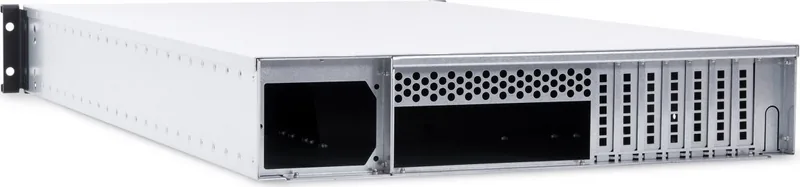
The Alphacool ES ServerRack is a specialized 4U chassis engineered for high-performance computing environments that demand exceptional thermal management. Designed specifically for system integrators and data centers, this rack unit seamlessly combines robust hardware support with advanced liquid cooling capabilities. It serves as the backbone for demanding server upgrades, ensuring stability and efficiency in critical operations.

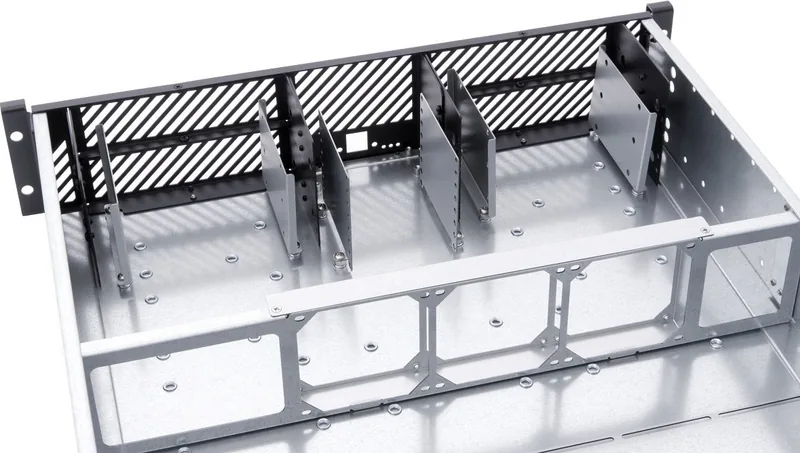
At its core, the ES ServerRack offers versatile storage options, accommodating two 5.25-inch drives, four 2.5-inch HDDs or SSDs, and two 3.5-inch drives split across 5.25-inch bays. The internal architecture supports full motherboard compatibility and allows for one add-in card, providing flexibility for various configurations. A standout feature is the integrated water-cooling readiness, utilizing Alphacool NexXxoS UT60 radiators and ES Reservoirs to maintain optimal operating temperatures even under heavy loads.

Installation is streamlined with slide rails included for easy insertion into standard racks. The design prioritizes safety and maintenance, featuring clear instructions for dismantling rear covers and mounting components without damaging threads. Users are advised to handle electrostatic discharge carefully, using grounded surfaces and anti-static gear to protect sensitive electronics. The chassis also includes pre-cut panels for external water cooling hoses, allowing for clean cable management and efficient heat dissipation.

This server solution is not merely a container but a comprehensive system designed for reliability. By adhering to strict safety protocols regarding power disconnection and component handling, users can ensure long-term performance. Whether for enterprise data processing or high-end computing tasks, the Alphacool ES ServerRack delivers the durability and cooling precision required for modern infrastructure.

Note: The front panel is sold separately and must be purchased to complete the enclosure assembly.

M: QW-35-FL

© Copyright 2026 Manual.ly