
Alphacool Eisblock Aurora Acrylic GPX-A RX 5700/5700XT Reference Manual
PDF manual · 4 Pages
English



Quick check
Incorrect answer, please try again.
Chat with your Alphacool Eisblock Aurora Acrylic GPX-A RX 5700/5700XT Reference manual using AI
Get instant AI answers from your Alphacool Eisblock Aurora Acrylic GPX-A RX 5700/5700XT Reference manual
Ask anything about the Alphacool Eisblock Aurora Acrylic GPX-A RX 5700/5700XT Reference. Answers come from this manual, with the pages they are based on.
Ask a Question
Do you recommend Eisblock Aurora Acrylic GPX-A RX 5700/5700XT Reference?
Yes NoFrequently Asked Questions
It is intended for AMD Radeon RX 5700/5700XT reference designs. The guidance warns that board revisions can slightly change component layout, which may prevent proper fit. Compare your card to the referenced layout before installing to avoid clearance and contact issues.
Is this answer helpful?
The kit guidance lists multiple thermal pads in different sizes, a thermal grease tube, and the necessary mounting hardware. During installation, you clean the contact surfaces, remove pad protective foils, place pads exactly on the copper block, and apply a very thin thermal paste layer to the GPU.
Is this answer helpful?
Apply a thin, even thermal paste layer to the GPU with a plastic strip or similar tool. The layer should be less than one millimeter thick. Thicker paste increases the chance of contaminating surrounding components.
Is this answer helpful?
Hand-tighten the M2x5 screws crosswise, one turn at a time, following the shown pattern. For the slot bracket, an M2 nut is used additionally. The guidance also recommends retightening after about 12 hours of GPU use to restore uniform mounting pressure.
Is this answer helpful?
Yes. The instructions describe connecting the included Digital-RGB adaptor to a 3-pin female connector and then to a Digital-RGB controller (example given: Alphacool Aurora Eiscontrol, Art. 15360, not included). Additional Digital-RGB LEDs can be connected to the remaining 3-pin male connector.
Is this answer helpful?
The guidance stresses that you must not run cooling components without coolant flowing through the loop, due to overheating and potential hardware destruction. It also recommends a leak or tightness test, keeping loop pressure to a maximum of 0.8 bar, and using only distilled water or ALPHACOOL CAPE KELVIN CATCHER.
Is this answer helpful?
Advantages and Disadvantages
Advantages

- Built for AMD Radeon RX 5700/5700XT reference card layouts, improving compatibility when the board matches the intended component positioning
- Includes required thermal pads, thermal grease, and M2 mounting parts to complete a full GPU cooler install
- Clear mounting method: crosswise hand-tightening and retightening after about 12 hours of use
- Digital-RGB integration supported via included adaptor and Digital-RGB controller connection
- Safety-focused guidance reduces risk by stressing coolant flow, leak testing, and correct sealing practices
Disadvantages

- Fit can fail if the graphics card manufacturer revises the board layout, so mismatched revisions may not mount properly
- Installation must be careful with glued original coolers to avoid tearing components
- Requires meticulous contact preparation and thin paste application under 1 mm to avoid contamination
- Dry operation and poor sealing can damage hardware quickly, with burn risk if coolant flow is missing
- Warranty exclusions apply for improper installation, tool misuse on connector threads, and unsuitable coolant choice
Product Specification
Type
GPU
Material
Copper (nickel-plated), PMMA
Compatibility
AMD Radeon RX 5700, AMD Radeon RX 5700XT
Connections
G1/4"
Illumination
LED (RGB)
Dimensions (LxWxH)
10.51x4.72x0.98in
Weight
2.45lb
Special Features
Voltage regulators cooled (GPU)
Product Description
Alphacool Ice Block Aurora Acrylic GPX-A for Radeon RX 5700/5700XT Reference
Premium cooling built around a precise GPU layout
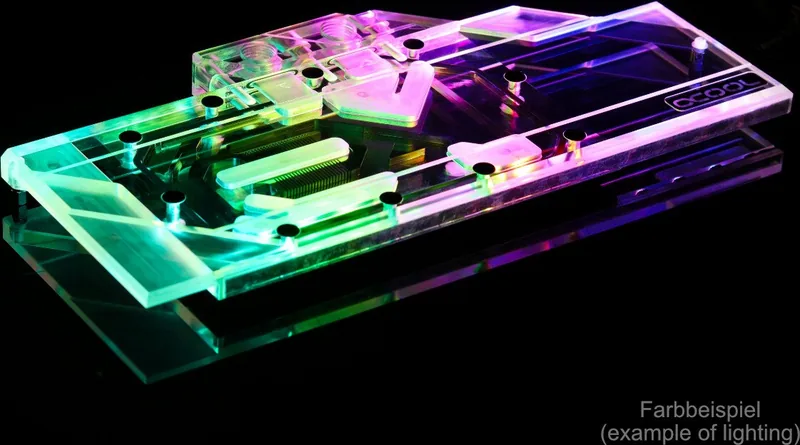
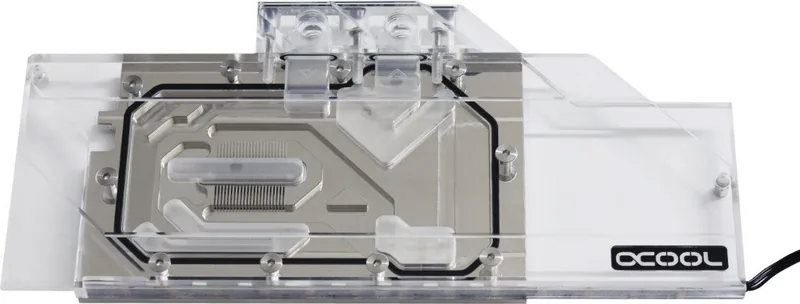
The Alphacool Ice Block Aurora Acrylic GPX-A is designed specifically for the AMD Radeon RX 5700 and RX 5700XT in reference designs. Its acrylic-forward build and copper contact area focus on stable thermal transfer, while the included hardware kit supports correct pad and thermal paste application for consistent GPU contact.
A key part of getting performance is the fit. The installer notes highlight that board revisions can change component placement, so comparing your card against the provided layout reference before mounting is essential. The goal is simple: ensure the cooler clears taller components and that the GPU contact imprint matches expectations.
What you install, and how the system is completed
The package guidance calls out the included essentials: multiple thermal pads in different sizes, a thermal grease tube, M2x5 screws, an M2 nut for the slot bracket, and a Digital-RGB adaptor plus plugs and a plug tool. Installation starts by carefully dismantling the original cooler, especially when thermal glue is involved, then cleaning away leftover paste or pad residue with alcohol.
From there, the procedure emphasizes clean contact surfaces, film removal from the thermal pads, and careful pad placement onto the copper block. One pad may need cutting to size using the provided cutting pattern. For the GPU, apply a very thin, even thermal paste layer, keeping it under a millimeter to avoid contaminating surrounding components.
Once the card is positioned on the cooler, the screws are tightened crosswise by hand, one turn at a time. After about 12 hours of use, the screws should be retightened to maintain even mounting pressure.
Digital-RGB integration for a cohesive build
The included Digital-RGB adaptor lets you control lighting via a compatible Digital-RGB controller (for example, Alphacool Aurora Eiscontrol, Art. 15360, not included). It also supports connecting additional Digital-RGB LEDs through the remaining 3-pin male connector.
Key results
- Precise pad and thermal paste placement steps tailored for the RX 5700/5700XT reference layout
- Emphasis on clean contact surfaces to improve thermal transfer consistency
- Correct mounting approach, including crosswise hand-tightening and retightening after 12 hours
- Digital-RGB support via a 3-pin adapter to a compatible controller
- Safety-first guidance to prevent damage from dry operation, leaks, and tool-related connector strain
Notes
The Alphacool Ice Block Aurora Acrylic GPX-A AMD Radeon RX 5700/5700XT Reference Manual highlights key safety points: do not run without proper coolant flow, keep loop pressure within 0.8 bar, and use only distilled water or ALPHACOOL CAPE KELVIN CATCHER.
Search for 67,706 Manuals online


Type-in Brand or Model
Geneviève Huet
9 months ago
The block has RGB/LED. Is the RGB adapter included, and will it work with a standard 3-pin motherboard RGB header?
Manual.ly
9 months ago
The RGB on the cooling block requires a compatible motherboard header for digital 5V RGB (ARGB), typically a 3-pin 5V digital connector. In some kits, the specific RGB adapter cable is not included, so you may need to purchase the correct adapter for your motherboard header type. If your board does not provide a matching 3-pin 5V digital RGB/ARGB header (or only supports a different RGB standard), the LEDs cannot be connected directly. Check your motherboard manual for the exact RGB header type before ordering. If you are unsure, contact support with your motherboard model so we can help identify the right adapter or the non-RGB version.