
Alphacool Eisbaer Extreme 280 Manual
PDF manual · 88 Pages
English



Quick check
Incorrect answer, please try again.
Chat with your Alphacool Eisbaer Extreme 280 manual using AI
Get instant AI answers from your Alphacool Eisbaer Extreme 280 manual
Ask anything about the Alphacool Eisbaer Extreme 280. Answers come from this manual, with the pages they are based on.
Ask a Question
Do you recommend Eisbaer Extreme 280?
Yes NoFrequently Asked Questions
It is an expandable liquid CPU cooler with a 280 mm radiator, integrated pump, reservoir, XPX Eisblock CPU block, and quick-release connectors for compatible cooling-loop additions.
Is this answer helpful?
The cooler supports many AMD and Intel sockets, including AMD AM4, AM5, AM3-series, FM-series, and TR4, plus Intel LGA 2011, 2011-3, 2066, 1151, 1150, 1155, 1156, and 1366.
Is this answer helpful?
Yes. Vertical mounting is supported when the reservoir and viewing window are positioned at the bottom. Horizontal mounting should place the fans upward to help protect the integrated pump.
Is this answer helpful?
It is prefilled for normal operation. Check the reservoir level if the loop is expanded or if the pump becomes unusually loud. Top up only with approved clear coolant, distilled water, or osmosis-filtered water.
Is this answer helpful?
Yes. The preinstalled Eisbaer Ready quick-release connectors support expansion with compatible components such as a GPX Eiswolf GPU cooler. Ensure each component outlet connects to the next component inlet.
Is this answer helpful?
Use the included socket-specific hardware and tighten by hand only. Over-tightening can damage threads, loosen mounting parts, or prevent even contact between the CPU block and processor.
Is this answer helpful?
Advantages and Disadvantages
Advantages

- Supports a wide range of AMD and Intel CPU sockets, including AM5, TR4, LGA 2066, and LGA 1151.
- 280 mm radiator supports dual-fan cooling and offers horizontal or vertical installation options.
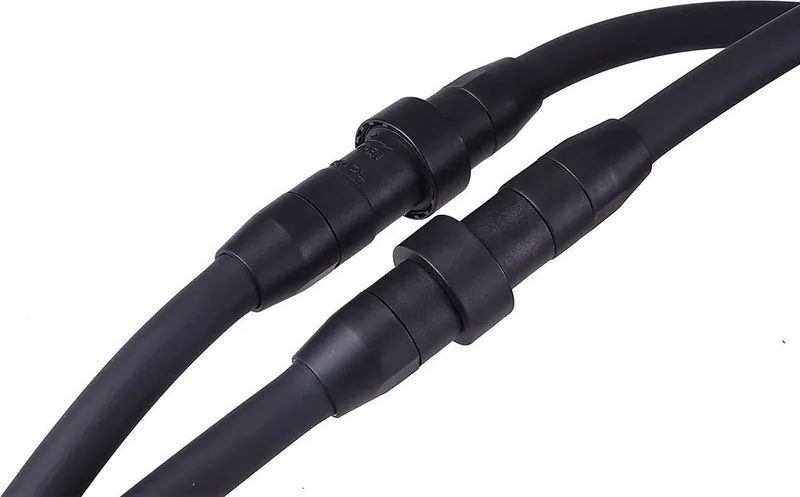
- Preinstalled Eisbaer Ready quick-release connectors simplify expansion with compatible loop components.
- Prefilled reservoir, included thermal paste, brackets, screws, springs, and washers support a complete installation.
- PWM fan control and separate pump connections enable motherboard-based speed monitoring and control.
Disadvantages

- Correct radiator orientation is essential, as improper positioning can damage the integrated pump.
- Installation requires careful socket-specific mounting and hand-tightening to avoid thread or component damage.
- Expansion may require coolant top-ups and air bleeding after adding new hardware.
- Quick-release connectors can release a few drops of coolant when disconnected.
- Only specified coolant types should be used, limiting fluid selection for customization.
Product Specification
Type
internal (open system)
Cooling plate
CPU, copper
Compatibility
1150, 1151, 1155, 1156, 1200, 1356, 1366, 1700, 2011-0, 2011-1, 2011-3, 2066, AM2, AM2+, AM3, AM3+, AM4, AM5, FM1, FM2, FM2+, TR4, sTRX4, sWRX8, SP3
Radiator
11.02 in (radiator class), 1.18 in (radiator height), copper
Fans
2 x 5.51 x 5.51 in, 1300 rpm, 64.74 CFM, 64.74 CFM, 31 dB(A)
Reservoir
4.67 fl oz
Pump
13.94 ft
Connections
G1/4", Alphacool quick-release
Special features
pressure equalization valve, pre-filled
Note
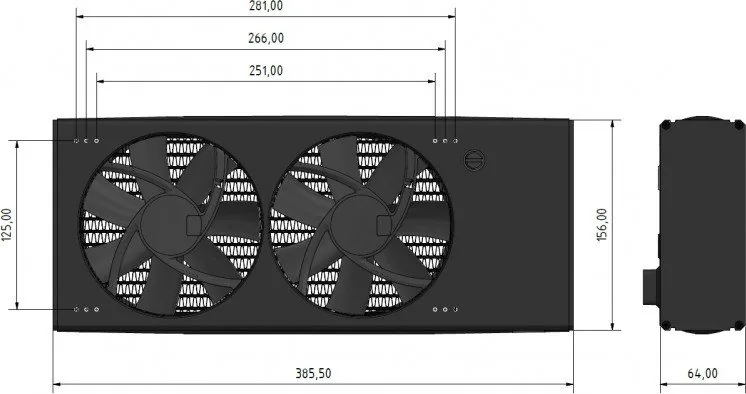
Radiator dimensions (W x H x D): 15.2 x 2.52 x 6.14 in. TR4 conversion kit available.
Product Description
Alphacool Eisbaer Extreme 280 - Read, Download & Print Free
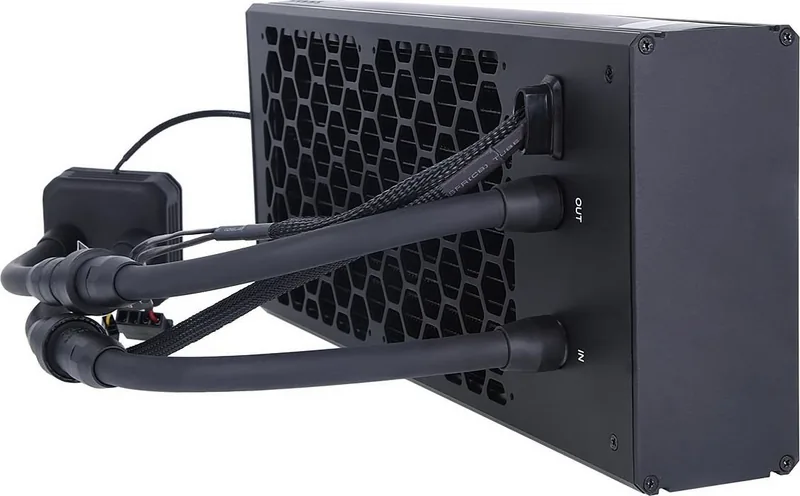
The Alphacool Eisbaer Extreme 280 is a liquid CPU cooling solution designed for PC builders who want robust cooling performance, flexible mounting, and the option to expand their cooling loop later. Its 280 mm radiator format provides room for two fans, while the integrated pump and reservoir create a compact all-in-one layout that remains adaptable for enthusiast systems.
Built for Flexible PC Cooling
A notable feature of the Eisbaer Extreme 280 is its installation flexibility. The radiator can be mounted horizontally with the fans facing upward, or vertically with the reservoir positioned at the bottom. These orientations are important because correct positioning helps protect the integrated pump and supports reliable coolant circulation.
The cooler includes mounting hardware for a broad selection of AMD and Intel platforms. Supported AMD sockets include AM4, AM5, AM3, AM3+, AM2-series, FM-series, TR4, and several legacy options. Intel support covers LGA 2011, 2011-3, 2066, 1151, 1150, 1155, 1156, and 1366. This wide compatibility makes it a practical choice for upgrades as well as new system builds.
Installation and Connection Highlights
The XPX Eisblock CPU block is fitted using the socket-specific bracket, screws, springs, washers, and backplate where required. Thermal paste is included, and the recommended application is a thin, even layer after cleaning the CPU surface. The mounting screws should be tightened by hand only, helping prevent damage to fittings, threads, or mounting hardware.
Pump power, pump control, and fan control are connected separately. PWM fan support allows the motherboard to monitor and regulate fan speed, while the pump receives dedicated power and control connections. A 3-pin connection is also provided for logo lighting, adding a subtle visual touch to a compatible build.
Expandable Cooling Loop
The Eisbaer Extreme 280 arrives prefilled, so regular operation does not normally require extra coolant. Its preinstalled Eisbaer Ready quick-release connectors make expansion easier, including integration with compatible GPX Eiswolf graphics card cooling hardware. When expanding, connect the outlet of one component to the inlet of the next, refill as needed, and remove air by gently moving the case until the fluid level stabilizes.
Notes
Use only suitable clear coolant, distilled water, or osmosis-filtered water. Perform a leak test before installation, keep loop pressure at or below 0.8 bar, and confirm pump and fan operation before powering the computer fully.
Search for 67,706 Manuals online


Type-in Brand or Model
Mikael Strand
5 months ago
Will this 280 mm AIO fit in my case, and are there any installation issues to consider?
Manual.ly
5 months ago
This cooler is significantly larger than a standard 280 mm AIO because the pump and reservoir are integrated into the radiator assembly. Check not only radiator support, but also clearance for its 64 mm depth, extra length, motherboard heatsinks, CPU power connectors, drive cages, and hose routing. A case with 420 mm radiator support is recommended for comfortable installation. The stiff hoses can kink if routed too tightly, and the included pump and fan cables may require extension cables. Ensure the radiator is mounted in the orientation specified in the manual, with the reservoir and hose connections positioned correctly.