
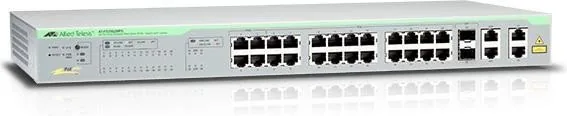
Allied Telesis FS750 Manual
PDF manual · 50 Pages
English



Quick check
Incorrect answer, please try again.
Chat with your Allied Telesis FS750 manual using AI
Get instant AI answers from your Allied Telesis FS750 manual
Ask anything about the Allied Telesis FS750. Answers come from this manual, with the pages they are based on.
Ask a Question
Do you recommend FS750?
Yes NoFrequently Asked Questions
It is best suited for small offices, branch networks, and edge deployments that need reliable switching, flexible mounting, and simple web-based management.
Is this answer helpful?
Yes. The combo ports include SFP slots for supported fiber transceivers, giving you an option for longer-distance uplinks or alternate network paths.
Is this answer helpful?
Yes. It includes WebSmart management, so you can configure and monitor it through a web browser without needing complex network tools.
Is this answer helpful?
No. PoE+ support is available only on the PoE-capable model in the FS750 family. That model can power compatible devices like phones and access points.
Is this answer helpful?
Yes. It can be rack mounted in a standard 19-inch equipment rack, and the mounting hardware is included with the unit.
Is this answer helpful?
SFP transceivers are sold separately, and you should use compatible modules and follow ESD precautions when installing or removing them.
Is this answer helpful?
Check the cable, remote device power, port type, distance limits, and whether the port is enabled. For fiber links, confirm the SFP module and optics are compatible.
Is this answer helpful?
Advantages and Disadvantages
Advantages

- Flexible mounting options for rack, wall, or desktop use.
- WebSmart management simplifies configuration through a browser.
- Combo ports support both copper and fiber expansion.
- PoE+ capability helps power edge devices with fewer adapters.
Disadvantages

- Many ports are Fast Ethernet, not full Gigabit access ports.
- SFP transceivers are not included and must be purchased separately.
- PoE power budget may be limited for high-demand installations.
- Advanced networking needs may require a more feature-rich platform.
Product Specification
Function
Switch
Type
Standalone, Rackmount (via mounting brackets), Wall mount (via mounting brackets)
Network ports
26x RJ-45, 2x RJ-45/SFP
Speeds
24x RJ-45 (10/100Base-T), 2x RJ-45 (10/100/1000Base-T), 2x SFP (100M/1Gb/s)
PoE
4x RJ-45 PoE+ or 24x RJ-45 PoE (4x 30W or 24x 15.4W), total: 193W
Backplane
12.8Gb/s, 9.5Mp/s, 8K MAC addresses
Officially supported standards
802.1AX, 802.1D, 802.1Q, 802.1p, 802.1s, 802.1w, 802.1X, 802.3, 802.3af, 802.3at, 802.3az, 802.3i, 802.3u, 802.3x, 802.3z
Configuration
Web interface
Cooling
active
Dimensions (WxHxD)
17.32x1.73x8.27in, 1U
Weight
11.02lb
Color
light gray
Special features
Metal casing, removable mounting brackets
Note
For this device, "link aggregation" was officially specified with the obsolete standard IEEE802.3ad. Since 2008, the function is no longer managed by the IEEE "Working Group 3" (IEEE 802.3, CSMA/CD - Ethernet), but by "Working Group 1" (IEEE 802.1, High Level Interface - Internetworking) and is technically defined unchanged via IEEE 802.1AX.
Product Description
Allied Telesis FS750 Rackmount Smart Switch: Practical Networking with PoE+
The Allied Telesis FS750 Rackmount Smart Switch, 26x RJ-45, 2x RJ-45/SFP, 193W PoE+ Manual highlights a compact, business-ready switch built for everyday network expansion. Designed for racks, desks, or wall mounting, the FS750 series focuses on reliability, flexible connectivity, and simple web-based control. It fits naturally into small offices, branch networks, and edge deployments where dependable performance matters more than complexity.
One of the strongest advantages of this family is its combination of Fast Ethernet access ports and combo uplinks. The dual-purpose RJ-45/SFP design gives administrators options when building or upgrading a network, whether they prefer copper connections or fiber transceivers for longer distances. The switch also supports automatic port behavior, link/activity LEDs, and straightforward diagnostics, making it easier to monitor the network at a glance.
PoE+ support on the higher-power model adds another layer of convenience. With up to 193W available, the switch can power compatible devices such as IP phones, wireless access points, and surveillance cameras without separate adapters. That helps reduce cable clutter and simplifies deployment in areas where clean installation is important. The WebSmart interface further supports practical management tasks, allowing configuration through a browser instead of requiring complex command-line work.
The FS750 series also stands out for its installation flexibility. It can be mounted in a standard 19-inch rack, placed on a tabletop with rubber feet, or secured to a wall with the included brackets. The included safety guidance, clear LED status indicators, and hot-swappable SFP support make it a thoughtful choice for teams that want straightforward hardware with room to adapt.
For buyers comparing small business switches, this model offers a balanced mix of accessibility and utility. It is not aimed at high-end core switching, but it delivers the essentials well: stable port connectivity, optional fiber expansion, and PoE power for edge devices. In that sense, it is a dependable solution for organizations that want a smart switch that is easy to install, easy to manage, and ready for mixed network environments.
Notes
- SFP transceivers are typically purchased separately.
- Check cable categories and distance limits before deployment.
- Use proper ESD precautions when handling fiber modules.
Search for 67,706 Manuals online


Type-in Brand or Model